
What Is Cloud Native and Why It Matters for Your Business

Idrees Shafiq
Cloud native systems move quickly, and their security needs move just as fast. Once organizations shift to containers and distributed services, the risks change. Workloads appear and disappear in moments, APIs become common targets, and a single misconfiguration can expose an entire environment. This is why teams need a clear understanding of what is cloud native security is and how it protects every part of this modern stack.
Cloud-native security focuses on securing applications, identities, and data across an environment that is constantly evolving. It relies on continuous visibility, strong access controls, and practices built for automation rather than manual checks.
This guide explains the fundamentals, the risks, and the tools that support a strong cloud native security platform. It also highlights the importance of cloud native data security in reducing exposure across the entire environment.
Table of Contents
What Is a Cloud-Native Security Platform?
A cloud-native security platform is an integrated solution built specifically for dynamic, scalable environments. Unlike traditional security tools that focus on static systems, these platforms operate in real time and are capable of adapting to continuous changes in workloads.
Key capabilities include:
- Real-time threat detection: Monitoring activity across containers, pods, and services to catch suspicious behavior instantly.
- Automated compliance: Enforcing policies consistently and reporting compliance against standards like CIS benchmarks or GDPR without manual intervention.
- Secrets vault and management: Storing API keys, tokens, and credentials securely while controlling access across services.
- Workload and container visibility: Understanding what is running, how services communicate, and whether configurations follow security best practices.
- Multi-cloud support: Extending protection across AWS, Azure, GCP, or hybrid environments without losing consistency.
Typical Components and Modules
A full cloud-native security platform usually includes:
- Cloud Security Posture Management (CSPM): Continuous configuration validation and risk assessment.
- Container / Kubernetes security: Runtime monitoring, admission controls, and image scanning.
- Secrets management: Secure storage, rotation, and auditing of sensitive credentials.
- API security gateway: Protects APIs from unauthorized access and abuse.
- Compliance and audit tools: Automated reporting to maintain regulatory adherence.
- Monitoring and alerting: Real-time visibility across logs, metrics, and traces.
- Identity and Access Management (IAM) integration: Ensures policies align with Zero Trust principles.
Core Principles of Cloud-Native Security
Cloud native environments are fast, flexible, and always changing, and their security principles reflect that reality. These principles guide how modern teams protect applications, data, and users without slowing development.
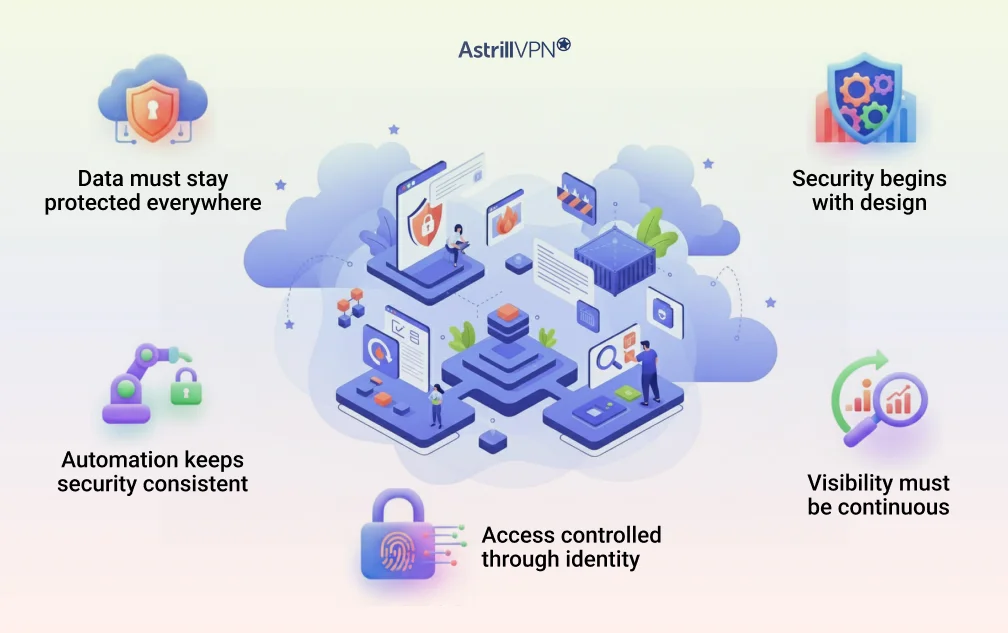
Security begins at the design stage
Cloud native security works best when it is part of the development process rather than a final checkpoint. Teams build security into their pipelines so problems are caught early instead of appearing after deployment. This approach keeps applications safer and reduces the cost of fixing issues.
Visibility must be continuous
Modern applications rely on many small components that move across different environments. Without clear visibility, it becomes difficult to understand what is running or whether something suspicious is happening. Continuous monitoring helps teams react quickly and stay ahead of threats.
Access is controlled through identity
Instead of trusting anything inside the network, cloud environments evaluate every request. Users, services, and machines must prove who they are before they gain access. This identity first model supports cloud-native security practices and aligns naturally with Zero Trust Architecture.
Automation keeps security consistent
Manual reviews cannot keep up with rapid scaling, frequent deployments, and dynamic workloads. Automated policies and scanning ensure security rules are applied reliably, even when the environment changes minute by minute. Automation eliminates guesswork and maintains consistent protection.
Data must stay protected everywhere
Cloud-native data security focuses on keeping information secure as it moves between services and while it is stored. Strong encryption, proper access control, and isolation help prevent accidental exposure and unauthorized access.
Layers of Cloud-Native Security: Where to Protect
Cloud native security works in layers. Each layer focuses on a different part of the environment, and together they create a complete security picture. When teams understand where protection is needed, it becomes easier to apply the proper controls without slowing development or exposing critical systems. This layered view also helps clarify what cloud native security is in practical terms, not just as a definition.
Infrastructure layer
Every cloud native application depends on an underlying infrastructure that is often shared, highly dynamic, and managed through code. This includes Kubernetes clusters, container runtimes, and the networks that connect them.
Securing this layer involves controlling how clusters are configured, who can access them, and how workloads are isolated from one another. Strong governance and regular checks help keep misconfigurations from becoming open doors.
Application layer
Applications in a cloud-native world are built from small services that communicate with each other constantly. Each component introduces its own risks, especially if it handles sensitive operations or relies on external inputs.
Security at this layer involves scanning code, validating images before they are deployed, and enforcing runtime protections that prevent suspicious behavior. These safeguards reduce the likelihood of attackers exploiting vulnerabilities in the application logic.
Identity layer
Users, machines, and services interact with cloud resources daily. Identity becomes the new perimeter, and it must be enforced carefully. Every request should be authenticated and authorized, and no component should receive trust automatically.
This principle aligns naturally with cloud-native security practices and is central to the Zero Trust framework. A strong identity layer helps stop lateral movement and keeps unauthorized entities from gaining access.
Data layer
Cloud-native data security ensures that information remains safe whether it is in motion or at rest. Data travels across clusters, services, and regions, and each journey introduces potential risks. Encryption, access policies, and strict segmentation help protect sensitive information from leaks or unauthorized use. Since data often flows between automated processes, these protections must be consistent and easy to audit.
Access layer
Even with all the above layers secured, teams still need a safe way to reach internal services and control panels. This access point becomes another critical layer of protection. A trusted VPN helps by creating a private tunnel between users and sensitive resources.
It reduces exposure by keeping internal services off the public internet, limits entry to authenticated users, and works naturally alongside Zero Trust principles. For many organizations, this access layer becomes the final safeguard that ties the rest of the security model together.
Common Cloud Native Security Practices and Tools
Cloud-native environments introduce a significantly different security rhythm. Instead of defending a single extensive application, you protect a living system made of containers, services, build pipelines, and identities that appear and disappear throughout the day. The practices below represent what experienced teams actually use in the real world, not just what appears in theory or vendor pitch decks.
Supply Chain Security as a First Line of Defense
Most cloud breaches start long before an application is deployed. They begin in the build pipeline where a dependency, image, or script slips in unnoticed. Mature teams treat their supply chain like a sensitive ecosystem. They scan every image before it enters production, sign builds so no one can tamper with them, and rely on frameworks such as SLSA to keep the process trustworthy.
Tools like Sigstore, Cosign, Trivy, and Snyk help developers understand precisely what is inside their containers. These tools do not guarantee safety on their own, but they provide teams with the visibility they need to avoid inheriting someone else’s vulnerability.
eBPF for Deep, Real Time Insight
Modern platforms rely heavily on eBPF because it watches what applications are actually doing rather than what they claim to do. Engineers use eBPF to observe traffic between microservices, identify unexpected behavior, or catch a compromised pod trying to talk to something it should never reach.
This level of visibility is powerful because it reacts to reality rather than configuration files. It shows how the environment behaves under real load and helps detect subtle threats that static scanners miss.
Identity Driven Access at the Workload Level
Cloud native systems no longer rely on IP addresses or the idea that anything inside the cluster is automatically safe. Instead, every workload needs its own identity. Platforms such as SPIFFE and SPIRE issue cryptographic identities to services so they can authenticate to each other without exposing secrets in plain text.
This identity driven model is one of the strongest cloud-native security practices because it mirrors Zero Trust. Nothing communicates unless it proves who it is, and this prevents attackers from moving freely inside the environment if they ever gain entry.
Using Admission Controllers to Block Risk Before Deployment
Admission controllers in Kubernetes, such as Kyverno or OPA Gatekeeper, act like a strict editor who reviews every deployment before it goes live. They catch risky configurations, prevent privileged containers, block images that were never scanned, and ensure policies are followed consistently.
These controllers create a predictable deployment environment. Developers can experiment freely, knowing that unsafe configurations will be stopped long before they reach production.
Runtime Protection That Understands Behavior
Security does not stop after deployment. Runtime tools like Falco, Cilium, and Aqua continuously watch the behavior of running workloads. If a container suddenly tries to modify system files or reach an unknown domain, the system reacts immediately. Instead of relying on signatures, these tools pay attention to unexpected patterns which makes them effective against novel attacks.
Better Secrets Management for Real World Teams
Secrets often leak when teams try to manage them manually. Cloud native environments rely on automated secret rotation, encrypted storage, and dedicated tools like HashiCorp Vault or cloud provider secret managers. They ensure secrets do not live where they should not and remain encrypted whether stored or in use.
Secure secret management is a practical example of cloud native data security. It keeps sensitive information safe even when applications scale rapidly or when multiple teams work in parallel.
Challenges and Risks in Cloud Native Environments
Cloud native systems are fast and flexible, but that speed introduces real security pressure. The risks come from rapid change, distributed services, and the complexity that naturally builds as environments grow.
Limited Visibility
A cloud native environment changes constantly. Containers start and stop within minutes, and services shift across nodes. When teams cannot see what is running, it becomes difficult to detect unusual activity or understand how traffic moves inside the system. This lack of real-time visibility is one of the first challenges companies face.
Frequent Misconfigurations
Most cloud issues happen because something was left open unintentionally. A container runs with more permissions than needed or a test database becomes publicly reachable. The rapid pace of cloud-native development makes these mistakes more common, which means misconfigurations remain a significant risk.
Complex Microservices
A microservice architecture gives attackers more places to explore. Each service has its own dependencies and permissions, which can create unpredictable attack paths. Security teams must understand how services communicate and ensure that no unnecessary connections exist. This complexity is often underestimated.
Supply Chain Exposure
Cloud-native systems rely heavily on open-source components and automated builds. If a dependency, registry, or pipeline step is compromised, the impact spreads quickly. This risk increases as teams add more tools and services to accelerate development.
Multi Cloud Overhead
Many companies operate across multiple cloud providers. Each platform handles identity, networking, and logging differently, which makes consistency harder to maintain. Security teams often spend more time aligning policies than responding to actual threats.
Human Mistakes
Cloud-native environments scale quickly, and manual decisions often cannot keep up. A small oversight can create a large vulnerability. This is why automation and policy-based controls play such a critical role in cloud security.
Unprotected Remote Access
A cloud-native system can be well-designed and still vulnerable if remote access is not properly controlled. Teams often expose internal dashboards, Kubernetes APIs, or administrative tools without realizing the extent of their visibility. A private VPN tunnel reduces this risk by hiding these services completely and allowing only authenticated users to reach them. When paired with Zero Trust principles, it becomes a crucial component of a secure access strategy.
Zero Trust and Cloud-Native Security
In traditional IT environments, security often relied on perimeter defenses. Anything inside the network was implicitly trusted, and the focus was on keeping attackers out. Cloud-native environments challenge this model. Services are distributed, workloads scale dynamically, and the perimeter is no longer clearly defined. This is where Zero Trust Architecture (ZTA) becomes essential.
What Zero Trust Means in Cloud-Native Environments
Zero Trust operates on a simple principle: never trust, always verify. Every request, whether from a user, service, or machine, must be authenticated and authorized before it can access resources.
In a cloud-native context, this principle extends to workloads, containers, APIs, and data flows. Identity becomes the primary boundary, replacing IP-based assumptions that no longer make sense in a dynamic environment.
By enforcing verification at every layer, Zero Trust reduces the impact of compromised accounts or services. Even if an attacker breaches one component, lateral movement is limited because each service requires explicit authentication and permission.
Core Zero Trust Practices for Cloud-Native Security
- Identity-Centric Access: Each user, service, and workload has a unique identity and only receives permissions necessary for its role. This minimizes the attack surface and prevents overprivileged access.
- Least Privilege Enforcement: Access rights are narrowly scoped and regularly reviewed. Services cannot communicate outside of defined relationships, and users cannot access unnecessary data.
- Continuous Verification: Access requests are not one-time checks. Platforms continuously monitor and verify sessions, ensuring behavior aligns with policies.
- Segmentation and Micro-Isolation: Network paths are limited and tightly controlled. Even within clusters, services interact only when necessary, reducing the blast radius of potential attacks.
- Encryption Everywhere: Data in transit and at rest is encrypted, preventing unauthorized access even if a network or storage component is compromised.
How Zero Trust and VPNs Complement Each Other
Zero Trust and VPNs are not competing approaches. In fact, they reinforce each other. While Zero Trust ensures that every interaction is verified, a VPN adds a private and encrypted path to access sensitive internal services. By hiding internal dashboards, APIs, and management interfaces behind a VPN, organizations reduce exposure to the public internet while still enforcing strong identity checks.
For example, developers accessing Kubernetes clusters or internal cloud services can only do so via an authenticated VPN connection. Once connected, Zero Trust policies control precisely what actions users can take and with which services they can communicate. This combination enhances cloud-native security by reducing attack vectors, limiting lateral movement, and ensuring secure remote access without compromising operational efficiency.
Why Zero Trust Is Essential for Cloud-Native Security
Cloud-native environments are inherently distributed and dynamic. Without Zero Trust, the pace of change creates blind spots that attackers can exploit. When properly implemented, Zero Trust aligns perfectly with cloud-native security practices, automates enforcement, and integrates seamlessly with cloud-native security platforms. It is no longer an optional strategy; it is a fundamental requirement for protecting modern workloads, data, and services.
VPN for Cloud-Native Environments
Even the most sophisticated cloud-native security platforms and Zero Trust frameworks cannot fully protect an environment if access is exposed to the public internet. Internal dashboards, APIs, cluster management tools, and other critical services are often the first targets for attackers. This is where a VPN becomes an essential component of cloud-native security.
Why VPN Still Matters
Cloud-native applications are designed for flexibility and speed, but that same design introduces multiple entry points. Developers, DevOps engineers, and automated processes need to access internal resources across multiple clouds, clusters, and environments. Without a secure tunnel, these resources can become visible and vulnerable.
A VPN creates a private, encrypted connection between authorized users and sensitive services. It ensures that internal systems are hidden from the public internet and that access is granted only to authenticated users. This reduces the overall attack surface while still enabling teams to work efficiently.
Protecting Internal Services and APIs
One of the most common cloud-native security risks is exposing services and APIs unintentionally. A VPN allows organizations to:
- Hide internal dashboards, staging environments, and build systems behind a private network.
- Restrict access only to users who authenticate through the VPN.
- Prevent accidental exposure of APIs or services to the public internet.
Enhancing Zero Trust with VPN
Zero Trust ensures that every request is verified and authorized, but it does not replace the need for a secure network path. When internal traffic passes through a VPN, it reinforces Zero Trust principles by adding a secure, authenticated channel. This combination ensures that even if a user’s device is compromised, attackers cannot bypass the network to reach sensitive services.
Simplifying Secure Remote Access
Cloud-native environments often involve remote teams, hybrid work setups, or distributed DevOps pipelines. A VPN allows secure access without exposing clusters or services publicly. It integrates seamlessly with cloud-native security platforms and can be combined with multi-factor authentication to ensure that only trusted personnel gain access.
Reducing the Attack Surface
By keeping critical services off the public internet, a VPN minimizes opportunities for attackers to probe, scan, or exploit vulnerabilities. This proactive reduction of exposure works hand-in-hand with automation, continuous monitoring, and policy enforcement to create a resilient security posture.
Conclusion
Cloud-native environments offer unparalleled speed, scalability, and flexibility, but they also introduce unique security challenges. Protecting these dynamic systems requires a combination of strong principles, advanced practices, and integrated tools. From embedding security into the development pipeline to monitoring workloads in real-time, every layer of the environment demands careful attention.
Zero Trust Architecture provides a guiding framework, ensuring that every identity, request, and connection is continuously verified and validated. Cloud-native security platforms bring visibility, automation, and policy enforcement to simplify complex workloads. Yet even the most sophisticated systems must account for secure remote access. A reliable VPN complements these controls by hiding internal services, restricting access to authorized users, and reducing the overall attack surface.
FAQs
Cloud native security focuses on dynamic, distributed, and containerized environments, whereas traditional security often assumes static infrastructure with a clear perimeter. In cloud native systems, workloads scale automatically, microservices communicate constantly, and environments span multiple clouds.
Security must be built into the development pipeline, continuously monitored, and identity-driven rather than relying on a fixed network boundary.
The key challenges include limited visibility due to constantly changing workloads, misconfigurations in containers or cloud resources, complex microservice interactions that create unpredictable attack paths, and supply chain risks from dependencies or container images.
Multi-cloud setups and human errors add additional layers of risk. Protecting access points and ensuring consistent security enforcement across dynamic workloads are also critical challenges.
Container security is the practice of protecting containerized applications from vulnerabilities, misconfigurations, and runtime threats. Containers encapsulate applications and their dependencies, making them portable; however, this also introduces potential risks if images are unverified or configurations are unsafe. Container security is crucial because a single compromised container can enable attackers to move laterally, access sensitive data, or disrupt workloads in a cloud-native environment.
Securing Kubernetes clusters involves multiple layers:
Implement role-based access control (RBAC) and enforce least privilege for users and workloads.
Use admission controllers to block unsafe deployments or unverified images.
Enable network policies and service segmentation to restrict communication between pods.
Continuously monitor runtime behavior with tools like Falco or Cilium.
Manage secrets securely using vaults or encrypted stores, and ensure logs and metrics are collected for observability.
Combining these practices helps prevent unauthorized access, misconfigurations, and potential breaches.
The shared responsibility model defines how security duties are divided between cloud providers and users. The provider secures the underlying infrastructure, including data centers, networks, and virtualization layers.
The user is responsible for securing applications, workloads, data, identity management, and access controls. In cloud-native environments, understanding this model ensures teams implement proper security measures on top of the provider’s platform while leveraging built-in protections effectively.



No comments were posted yet