




Is Apple Pay Safe? Guide to Apple Pay Security & Fraud Protection

Digital payments are everywhere, from buying coffee to shopping online, and Apple Pay has become one of the most popular options. But with rising cybercrime, scams, and data breaches, a common question keeps popping up: Is Apple Pay safe? The short answer is yes, Apple Pay is considered one of the most secure payment methods available today. Apple Pay is accepted by a large majority of retailers, with over 85–90% acceptance among U.S. retail chains.
Understanding why it’s secure and what risks still exist helps you use it more confidently and safely. In this guide, we’ll break down Apple Pay security, how it protects you from fraud and hackers, how it compares to traditional credit cards, and what happens if something goes wrong.
Table of Contents
What Is Apple Pay and How Does It Work?
Apple Pay is a digital wallet service that lets you make payments using your iPhone, Apple Watch, iPad, or Mac. Instead of sharing your actual card number, Apple Pay uses advanced security technologies to protect your information.
How Apple Pay Processes Payments?
- Your real card number is never stored on your device
- A Device Account Number (token) is created instead
- Payments are authenticated using Face ID, Touch ID, or a passcode
- Each transaction uses a one-time dynamic security code
How Secure Is Apple Pay?
Apple Pay is considered one of the most secure digital payment systems available today, thanks to its multi-layered approach to security, privacy, and fraud prevention. It’s designed so that your actual card details are never exposed to merchants or Apple.
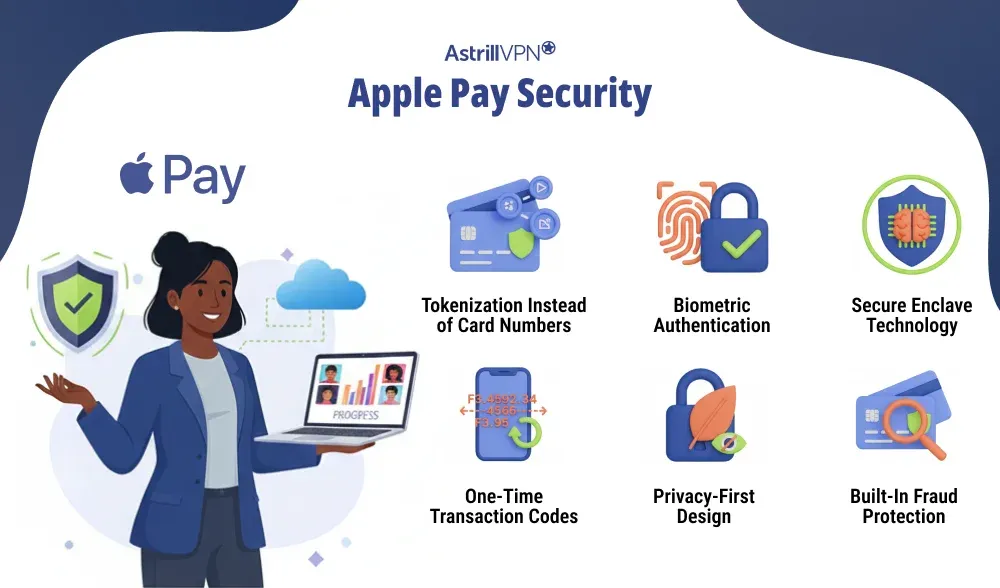
1. Tokenization Instead of Card Numbers
When you add a card to Apple Pay, your real card number is never stored on your device or Apple’s servers. Instead, Apple Pay creates a unique Device Account Number (token). This token is used for payments, making stolen transaction data useless to hackers.
2. Biometric Authentication
Even if someone steals your phone, they cannot make payments without your biometric authentication. Every Apple Pay transaction must be authorized using:
- Face ID
- Touch ID
- Secure device passcode
3. Secure Enclave Technology
Sensitive payment data is stored in Apple’s Secure Enclave, a hardware-based security system isolated from the primary operating system. This protects your data even if the OS is compromised.
4. One-Time Transaction Codes
Each transaction uses a dynamic, one-time security code. This prevents replay attacks and makes it nearly impossible for attackers to reuse payment information.
5. Privacy-First Design
Your payment activity remains private and encrypted. Apple Pay does not track or store:
- What you buy
- Where you shop
- How much do you spend?
6. Built-In Fraud Protection
Apple Pay transactions are covered by your bank or card issuer’s fraud protection policies, allowing you to dispute unauthorized charges just like a traditional card, but with added security layers.
Apple Pay Key Stats (2025–2026)
Global User Base
- Apple Pay is used by hundreds of millions of people worldwide, with estimates around 1.56 billion active users globally in 2025.
- Projections suggest this number could grow even more in the coming years, potentially surpassing 1 billion users by 2030.
- Apple Pay is available in around 78–95 markets worldwide and accepted by millions of merchants.
- Supported by over 11,000 banking and network partners globally.
- Other estimates for 2025 put transaction volume even higher (around $7.6 trillion–$8.7 trillion).
- Apple Pay accounted for around 14.2% of global online consumer payments in 2025.
Apple Pay Security Features
The following are detailed explanations of Apple Pay features.
Tokenization Protects Your Card Details
Apple Pay never shares your actual credit or debit card number during transactions. Instead, it uses tokenization, which replaces your card details with a unique Device Account Number. This token is meaningless outside that specific transaction, so even if payment data is intercepted, it cannot be reused by hackers or fraudsters.
Biometric Authentication for Every Payment
Every Apple Pay transaction requires Face ID, Touch ID, or a secure passcode. This ensures that only the authorized device owner can approve payments. Even if someone gains physical access to your iPhone or Apple Watch, they cannot complete a transaction without biometric verification.
Secure Enclave Hardware Protection
Sensitive Apple Pay information is stored inside Apple’s Secure Enclave, a dedicated, isolated chip built into Apple devices. This area is protected from the operating system, apps, and malware, making it extremely difficult for attackers to access payment credentials.
Dynamic Security Codes Per Transaction
Each Apple Pay payment uses a one-time dynamic security code that changes with every transaction. This prevents replay attacks and stops criminals from copying payment data to make fraudulent purchases later.
End-to-End Encryption
Apple Pay transactions are encrypted from the moment payment is initiated until it’s approved. This encryption ensures that payment data remains protected as it travels between your device, the merchant, and the payment network.
No Card Number Storage on Apple Servers
Apple does not store your full card numbers on its servers or devices. By eliminating centralized storage of sensitive payment data, Apple Pay reduces the risk of large-scale data breaches.
Privacy-Focused Payment Design
Apple Pay is built with user privacy in mind. Apple does not track your purchases, store transaction histories linked to your identity, or share payment data with advertisers. This keeps your financial activity private and secure.
Remote Lock and Device Control
If your device is lost or stolen, you can disable Apple Pay remotely in the Find My app. You can lock the device or erase its data, preventing anyone from accessing your payment information.
Bank-Level Fraud Protection
Apple Pay works alongside your bank’s existing fraud detection systems. Unauthorized transactions can be disputed, and most card issuers offer refunds for fraudulent charges, adding an extra layer of protection on top of Apple Pay’s security features.
Does Apple Pay Protect Against Scams?
Apple Pay offers strong protection against technical fraud, but it does not fully protect users from scams where payments are sent willingly. Understanding this difference is key to using Apple Pay safely. Because Apple Pay utilizes tokenization, biometric authentication, and one-time security codes, scammers and hackers cannot steal usable card details from Apple Pay transactions.
What does Apple Pay Protect You From?
Apple Pay is highly effective at preventing:
- Card skimming and cloning
- Data breaches at merchants
- Stolen card numbers are being reused.
- Fake or compromised payment terminals
Is Apple Pay Safe From Hackers?
Yes, Apple Pay is extremely safe from hackers and is widely considered one of the most secure digital payment systems available. Apple designed Apple Pay with multiple layers of protection that make direct hacking very difficult.
Why Hackers Can’t Easily Break Into Apple Pay
Apple Pay never exposes your real card number. Instead, it uses tokenization, replacing card details with a unique Device Account Number. Even if hackers intercept transaction data, it cannot be reused or converted back into your card information.
Every payment also requires Face ID, Touch ID, or a secure passcode, meaning hackers would need physical access to your device and your biometric data, an almost impossible combination.
Secure Enclave and Hardware-Level Security
Payment credentials are stored in Apple’s Secure Enclave, a dedicated hardware component isolated from the operating system and apps. This prevents malware or compromised apps from accessing Apple Pay data.
Encrypted, One-Time Transactions
Each Apple Pay transaction uses a dynamic, one-time security code and is encrypted end-to-end. This stops replay attacks and makes transaction interception useless to cybercriminals.
Is Apple Pay Safer Than a Credit Card?
Yes, Apple Pay is generally safer than using a physical credit card for both in-store and online payments. The key difference lies in how your payment information is handled and protected.
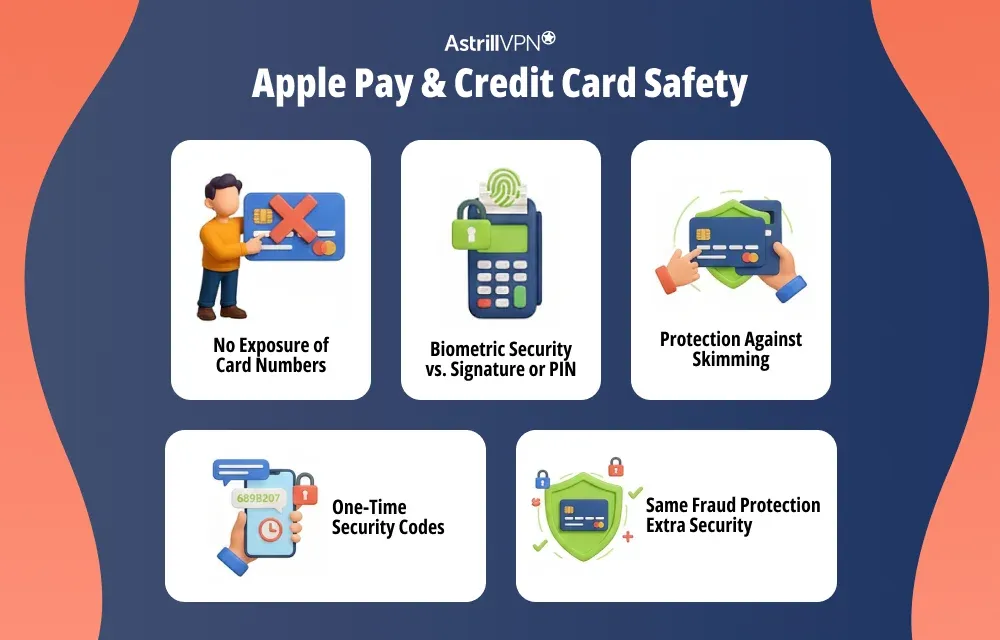
No Exposure of Card Numbers
When you use a physical credit card, your card number is shared with the merchant and stored in payment systems, increasing the risk of data breaches. Apple Pay, on the other hand, never shares your actual card number. It uses a unique Device Account Number (token), so your real card details stay hidden.
Biometric Security vs. Signature or PIN
Credit cards often rely on signatures or PINs, which can be stolen or guessed. Apple Pay requires Face ID, Touch ID, or a secure passcode for every transaction, making unauthorized use far more difficult, even if your device is lost or stolen.
Protection Against Skimming
Physical credit cards can be skimmed or cloned at compromised terminals. Apple Pay transactions are encrypted and tokenized, making skimming and cloning virtually impossible.
One-Time Security Codes
Apple Pay uses a dynamic, one-time security code for each transaction. Traditional cards reuse the same card number, making them more vulnerable if that number is exposed.
Same Fraud Protection, Extra Security
Apple Pay transactions are still backed by your bank’s fraud protection policies, just like credit cards. However, Apple Pay adds additional security layers, reducing the chances of fraud in the first place.
Is Apple Pay Safe for Online Purchases?
Yes, Apple Pay is very safe for online purchases and is often safer than manually entering your credit or debit card details on websites. Apple designed Apple Pay to minimize data exposure and reduce common online shopping risks.
No Card Details Shared With Websites
When you use Apple Pay online, the merchant never sees your actual card number. Apple Pay utilizes tokenization, replacing your card information with a unique device-specific token that protects your real card details from leaks or breaches.
Biometric Authentication at Checkout
Every online Apple Pay transaction requires Face ID, Touch ID, or a secure passcode. This extra verification step prevents unauthorized purchases, even if someone gains access to your device or browser.
Protection Against Data Breaches
Online stores are frequent targets for cyberattacks. Since Apple Pay does not store or transmit real card numbers, even a compromised website cannot expose your sensitive payment information.
Reduced Risk of Phishing and Fake Forms
Apple Pay reduces the need to manually enter card details, lowering the risk of falling for fake checkout pages or phishing forms designed to steal payment data.
Encrypted, One-Time Transactions
Each Apple Pay online payment uses a one-time dynamic security code and encrypted communication, preventing hackers from reusing intercepted transaction data.
Backed by Bank Fraud Protection
Just like regular card payments, Apple Pay purchases are protected by your bank or card issuer’s fraud policies, allowing you to dispute unauthorized charges.
Apple Pay Fraud Protection: What Happens If Something Goes Wrong?
Apple Pay is designed to prevent fraud before it happens, but if something does go wrong, there are explicit protections and steps in place to help you recover quickly.
Unauthorized Transactions Are Covered
If Apple Pay is used without your permission, the transaction is treated as unauthorized, just like credit or debit card fraud. Your bank or card issuer’s fraud protection policies apply, and in many cases, you won’t be held responsible for fraudulent charges once they’re reported.
Immediate Action You Can Take
If you notice suspicious activity:
- Contact your bank or card issuer right away
- Lock or erase your device using the Find My app.
- Change your Apple ID password if compromise is suspected.
These steps can stop further misuse almost instantly.
Apple Pay Adds an Extra Security Layer
Because Apple Pay uses tokenization and biometric authentication, fraud incidents are usually limited in scope. Even if a transaction occurs, your actual card number remains protected and doesn’t need to be exposed or replaced in many cases.
Disputes and Chargebacks
For eligible transactions, you can dispute Apple Pay payments through your bank, just as you would with a physical card. Credit card–based Apple Pay purchases typically offer stronger chargeback rights than peer-to-peer transfers.
Is Apple Wallet Safe?
Yes, Apple Wallet is considered very safe, built with strong security and privacy protections to keep your payment and personal information secure.
Encrypted Storage of Sensitive Data
Apple Wallet does not store your actual card numbers in a readable form. All sensitive information is encrypted and protected, ensuring that even if someone gains access to your device, they cannot view or extract your card details.
Secure Enclave Protection
Payment credentials inside Apple Wallet are stored in Apple’s Secure Enclave, a dedicated hardware component isolated from the primary operating system. This prevents apps, malware, and even iOS itself from accessing your sensitive wallet data.
Biometric and Passcode Security
Access to Apple Wallet and its payment features requires Face ID, Touch ID, or a secure passcode. This ensures that only the device owner can use stored cards, tickets, or passes.
No Central Storage of Card Numbers
Apple does not store your full card numbers on its servers. By avoiding centralized storage, Apple Wallet reduces the risk of large-scale data breaches that commonly affect other payment systems.
Remote Lock and Erase Capabilities
If your iPhone is lost or stolen, you can use Find My device to lock it or remotely erase it. This immediately disables Apple Wallet and prevents unauthorized access to your payment information.
Privacy-Focused Design
Apple Wallet is designed with privacy in mind. Apple does not track your purchases or build profiles based on your spending habits, keeping your financial activity private.
Can Apple Pay be used safely for International Payments?
Yes, Apple Pay can be used safely for international payments, and it offers the same security protections abroad as it does at home. Whether you’re shopping online from an overseas website or paying in-store while traveling, Apple Pay keeps your payment information secure.
Same Robust Security Abroad
Apple Pay still uses:
- Tokenization to hide your real card number
- Biometric authentication (Face ID, Touch ID, or passcode)
- Encrypted, one-time dynamic codes for each transaction
This means your card details are never exposed to merchants or potential hackers, even in foreign countries.
Protection Against Fraud
Apple Pay transactions internationally are also covered by your bank or card issuer’s fraud protection policies. If an unauthorized transaction occurs, you can report it and typically receive a refund, just like domestic transactions.
Convenience and Reduced Risk
Using Apple Pay abroad reduces the need to carry large amounts of cash or expose your physical cards to skimming devices. It also simplifies currency conversion, as your bank or card issuer handles exchange rates securely.
What Happens If My Phone Is Stolen?
If your iPhone, iPad, or Apple Watch is lost or stolen, Apple Pay helps keep your payment information secure. Transactions cannot be completed without Face ID, Touch ID, or your device passcode, so a thief cannot simply access your wallet and make purchases.
You can use the Find My app to lock your device, suspend Apple Pay, or remotely erase all data, preventing unauthorized access immediately. You can also contact your bank or card issuer to stop payments or issue a replacement card if necessary. These protections make Apple Pay significantly safer than carrying physical credit or debit cards, which can be stolen and used instantly.
Is Apple Pay Safe to Use With Strangers?
Apple Pay can be used safely with others in many situations, but caution is needed when sending money to people you do not know personally. It is generally safe for transactions at retail stores, authorized online merchants, or trusted peer-to-peer transfers.
However, sending money to strangers on online marketplaces, social media, or through unsolicited requests carries a risk. Apple Pay cannot prevent you from authorizing a payment, even if it turns out to be a scam. To stay safe, always verify the recipient’s identity, avoid paying unverified sellers, and be wary of urgent or high-pressure payment requests. While Apple Pay keeps your financial data secure, user vigilance is essential to prevent scams.
Conclusion
Apple Pay is highly secure, privacy-focused, and safer than traditional credit cards for both online and in-store purchases. Its use of tokenization, biometric authentication, and hardware-level security makes it extremely difficult for hackers to exploit. No system can fully protect against user mistakes or scams. Staying alert, securing your Apple ID, and sending payments only to trusted parties ensure you get the maximum safety benefits from Apple Pay. Used wisely, Apple Pay isn’t just convenient, it’s one of the safest ways to pay in the digital world.
FAQs
Here are some frequently asked questions.
Apple Pay is significantly safer due to tokenization, biometric authentication, and the absence of exposed card numbers.
Yes, it’s one of the safest options for online shopping.
Yes, fraud protection is provided through your bank or card issuer.
Yes, Apple Wallet uses encryption and hardware-level security.
Yes, security remains consistent across borders.
Apple Pay remains locked, and you can turn it off remotely.
Technically, yes, but scams are possible; always verify recipients.

Secure your privacy instantly. Try AstrillVPN with zero risk.
About The Author










No comments were posted yet