




What Is Zoom Bombing: How it Works & Why It’s a Security Risk?

As virtual meetings, online classes, and remote collaboration become the norm, video-conferencing platforms like Zoom have become essential tools for work, education, and social interaction. However, this rapid shift to digital communication has also opened the door to new forms of online abuse. One of the most disruptive and widely reported threats is Zoom bombing, a malicious act where uninvited individuals hijack virtual meetings to spread offensive content and cause chaos.
Zoom bombing isn’t just an inconvenience; it can interrupt learning, derail business discussions, and expose participants to harmful or disturbing material. Understanding what Zoom bombing is and how it works is crucial for anyone who hosts or joins online meetings. This guide breaks down the concept, explains how these attacks occur, and highlights why securing virtual meetings is more important than ever.
Table of Contents
What Is Zoom Bombing?
Zoom bombing is a form of cyber harassment in which uninvited individuals join a Zoom meeting to disrupt it deliberately. These attackers often share offensive content, shout abuse, display inappropriate images or videos, or spam the chat to derail the meeting. The goal is usually to shock, embarrass, intimidate, or simply cause chaos.
Although the term originated from Zoom, similar attacks can occur on other video-conferencing platforms as well. Zoom bombing primarily targets:
- Online classrooms
- Business meetings
- Webinars and virtual events
- Social or community video calls
Why Zoom Bombing Happens?
Zoom bombing often occurs because of weak meeting security settings. When meeting links are shared publicly or access controls are not correctly configured, attackers can easily exploit these gaps. In many cases, attackers are motivated by:
- Trolling or seeking attention
- Harassment or hate speech
- Disrupting educational or professional activities
- Targeting specific groups or communities
How Does Zoom Bombing Work?
Zoom bombing follows a relatively simple process. Below is a step-by-step breakdown of how these attacks typically happen.
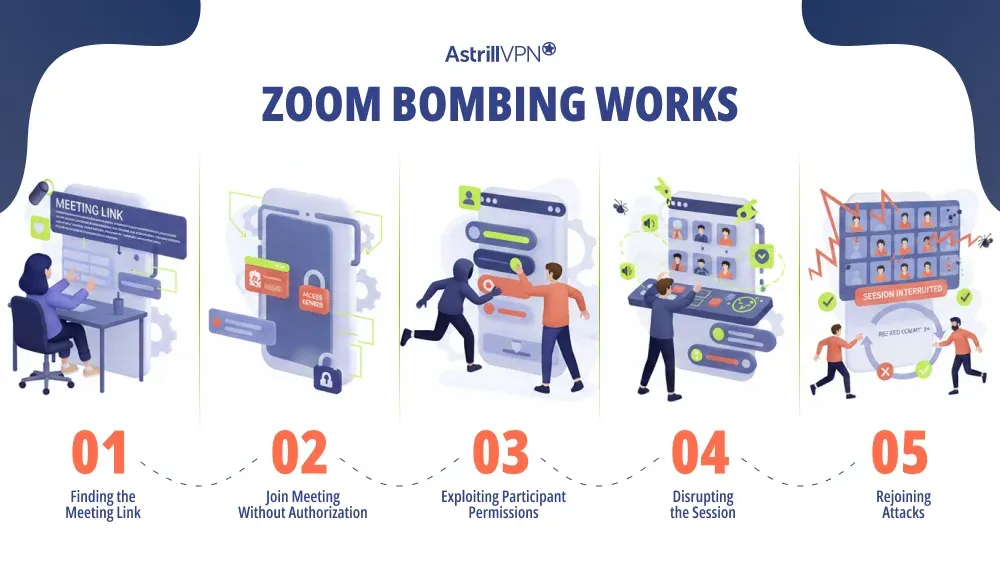
1. Finding the Meeting Link
Attackers first obtain access to a meeting link. This usually happens when:
- The meeting URL is shared publicly on social media
- Links are posted on public websites or forums.
- Meeting IDs are reused without passwords.
- Invitations are forwarded without restrictions.
2. Joining the Meeting Without Authorization
Attackers can join freely, just like legitimate participants. This makes open meetings especially vulnerable. If a meeting does not require:
- A password
- Waiting room approval
- Host authentication
3. Exploiting Participant Permissions
Once inside the meeting, attackers exploit poorly managed permissions. The attacker can immediately start causing disruption. For example, if participants are allowed to:
- Share screens
- Unmute themselves freely
- Post images, links, or files in chat
4. Disrupting the Session
This is the actual “bombing” phase. Disruptive actions include:
- Sharing explicit or violent images and videos
- Using hate speech or verbal abuse
- Playing loud music or disturbing sounds
- Spamming chat messages with offensive content
- Drawing inappropriate content on shared whiteboards
5. Rejoining Attacks
This often happens when hosts do not lock meetings or update security settings after removing an intruder. In some cases, attackers may:
- Rejoin the meeting after being removed
- Coordinate attacks with multiple people.
- Share the meeting link with others to amplify disruption.
Who Is Most at Risk of Zoom Bombing?
Any meeting that prioritizes ease of access over security can become a target. Zoom bombing most commonly affects:
- Schools and universities are conducting online classes
- Public webinars or open community meetings
- Nonprofits and advocacy groups
- Organizations hosting significant virtual events
Impact of Zoom Bombing
The consequences of Zoom bombing go beyond simple inconvenience. For educators and employers, repeated incidents can undermine trust in virtual collaboration tools. They can include:
- Emotional distress for participants
- Loss of productivity and learning time
- Reputational damage for organizations
- Exposure to harmful or explicit material
- Legal and compliance concerns in professional settings
Is Zoom Bombing Illegal?
In many regions, sharing explicit content without consent or harassing individuals online can lead to legal consequences. Zoom bombing may be illegal depending on:
- The nature of the content shared
- Local cybercrime and harassment laws
- Whether hate speech or threats are involved
How to Prevent Zoom Bombing?
Zoom bombing can be stopped almost entirely by using the proper meeting controls. Most attacks happen because basic security settings are ignored.
Use Meeting Passwords
Always protect your meetings with a strong password. Passwords prevent random users from entering, even if the meeting link is leaked.
Enable the Waiting Room Feature
Waiting rooms allow the host to screen participants before they join. This gives you complete control over who enters the meeting and helps block suspicious or unknown users.
Do Not Share Meeting Links Publicly
Avoid posting meeting links on public websites, social media, or forums. If you must promote an event publicly, use registration links instead of direct meeting URLs.
Restrict Screen Sharing
Limit screen sharing to the host only. This prevents attackers from suddenly displaying offensive images, videos, or messages during the meeting.
Lock the Meeting After It Starts
Once all expected participants have joined, lock the meeting. This stops anyone else from entering, even if they have the link and password.
Disable “Join Before Host”
Turning off this option ensures participants can’t start a meeting without the host present, reducing the risk of early disruptions.
Control Chat Permissions
Restrict chat to host-only or turn off private messaging between participants. This prevents spam, harassment, and malicious link-sharing.
Remove and Report Disruptive Participants
If someone behaves suspiciously, remove them immediately and use the report feature. Removed users cannot rejoin the meeting.
Keep Your Zoom App Updated
Regular updates include security patches and new controls that protect against known attack methods on Zoom.
Assign a Co-Host
For large meetings or webinars, having a co-host helps monitor participants, manage chat, and respond quickly to threats.
Use Webinar Mode for Public Events
Webinars offer stronger audience controls than standard meetings, making them ideal for large or public-facing sessions.
Conclusion
Zoom bombing is a clear example of how convenience without security can be exploited in digital environments. While the attack itself is often simple, its impact can be severe, especially in educational and professional settings. Implementing security features such as password protection, waiting rooms, and user verification can significantly reduce the likelihood of unwanted intrusions. Additionally, educating participants about the risks and encouraging best practices for online privacy are crucial steps in fostering a safer digital meeting culture. By prioritizing security alongside convenience, we can create an environment where individuals feel secure and focused, ultimately enhancing productivity and collaboration in our virtual interactions. Understanding what Zoom bombing is and how it works is the first step toward creating safer, more secure online meetings.
FAQs
Here are some frequently asked questions.
Yes. Even private meetings can be Zoom-bombed if the link is forwarded, passwords are weak, or meeting controls are not properly configured.
Zoom bombers may share hate speech, explicit images or videos, loud noises, abusive language, or spam links. The goal is usually to shock, disrupt, or intimidate participants.
Online classrooms, public webinars, open community meetings, and large corporate calls are most at risk, especially when links are publicly posted.
Common signs include unknown participants joining suddenly, screen sharing without permission, offensive messages in chat, or loud and disruptive audio interruptions.
Immediately remove the attacker, lock the meeting, turn off screen sharing for participants, and mute all attendees. Ending the meeting may be necessary if the disruption continues.

Secure your privacy instantly. Try AstrillVPN with zero risk.
About The Author










No comments were posted yet