




What Is a Reverse Proxy? How It Works and How It Compares to a VPN


The internet has many moving parts that most people never see. Reverse proxies are one of the bigger ones. They handle load balancing, security filtering, SSL management, and caching for a huge share of the web’s infrastructure, yet the average user has no idea they exist.
For IT professionals, developers, and anyone thinking seriously about network security, understanding what a reverse proxy does and how it fits alongside tools like VPNs is genuinely useful knowledge. These aren’t competing technologies. They just operate on different sides of the connection and protect different things.
This guide covers everything: what a reverse proxy is, how it works, what it protects, where it’s used, and how it compares to a VPN in ways that actually matter.
Table of Contents
What Is a Reverse Proxy?
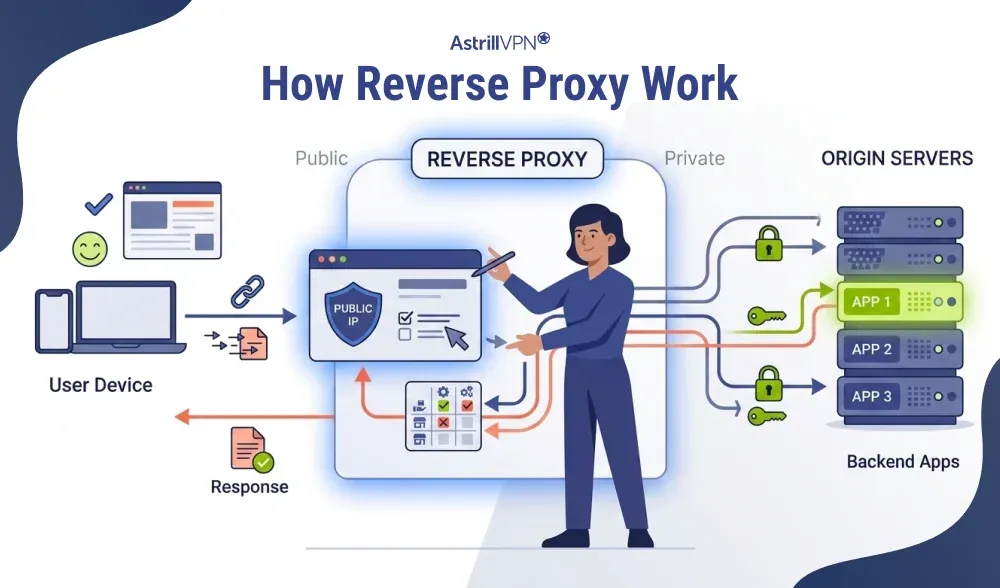
A reverse proxy is a server that acts on behalf of backend servers, not on behalf of the user. It sits at the edge of a network, receives incoming requests from the internet, routes them to the appropriate backend server, and returns the server’s response to the user.
From the user’s perspective, nothing looks unusual. They sent a request and got a response. What they don’t see is the proxy layer that intercepted the request, evaluated it, forwarded it, and delivered the response. That transparency is intentional.
The “reverse” label distinguishes it from a regular forward proxy. A forward proxy works on the client side: the user configures it, and it represents them when making requests. A reverse proxy works on the server side: the server owner configures it, and it represents the backend infrastructure to the outside world. Same concept of an intermediary, but in a completely different direction.
Forward Proxy vs. Reverse Proxy
These two terms are often conflated, which is understandable given the naming. Here’s a clear breakdown:
| Feature | Forward Proxy | Reverse Proxy |
|---|---|---|
| Sits in front of | The client (user) | The server (backend) |
| Configured by | The user or their IT team | The website/server owner |
| Hides | The user’s IP from servers | The server’s IP from users |
| Primary purpose | User privacy, filtering, geo-bypass | Load balancing, security, performance |
| Who sees it | The destination server | The user sending requests |
| Common tools | Squid, corporate proxies, VPNs | Nginx, HAProxy, Cloudflare |
| Use case example | Employee browsing via company proxy | Traffic routed across multiple servers |
The short version: a forward proxy protects the user from the server. A reverse proxy protects the server from the user, and from the broader internet. Both are intermediaries. Both intercept traffic. They just do it from opposite ends of the connection.
What Is a Reverse Proxy Server?
A reverse proxy server is the actual hardware or virtual machine running reverse proxy software. It’s positioned at the network edge, acting as the first point of contact for all incoming traffic before anything reaches the internal infrastructure.
In practice, this could be a dedicated bare-metal server, a cloud-hosted virtual instance, or a node in a globally distributed network. The most common reverse proxy software includes Nginx, HAProxy, and Apache Traffic Server. Cloudflare is one of the largest distributed reverse proxy networks, sitting in front of millions of websites simultaneously.
Smaller deployments might run reverse proxy software on the same machine that hosts the application. Enterprise setups typically treat it as a dedicated, high-availability infrastructure, since every request flows through it.
What Does a Reverse Proxy Do?
The list is longer than most people expect. A reverse proxy isn’t just a pass-through layer.
Load Balancing
When traffic spikes, a reverse proxy distributes requests across multiple backend servers so no single machine gets overwhelmed. It can rotate servers evenly, route to the server with the fewest active connections, or pin specific users to the same server. This is how high-traffic platforms handle millions of concurrent users without going down.
Caching
Serving the same content repeatedly from the origin server wastes resources. A reverse proxy caches responses and serves them directly for repeat requests, reducing backend load and cutting response times. Static assets like images, scripts, and stylesheets are especially well-suited to caching.
SSL Termination
Encrypting and decrypting HTTPS traffic is computationally expensive. Rather than making every backend server handle that overhead, the reverse proxy terminates SSL at the edge, decrypts the traffic, and forwards plain HTTP internally. This offloads a heavy task and centralizes certificate management.
Request Routing
A reverse proxy can direct traffic to different backend services based on URL paths, hostnames, or request headers. Traffic to /api/ goes one place; traffic to /blog/ goes somewhere else. This makes complex, multi-service applications look simple from the outside.
Compression
Before sending responses to users, a reverse proxy can compress the data using gzip or Brotli. Smaller payloads mean faster load times, especially on mobile or slower connections.
Origin Server Anonymization
A reverse proxy masks the real IP addresses of backend servers. The outside world only ever sees the proxy’s IP. Attackers can’t directly target infrastructure they can’t find, which is a meaningful security advantage for any organization handling sensitive data.
How Does a Reverse Proxy Work?
The process runs fast and mostly out of sight. Here’s what actually happens when a request flows through a reverse proxy:
- A URL gets typed, a link gets clicked, or an app makes an API call. The request travels toward the IP associated with the domain.
- That IP belongs to the proxy, not the backend server. The proxy is the first thing the request touches.
- The proxy evaluates the request by checking the URL, headers, and routing rules to determine where it should be routed.
- The proxy sends the request to the appropriate backend server over a private network.
- The origin server handles the request and sends a response back to the proxy.
- It returns the response to the user. From their end, it came directly from the website.
The whole sequence typically takes milliseconds. All the routing logic, security checks, and caching decisions happen in the background without the user noticing.
Reverse Proxy Security: What It Protects and How
Security is one of the strongest reasons organizations run a reverse proxy. The protections are specific and well-established.
DDoS Mitigation
Distributed denial-of-service attacks flood servers with traffic to knock them offline. A reverse proxy can absorb a significant volume of that traffic, apply rate limiting, and filter attack patterns before they reach the backend. Many reverse proxy providers also include dedicated DDoS scrubbing infrastructure.
Web Application Firewall Integration
Every request passes through the reverse proxy, making it a natural location for a web application firewall (WAF). SQL injection attempts, cross-site scripting, malformed requests, and other common exploit patterns can all be caught and blocked at the proxy level before they reach the application itself.
Infrastructure Concealment
Backend servers that aren’t directly exposed to the public internet are much harder to target. The reverse proxy absorbs the exposure. Even extensive reconnaissance against the proxy won’t reveal what’s sitting behind it.
Centralized SSL Management
Managing certificates across multiple backend servers is error-prone. Renewals get missed. Configurations drift. Handling SSL at the proxy level means one place to manage, one renewal cycle to track, and one configuration to audit.
Authentication and Access Control
A reverse proxy can enforce authentication requirements before forwarding any request to the backend. Internal tools, admin panels, and staging environments can all sit behind access controls at the proxy layer without the backend needing to implement them independently.
Bot and Scraper Filtering
Automated traffic, scrapers, credential-stuffing bots, and abusive API clients can be identified and filtered at the proxy layer based on headers, request rates, and behavioral patterns, before they create load or risk on the origin server.
Reverse Proxy vs. VPN: Understanding the Difference
This is the comparison that matters most to anyone thinking holistically about network security. Reverse proxies and VPNs are frequently mentioned in the same breath, but they operate at opposite ends of the connection and protect completely different things.
| Feature | Reverse Proxy | VPN |
|---|---|---|
| Who it protects | The server and backend infrastructure | The user and their device |
| Configured by | The website/server owner | The end user |
| Encrypts traffic | At the server edge (SSL termination) | End-to-end, from device to VPN server |
| Hides IP of | The backend server from users | The user from websites and servers |
| Use case | Load balancing, DDoS protection, caching | Privacy, bypassing geo-restrictions, secure browsing |
| Who sets it up | Developers and sysadmins | Individual users |
| Works at | Network/application layer (server side) | Network layer (client side) |
| Can they be combined? | Yes | Yes, they serve different ends of the same connection |
A Reverse Proxy Protects the Server
A reverse proxy is infrastructure that server owners deploy to protect and manage their backend systems. It has nothing to do with the user’s privacy or connection security on their end. The user doesn’t configure it, doesn’t control it, and often doesn’t know it’s there.
Its job is to shield the backend from direct exposure, distribute load, filter malicious traffic, and improve performance. It works at the server edge and operates on behalf of the organization running the infrastructure.
A VPN Protects the User
A VPN works on the user’s device. It encrypts traffic between the device and the VPN server, masking the user’s real IP address and protecting their connection from interception. It’s configured and controlled by the user, and exists specifically to protect the user’s privacy and security.
When you connect through AstrillVPN, your traffic is encrypted before it leaves your device. Any server you reach, whether it’s behind a reverse proxy or not, only sees the VPN server’s IP. Your real location and identity stay out of whatever access logs, reverse proxy headers, or traffic analytics the destination maintains.
They Solve Different Problems, Not the Same One
This is the point worth emphasizing. A reverse proxy can’t replace a VPN, and a VPN can’t replace a reverse proxy. They’re not competing for the same job.
An IT professional securing their organization’s web infrastructure needs a reverse proxy. An employee working remotely and wanting to keep their connection private needs a VPN. A developer who wants both their application to be secure and their own browsing to be private benefits from having both, operating independently at their respective ends of the connection.
Framing them as alternatives misunderstands what each tool actually does.
When You’d Use Both
A company might run Nginx as a reverse proxy in front of their application servers while also requiring employees to connect via VPN for remote access. These two tools are doing completely separate things. The reverse proxy manages inbound traffic to the application. The VPN secures the employee’s outbound connection to the company network. Neither one makes the other redundant.
For everyday users, the combination is simpler: the reverse proxies operated by the websites you visit protect those services’ infrastructure. Your VPN protects your end of the connection. Both can be in play simultaneously without conflict.
What Are Some Use Cases for Reverse Proxies?
Reverse proxies show up across nearly every category of serious web infrastructure. Here’s where they make the most impact:
High-Traffic Websites and E-Commerce
Sites that experience unpredictable traffic surges use reverse proxies for load balancing and response caching. Without it, a single spike could bring down the entire platform. With it, traffic gets distributed, and cached responses reduce the pressure on origin servers significantly.
Content Delivery Networks
CDNs are large distributed networks of reverse proxy servers spread across geographic locations. When you load a website through a CDN, you’re connecting to the nearest proxy node rather than a distant origin server. That proximity cuts latency and speeds load times considerably.
Microservices Architectures
Modern applications are often built as collections of small, independent services. A reverse proxy serves as the unified entry point that routes requests to the correct microservice, enforces rate limiting, handles authentication, and manages centralized logging. The client sees a single clean API. The backend can be as complex as needed.
API Gateways
When an organization exposes APIs to developers or partners, a reverse proxy typically serves as the gateway, handling authentication, rate limiting, version routing, and logging before requests reach the actual API servers.
Internal Application Access
Organizations use reverse proxies to give remote employees access to internal tools without exposing those tools to the public internet. The proxy handles authentication and access control at the edge. The actual application servers remain on a private network.
Zero Downtime Deployments
Traffic can be gradually shifted between old and new server instances through the reverse proxy during a deployment. This allows updates to happen without taking the site offline.
Streaming Platforms
Video and audio streaming services use reverse proxies for geographic routing, load distribution, and content caching. Smooth playback without buffering is, in large part, a reverse proxy problem solved well.
FAQs
A reverse proxy server sits between users and backend servers. It receives incoming requests, forwards them to the appropriate server, and then returns the server’s response to the user. This setup helps improve security, performance, load balancing, and traffic management.
A forward proxy represents the client and hides user activity from websites, while a reverse proxy represents the server and hides backend infrastructure from users. Forward proxies are commonly used for privacy and access control, whereas reverse proxies are used for security, caching, and load balancing.
Reverse proxies are commonly used for load balancing, SSL termination, caching, DDoS protection, hiding origin server IP addresses, traffic filtering, API gateway management, and improving website performance.
A reverse proxy manages and routes web traffic to backend servers, while a firewall primarily filters and blocks unauthorized network traffic. Reverse proxies focus on application delivery and performance, whereas firewalls focus on network security and access control.
A CDN acts as a distributed reverse proxy by receiving user requests through edge servers, serving cached content locally, and forwarding uncached requests to the origin server. This improves speed, scalability, and protection against traffic spikes and DDoS attacks.
A reverse proxy mainly handles traffic routing, caching, and load balancing, while a WAF (Web Application Firewall) specifically protects web applications from threats like SQL injection, XSS, and malicious HTTP requests. A WAF is often deployed alongside a reverse proxy for stronger security.

Secure your privacy instantly. Try AstrillVPN with zero risk.
About The Author










No comments were posted yet