
What Is a Backdoor Attack? Types, Detention & Protection

Arsalan Rathore
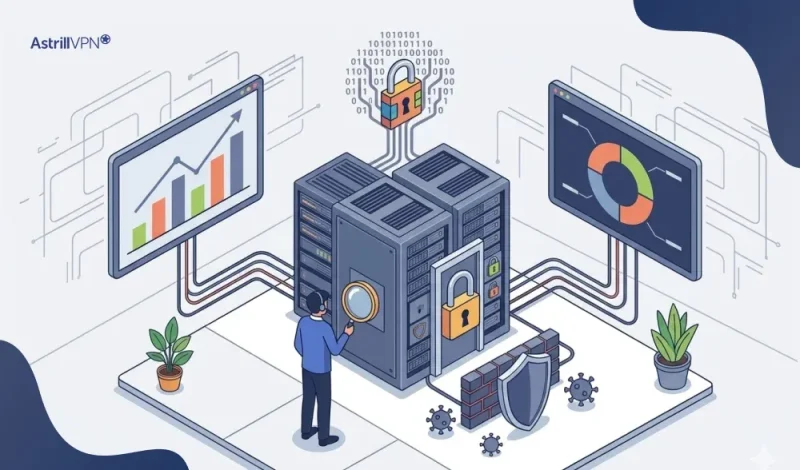
Backdoors are one of the oldest and most persistent threats in cybersecurity. Backdoor attacks are not new, but they are growing. The data is sobering: Mandiant found backdoors in roughly 35% of malware families identified during incident response cases in 2024. Average breach costs involving backdoor access have climbed toward $4.7 million. And the average time between initial intrusion and discovery is measured not in days but in months.
Most cybersecurity threats make themselves known eventually. Backdoors are different. They are built to stay hidden, and the best ones do exactly that for a very long time. Here, we get into what backdoor attacks actually involve, which malware examples have done the most damage in the real world, and what you can realistically do about it.
Table of Contents
What Is a Backdoor?
A backdoor is like a hidden entrance to a house that nobody knows about. Imagine a home with a sturdy front door, complete with a deadbolt, alarm system, and a camera keeping an eye on the porch. It feels secure, right? But what if there’s an old service entrance at the back, overgrown with bushes and long forgotten? All that effort to secure the front means little if someone discovers that hidden way in.
Backdoors can come with good intentions, too. Sometimes, developers include them in software for harmless reasons, like testing features or providing remote support. But often, these shortcuts get forgotten over time. They aren’t documented, updates overlook them, and eventually, someone may inadvertently stumble onto an access point that was never intended to be accessible.
In real life, backdoors take many forms. It might be a router that has a default password no one changed, or a hacker who quietly plants malicious software in a company’s network and waits for the right moment. It could even be a sketchy download that creates a vulnerability on your computer while you’re just watching videos. Each scenario looks different, but they all share that eerie idea of an entry point that was never meant to be found.
What Is the Purpose of a Backdoor?
The purpose of a backdoor depends almost entirely on who created it and why. That distinction matters because not every backdoor starts as a threat.
Legitimate uses:
- Software developers use backdoors during testing and debugging to access systems without having to authenticate every time.
- IT administrators might configure remote access points for maintenance, particularly on servers or enterprise systems.
- Law enforcement agencies in several countries have lobbied for and in some cases legally required software companies to maintain backdoors that allow access during criminal investigations.
- Device manufacturers sometimes include them to assist with firmware updates or technical support.
When it comes to malicious uses, things get pretty serious. If a hacker creates or finds a backdoor, it’s usually for one of a few reasons: they want to steal data without getting caught, set up a way to come back for future attacks, install extra malware like ransomware or keyloggers, or just use a hacked machine to go after other targets on the same network.
The uncomfortable truth about backdoors created for legitimate purposes is that they rarely stay legitimate forever. A debugging hook left in production code becomes a vulnerability. A government-mandated access mechanism becomes an espionage vector. The 2024 revelation that China had been using US telecom infrastructure to intercept communications, infrastructure that existed because of legally mandated backdoors, is a clear illustration of exactly this problem.
How Does a Backdoor Attack Work?
Understanding what is a backdoor attack means understanding its lifecycle, which typically unfolds in four stages. Attackers rarely rush. The goal is access that lasts, not a smash-and-grab.
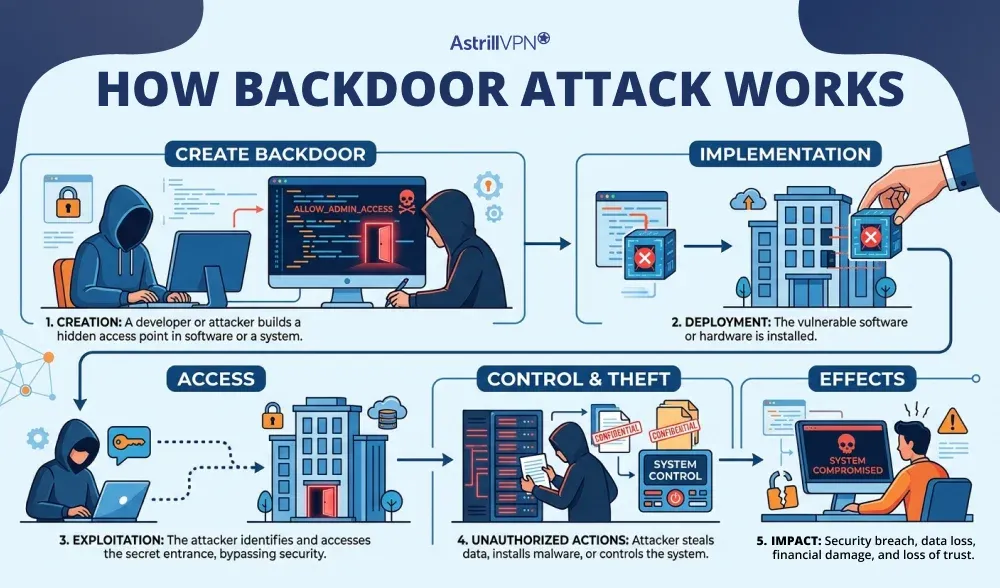
Stage 1: Getting In
There are a bunch of ways that attackers can get their foot in the door. Phishing emails with nasty attachments are still super common. Unpatched software flaws, especially in things like VPNs, web servers, and remote access tools, can also be a big problem. Weak or default passwords on routers and smart gadgets make it way too easy for hackers. Sometimes, they don’t even have to try too hard they can just find an old vendor account that was never removed and stroll right in.
Stage 2: Establishing the Backdoor
Once inside, the attacker installs or activates a backdoor. This might mean deploying backdoor malware, exploiting an existing vulnerability to create a persistent access point, or modifying a legitimate system file to open a hidden communication channel. More sophisticated attackers will disguise the backdoor as a normal system process to blend it into routine activity.
Stage 3: Maintaining Persistence
Here is where backdoor attacks separate themselves from other forms of intrusion. The attacker’s priority is not to cause immediate damage. It is to make sure they can come back whenever they want. Scripts are installed to ensure the backdoor survives reboots and updates. Some implants are written entirely in memory to avoid leaving files on disk. Others modify the system at such a deep level that standard security tools cannot find them.
Stage 4: Exploitation
With persistent access secured, attackers can take their time. They may spend weeks mapping the network, identifying high-value systems, and escalating their privileges before taking any visible action. Data exfiltration happens gradually to avoid triggering volume-based alerts. Ransomware might be deployed months after the initial intrusion. During this entire window, the victim often has no idea anyone is in their system.
According to research published in 2025, one threat actor maintained backdoor access to US legal firms and technology companies for an average of 393 days before being discovered. That is over a year of uninterrupted access.
Types of Backdoors
Backdoors come in several varieties, each with its own characteristics and risk profile. Knowing the differences helps you understand why some are harder to detect than others.
Trojans
The most common form of backdoor malware. A Trojan disguises itself as something harmless, a legitimate app, a software update, a PDF attachment, and once executed, it quietly installs a backdoor. The user never sees anything out of the ordinary. Trojans can be delivered via phishing, compromised websites, or even malicious browser extensions.
Web Shells
A web shell is a script uploaded to a compromised web server that allows an attacker to send commands via a browser. For the attacker, it looks like a normal web page. For them, it is a full command-line interface to the server. Web shells are particularly common in attacks against organizations that run their own servers or content management systems.
Rootkits
Rootkits operate at a deep system level, sometimes below the operating system itself. They are specifically designed to hide both themselves and any other malware running alongside them. A rootkit infection can create a backdoor that is virtually invisible to standard antivirus tools because the rootkit actively conceals its presence from whatever is looking for it.
Built-In and Hardware Backdoors
Some routers, firewalls, and other hardware devices contain hidden access points in their firmware. Manufacturers often install these for support purposes, but they rarely provide public documentation. If attackers find these access points, they cannot be fixed with a simple software update. Some low-cost devices come with hardcoded usernames and passwords built into their firmware.
Supply Chain Backdoors
Supply chain backdoors are a serious threat. These backdoors can be added to software or hardware before it reaches the user, during development, packaging, or distribution. Since these compromised products come from trusted sources, most users and security teams do not suspect anything. The SolarWinds attack is a well-known example of this risk.
Cryptographic Backdoors
These exploit weaknesses in the encryption protocols used to protect data. Rather than breaking through a system’s defenses directly, a cryptographic backdoor allows an attacker to decrypt protected communications without the private key. This type is particularly alarming because it can undermine security measures that users believe are protecting them.
Real-World Backdoor Malware Examples
Looking at specific examples of backdoor malware helps make the abstract concrete. These are not hypothetical scenarios. They caused real damage to real organizations.
SolarWinds (SUNBURST) – 2020
Attackers compromised SolarWinds’ software build process and injected malicious code, dubbed SUNBURST, into a routine software update for their Orion network monitoring platform. This update was distributed to approximately 18,000 customers, including US federal agencies and Fortune 500 companies. The backdoor remained active for nearly a year before it was discovered. It established an encrypted communication channel with attacker-controlled servers and allowed full access to internal systems at some of the most sensitive organizations in the world. The estimated cost to SolarWinds alone exceeded $18 million.
Back Orifice – 1998 (Still Relevant)
Originally released as a tool to expose Windows 98’s security flaws, Back Orifice quickly became one of the earliest pieces of backdoor computer virus software to gain widespread criminal use. It allowed complete remote control of infected Windows machines, including file access, system monitoring, and data extraction. Its successor, BO2K, later extended these capabilities to Windows XP and Vista. Back Orifice established the template that modern remote access trojans still follow today.
VPNFilter – 2018
VPNFilter targeted networking equipment directly, infecting routers and NAS devices from multiple major manufacturers. What made it particularly dangerous was its persistence: the malware survived device reboots, which is unusual for router-based infections. Once installed, it could intercept all network traffic passing through the device, steal credentials, and deliver additional payloads to devices on the network. At its peak, VPNFilter had infected over 500,000 devices across 54 countries.
XZ Utils Supply Chain Attack – 2024
Discovered in March 2024 by a Microsoft developer who noticed unexpected CPU usage, this attack involved a sophisticated, patient attacker who spent nearly two years building trust as a contributor to the open-source XZ Utils compression library before inserting malicious code into versions 5.6.0 and 5.6.1. The backdoor would have allowed remote code execution on any affected Linux system via SSH. It received a CVSS score of 10.0, the maximum possible. It was caught before widespread deployment, but the incident exposed how deeply patient and methodical modern supply chain attacks have become.
ShadowPad – 2017 to Present
ShadowPad was first discovered embedded in NetSarang’s server management software in 2017. The backdoor could download and execute additional payloads, communicate with command-and-control servers, and spoof data. Since then, ShadowPad has become closely associated with Chinese state-sponsored threat actors and has evolved into a platform researchers describe as shared by multiple advanced persistent threat groups. Its modular design allows attackers to add or remove capabilities as needed, making it one of the most adaptable pieces of backdoor malware in active use.
GhostCtrl – Android Backdoor
GhostCtrl targeted Android devices by masquerading as popular legitimate apps, including a fake version of WhatsApp. Once installed, it gave attackers complete control over the device: access to the camera, microphone, call logs, messages, and files. It communicated with command-and-control servers and could exfiltrate essentially anything stored on or accessible through the phone. GhostCtrl is a stark reminder that backdoor threats extend well beyond desktop computers and corporate networks.
Backdoor vs. Other Types of Malware: What Makes Them Different?
People sometimes use terms like backdoor, Trojan, rootkit, and virus interchangeably. They are related, but they are not the same thing, and the distinctions actually matter when you are trying to understand what you are dealing with.
A backdoor computer virus is primarily defined by its purpose: maintaining hidden, persistent access. It is not designed to immediately destroy files or demand payment. Its goal is to stay invisible and stay useful to the attacker for as long as possible.
A traditional computer virus replicates itself and spreads, often causing visible damage. Ransomware encrypts data and makes itself very obvious. Spyware records your activity. A worm self-propagates across networks. A backdoor does not necessarily do any of those things. It just keeps a door open.
The overlap comes in how backdoors are delivered. A trojan can install a backdoor. A rootkit can conceal one. A worm can spread one to every machine on a network. In practice, most serious backdoor attacks involve several types of malware working together, with the backdoor itself being the persistent, invisible component that ties everything else together.
According to Mandiant’s threat intelligence data from 2024, backdoors appeared in roughly 35% of malware families identified during incident response investigations. That number underlines just how central backdoor functionality is to modern cyberattacks.
How to Detect a Backdoor Attack
Finding backdoors in systems is very challenging. This isn’t a reason to give up; it’s a fact that should shape your approach. You can’t wait for a backdoor to reveal itself, because it won’t. Instead, you need to search for indirect signs and create systems that highlight unusual activity.
Warning signs to watch for:
- Unexplained slowdowns: If a system is running noticeably slower without a clear reason, it may be that background processes are consuming resources to upload data or log activity.
- Unusual network traffic: Spikes in outbound data at odd hours, particularly to unfamiliar IP addresses or foreign servers, can signal active data exfiltration via a backdoor.
- Unfamiliar processes or programs: Anything running that you did not install and cannot account for deserves immediate investigation.
- Login anomalies: Access attempts or successful logins from unusual locations, times, or devices that do not match normal usage patterns.
- Modifications to system files: Unexpected changes to core system files or registry entries may indicate tampering.
From a tools perspective, SIEM (Security Information and Event Management) platforms are useful for correlating log data and detecting anomalies across large environments. Endpoint Detection and Response (EDR) solutions provide deeper visibility into process behavior, file modifications, and network connections at the device level. For smaller setups, a reputable antivirus with real-time monitoring and network traffic analysis tools are the practical starting point.
One thing worth noting: machine learning-based detection tools are becoming increasingly important precisely because backdoors are designed to evade signature-based detection. An algorithm that can recognize behavioral patterns, rather than just known malware signatures, has a better chance of catching novel threats.
How to Prevent Backdoor Attacks
No single measure prevents backdoor attacks completely. The goal is to layer defenses so that even if one protection fails, others remain. Here is what actually makes a difference.
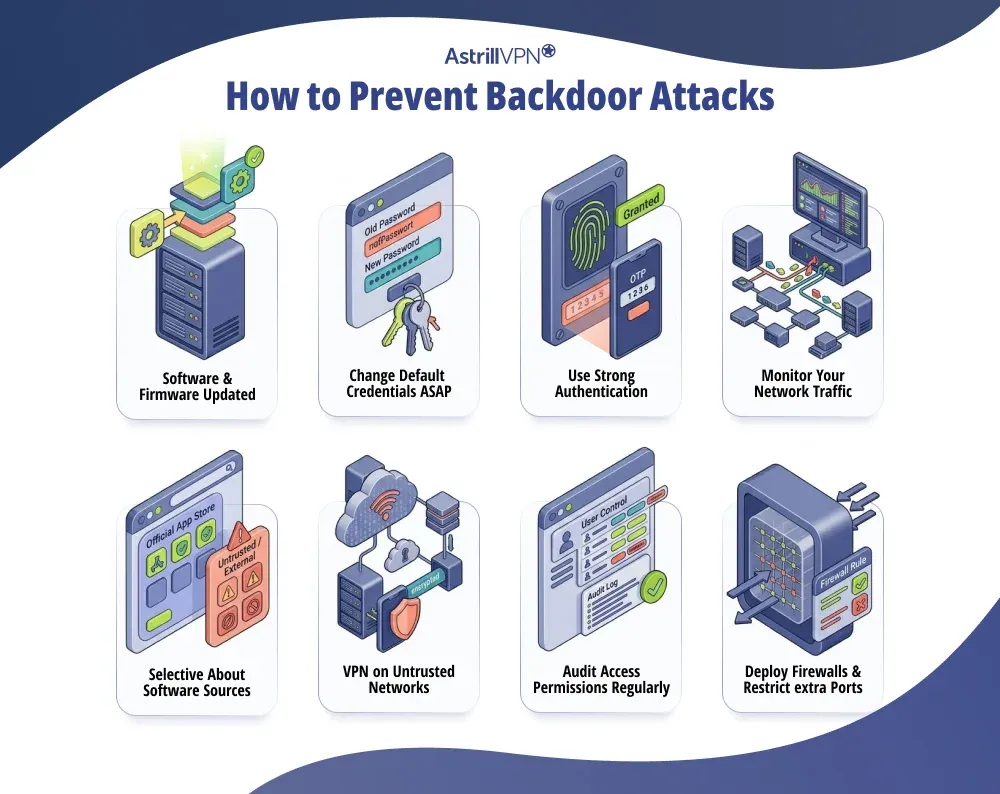
Keep Software and Firmware Updated
Most backdoor attacks exploit known vulnerabilities in unpatched software. Attackers routinely scan the internet for systems running outdated versions of common applications because they know exactly which vulnerabilities exist and how to exploit them. Patching promptly removes those opportunities. This applies equally to routers, firewalls, and any other networked hardware, not just operating systems and applications.
Change Default Credentials Immediately
A router, NAS device, or any other piece of hardware shipped with a default username and password is essentially broadcasting its credentials to anyone who cares to look them up. Changing these immediately after setup is one of the simplest and most effective steps you can take. Default credentials are well-documented publicly, and attackers use automated tools to scan for devices that have never had them changed.
Use Strong Authentication
Multi-factor authentication (MFA) does not stop a backdoor once it is installed, but it significantly raises the bar for initial access. Many backdoor attacks begin with stolen or weak credentials. If logging in requires more than just a password, credential theft alone is not enough to get an attacker in. Combine MFA with strong, unique passwords for every account and you remove two of the most common entry points.
Monitor Your Network Traffic
Active backdoors communicate. They check in with command-and-control servers, send stolen data, and receive instructions. This communication creates network traffic, and that traffic can be detected if you are looking for it. Monitoring for unusual outbound connections, particularly to unfamiliar external IP addresses, can reveal an active backdoor even if the malware itself evades endpoint detection.
Be Selective About Software Sources
Supply chain attacks have made it clear that even software from seemingly legitimate sources can be compromised. Stick to official vendor channels for downloads, verify checksums when available, and be skeptical of third-party versions of popular software. The XZ Utils incident in 2024 was discovered precisely because a developer noticed something was off in code from what appeared to be a trusted contributor.
Use a VPN on Untrusted Networks
A VPN does not prevent backdoor malware from being installed on your device, but it does add a meaningful layer of protection for your network traffic. When you connect through a VPN, your data is encrypted before it leaves your device, which makes it significantly harder for anyone monitoring the network to intercept your communications or identify the servers you are connecting to.
This matters particularly on public Wi-Fi networks, where VPNFilter-style attacks on routers and man-in-the-middle interception are genuine risks. If you are working remotely, traveling, or accessing sensitive accounts from locations outside your home network, using a reputable VPN like AstrillVPN encrypts your traffic so that even if the network infrastructure is compromised, your data remains protected in transit.
AstrillVPN uses AES-256 encryption with a strict no-logs policy, which means your online activity is not recorded or stored. For anyone serious about maintaining privacy against surveillance or network-level interception, this kind of encryption baseline is a foundational layer of any sensible security setup.
Audit Access Permissions Regularly
One of the most common and overlooked vulnerabilities is old or forgotten accounts with unnecessary privileges. Former employees, old vendor accounts, and test credentials that were never removed are all potential backdoor entry points. Regular access audits, combined with a least-privilege policy (meaning users only have access to what they actually need), significantly reduce the attack surface.
Deploy Firewalls and Restrict Unnecessary Ports
Backdoors often communicate through specific network ports. A properly configured firewall that blocks unnecessary inbound and outbound connections limits the channels available to attackers. This will not stop all backdoor communication, as sophisticated malware often uses common ports like 80 or 443 to blend in, but it eliminates the easiest and most obvious communication channels.
The Government Backdoor Debate: Why It Matters to Everyone
The backdoor conversation is not just about criminal hackers. Governments have long argued that they need access to encrypted systems for legitimate law enforcement and national security purposes. In 1993, the US government tried to mandate the Clipper chip, a hardware device with a built-in government backdoor. Public backlash killed the proposal, but the debate never really went away.
In 1994, the Communications Assistance for Law Enforcement Act (CALEA) required US internet providers to build in access mechanisms for law enforcement. Those same mechanisms became the entry point that Chinese state actors reportedly used to intercept US communications in 2024, including calls involving presidential campaign staff.
The core problem is mathematical. A backdoor that can be accessed by authorized parties can, in principle, be accessed by unauthorized ones. There is no such thing as a backdoor that only the good guys can use. Security researchers have made this argument repeatedly, and events keep proving them right.
For individuals who value their privacy, this debate has a direct practical implication. The tools and services you use to protect your data should not have government-mandated access built in. End-to-end encryption, zero-knowledge architectures, and no-logs VPN policies all exist partly in response to this concern. They are not just features: they are commitments that no third party, including the service provider itself, can access your data.
Backdoors in IoT Devices and Cloud Environments
The attack surface for backdoor threats has expanded dramatically in the past decade. It used to be that you mainly worried about your desktop computer and maybe your email. Now the conversation includes smart TVs, home routers, security cameras, voice assistants, connected thermostats, and anything else with a network connection.
IoT devices are particularly vulnerable because they are often designed with convenience as the priority and security as an afterthought. Many ship with hardcoded credentials that cannot be changed. Firmware updates are infrequent or nonexistent. The devices run for years in environments where nobody is monitoring them for unusual activity. For an attacker looking for a persistent foothold, a compromised smart device is close to ideal.
Cloud environments introduce different challenges. Misconfigured storage buckets, overly permissive access controls, and credentials accidentally left in public code repositories are all common entry points. A single misconfigured cloud account can give an attacker access to data across every system connected to it. Cloud-based backdoors are harder to detect because the volume of legitimate traffic and activity in a cloud environment makes anomalies much harder to spot.
AI systems are the newest frontier. Researchers have demonstrated that backdoors can be embedded in machine learning models through a technique called training data poisoning, where malicious trigger patterns are hidden in the training data. The model behaves normally in general use but produces attacker-controlled outputs when it encounters the trigger. This type of attack is still emerging, but it is already a serious concern for organizations deploying AI-driven security tools.
What to Do If You Think Your System Has Been Compromised
If you suspect a backdoor attack has affected your system, the response matters. Acting carelessly can tip off the attacker, cause data loss, or make forensic investigation harder.
- Isolate the affected system. Disconnect from the network to prevent further data exfiltration or lateral movement to other machines. Do not shut it down immediately, as some forensic evidence exists only in memory and will be lost on reboot.
- Document what you observe. Note any unusual processes, network connections, or file modifications before starting the remediation process. This information is valuable for understanding how the intrusion happened and what was accessed.
- Engage a security professional or incident response team. For organizations, this is not optional. For individuals dealing with serious intrusions, professional help is worth considering. Simply running an antivirus scan is unlikely to be sufficient for a sophisticated backdoor.
- Change all credentials. Any passwords or access keys that could have been exposed need to be changed, from a clean, uncompromised device.
- Consider a full reinstall. For a sophisticated backdoor, particularly one involving rootkits, a clean operating system reinstall is often the only way to be confident the system is clear. Patching over a compromised system is not reliable.
Removing a backdoor trojan is rarely as simple as deleting a file. Sophisticated implants modify multiple system components, create multiple persistence mechanisms, and may reinstall themselves if partially removed. Thorough remediation requires both technical expertise and patience.
Conclusion
What makes backdoors so persistently dangerous is the combination of stealth and patience. Unlike ransomware, which announces itself loudly, a backdoor is content to sit quietly and gather information. By the time it is discovered, the damage may already be done, and the attacker may have moved on to their next target.
Protection requires both technical measures and informed habits. Keeping systems updated, using strong authentication, monitoring network traffic, being cautious about software sources, and encrypting your internet traffic with a trusted VPN all contribute to a posture that makes you a harder target.
No single tool eliminates the risk entirely. But the combination of awareness and layered defense genuinely does reduce it. Understanding what a backdoor attack is, how it works, and what signs to look for puts you in a substantially better position than the vast majority of users who have never given it a second thought.
FAQs
No. A backdoor is not the same as a computer virus. A backdoor is a hidden method that allows someone to bypass normal authentication and gain unauthorized access to a system. A virus, on the other hand, is malware that replicates itself and spreads to other files or systems. A backdoor may be installed by a virus or other malware, but the two are different.
The main purpose of a backdoor is to give attackers persistent and covert access to a compromised system. Once installed, it allows hackers to remotely control the device, steal data, install additional malware, monitor activity, or use the system as part of a botnet without the user knowing.
A backdoor trojan is a type of trojan malware that secretly creates a backdoor in a system after it is installed. Unlike other malware that may focus on encryption (like ransomware) or replication (like worms), a backdoor trojan’s main function is to open remote access for attackers, allowing them to control the system or deploy additional malicious tools.
Common signs include:
Unusual network traffic or unknown remote connections
Slower system performance without a clear reason
Unknown programs running in the background
Security software being disabled or modified
Unexpected changes to system settings or files
Yes, modern antivirus and endpoint security tools can detect many backdoor malware variants, especially known signatures and suspicious behaviors. However, advanced or custom backdoors may evade basic antivirus solutions, which is why behavior monitoring, firewalls, and endpoint detection and response (EDR) tools are often needed for stronger protection.

Secure your privacy instantly. Try AstrillVPN with zero risk.
About The Author


No comments were posted yet