




What Is an On-Path Attack? How It Works and How to Prevent It


Every time you open a website, send a message, or log in to an account, your data travels across multiple networks before reaching its destination. Most of the time, that journey is invisible and secure. But when an attacker quietly inserts themselves into that path, the risks change fast.
On-path attacks are one of the most dangerous forms of network interception because they allow attackers to observe, manipulate, and exploit live communications without raising obvious alarms. This guide explains what an on-path attack is, how it works, and what it means for your online security.
Table of Contents
What Is an On-Path Attack?
An on-path attack is a type of cyberattack where a malicious actor secretly positions themselves between two communicating parties, such as a user and a website, and intercepts the data flowing between them. Instead of data traveling directly from your device to its intended destination, it is quietly routed through the attacker’s system first.
In simple terms, the attacker becomes part of the communication path. This allows them to read sensitive information, capture login credentials, inject malicious content, or even alter messages in real time without either side realizing it.
Relationship to man-in-the-middle attacks and why the terminology matters
On-path attacks are closely related to the man-in-the-middle attacks that many people know. In fact, they describe the same core concept. The difference lies in how modern cybersecurity frames the threat.
The term on-path attack emphasizes the technical reality of the threat. The attacker is not just conceptually “man in the middle.” They are literally placed on the data route itself. This wording matters because it highlights the infrastructure level of the attack. It highlights how routing, wireless access points, compromised networks, and poisoned traffic paths enable interception.
In professional security contexts, an on-path attack is often preferred because it focuses on network position and control, which are the fundamental enablers of the compromise.
Key traits that distinguish on-path attacks from other network threats
What makes on-path attacks especially dangerous is not just interception, but control. Unlike phishing or malware that rely on tricking users or infecting devices, on-path attacks operate silently within the communication flow. Some defining traits include:
- The attacker can see data as it moves, including credentials, session cookies, and private messages
- The attacker can modify traffic, injecting malicious code, redirecting users, or altering downloads
- Both parties often believe they are communicating directly, with no visible sign of interference.
- Attacks can scale across entire networks, public Wi Fi hotspots, compromised routers, or corporate environments.
Who Is an On-Path Attacker?
An on-path attacker is any individual or entity that successfully positions themselves within the data flow between two communicating systems. This could be between your device and a website, an app and its server, or even two internal systems inside an organization. Once in that position, the attacker gains the power to observe, intercept, and influence everything moving across that connection.
Unlike attackers who rely on tricking users into clicking malicious links or installing harmful software, an on-path attacker works at the network level. Their advantage comes from location and access, not direct interaction. If they control or compromise part of the route your data travels, they can quietly turn that access into intelligence, theft, or sabotage.
Who typically becomes an on-path attacker
On-path attackers range widely in skill, motive, and scale. Some are opportunistic cybercriminals who exploit weak public Wi Fi networks, unsecured routers, or misconfigured access points to harvest login details, financial data, or personal information. These attackers often target cafés, airports, hotels, and shared workspaces where traffic is easier to intercept.
Others are more advanced actors. This includes organized cybercrime groups and state-aligned operators who compromise internet service providers, enterprise networks, or backbone infrastructure. In these cases, on-path attacks are used for long-term surveillance, corporate espionage, data manipulation, or targeted intrusions.
There are also insider threats. A malicious employee or contractor with access to internal networks can become an on-path attacker by monitoring, rerouting, or tampering with internal communications.
Where do on-path attackers position themselves?
To carry out an on-path attack, the attacker must gain control of a point along the communication route. Common positions include:
- Public or rogue wireless access points that impersonate legitimate networks
- Compromised routers, switches, or gateways
- Infected machines inside a local network used to poison traffic paths
- Manipulated DNS systems or traffic routing mechanisms
- Malicious proxies or silently inserted relay systems
What motivates on-path attackers?
The goals behind on-path attacks are often more serious than simple disruption. Because attackers can see and alter traffic in real time, they gain access to remarkably high-value opportunities, including:
- Stealing usernames, passwords, and authentication tokens
- Hijacking active sessions without knowing the password
- Injecting malicious updates, ads, or spyware into legitimate traffic
- Monitoring sensitive business or personal communications
- Manipulating financial transactions or software downloads
How Does an On-Path Attack Work?
An on-path attack follows a precise technical flow. The attacker first places themselves inside the network route, then quietly redirects traffic, and finally exploits the access to intercept or manipulate data.
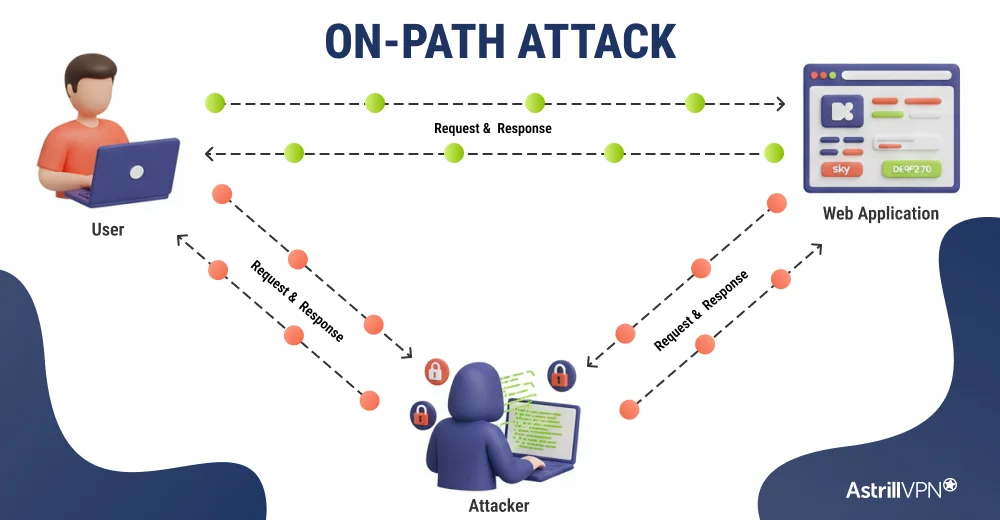
Step 1: The attacker gains a network position
The attacker compromises or controls a point on the network path. This could be a rogue Wi-Fi hotspot, an infected device on a local network, a compromised router, or a manipulated DNS system. The goal is simple: reach a place where traffic naturally passes.
Step 2: Traffic is rerouted through the attacker
Using techniques such as traffic poisoning or routing manipulation, the attacker forces devices to send data through their system. The connection still appears normal to both the user and the server.
Step 3: Data is intercepted in real time
Once traffic flows through the attacker, they can observe communications. This may include credentials, session cookies, messages, downloads, or internal application data.
Step 4: Traffic is altered when needed
Beyond monitoring, the attacker can inject malicious code, redirect users, modify downloads, or tamper with active sessions. This is what turns interception into full compromise.
Step 5: Access is maintained and expanded
Attackers often preserve their network position to collect more data, steal credentials, and move deeper into systems over time.
Common Types and Techniques of On-Path Attacks
On-path attacks involve placing the attacker directly into the network traffic stream. While the objective is always interception and control, attackers use different techniques depending on the environment they are targeting.
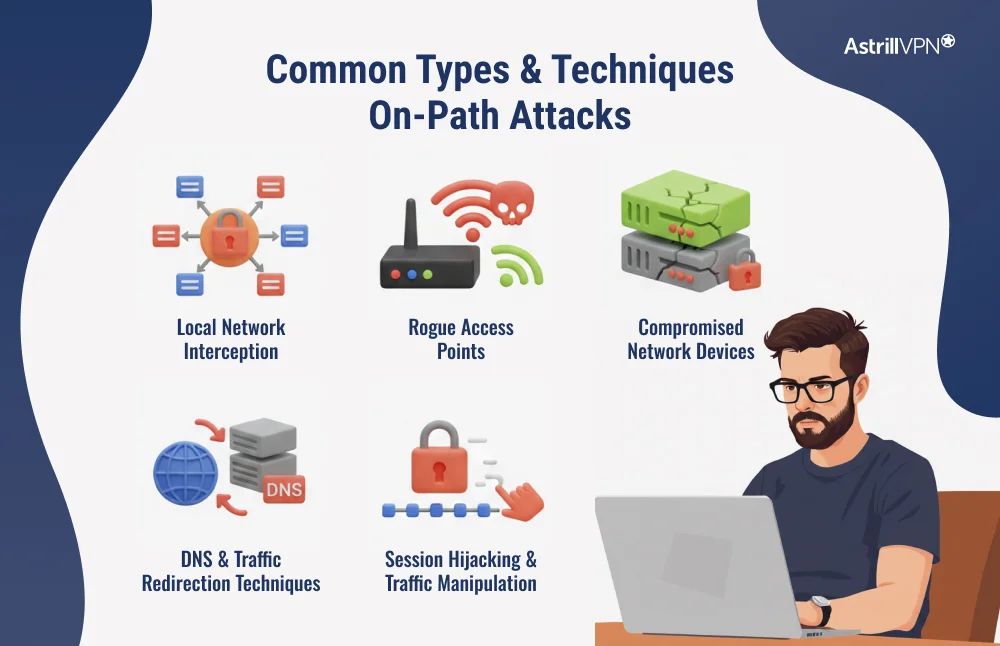
Local network interception
This is one of the most common forms of on-path attacks. The attacker targets devices on the same local network, such as public Wi-Fi, offices, or shared workspaces. By manipulating how devices resolve addresses and route traffic, the attacker makes themselves the gateway through which data passes. This allows them to monitor sessions, capture credentials, and interfere with ongoing connections.
Rogue access points
Attackers often create fake wireless networks that mimic legitimate ones. When users connect, all their traffic automatically flows through the attacker’s system. This gives full visibility into browsing activity and opens the door to traffic manipulation, credential theft, and malicious content injection.
Compromised network devices
Routers, switches, and gateways are high-value targets. If an attacker compromises one of these devices, they gain control over large volumes of traffic. This technique is frequently used in enterprise environments and advanced threat operations, where long-term access and broad visibility are the primary goals.
DNS and traffic redirection techniques
By interfering with how domain names and routes are resolved, attackers can silently redirect users to malicious systems while showing legitimate website addresses. This allows them to position themselves on the path without the victim ever realizing that traffic has been altered.
Session hijacking and traffic manipulation
Once traffic flows through the attacker, they can steal active session tokens, alter requests and responses, inject malicious scripts, or modify downloads. This transforms passive interception into a direct system compromise.
On Path Attack Example
On-path attacks are not just theoretical threats. They are happening right now in the real world, especially when people use public networks with weak security protections.
Public WiFi Evil Twin Attacks
One of the most common real-world examples of on-pathway interception involves so-called “Evil Twin” WiFi networks. In 2025, security warnings highlighted an increase in cybercriminals setting up fake WiFi hotspots at airports, hotels, and tourist hubs that mimic legitimate network names. Unsuspecting users connect to these networks, thinking they are safe. Once connected, attackers can intercept and collect personal data, login credentials, and even banking information as traffic flows through their system rather than the legitimate network.
Because the fake network appears trusted and users rarely check details before connecting, the attacker effectively becomes part of the data path, allowing them to quietly monitor and manipulate communication.
Public WiFi Downgrade and Eavesdropping
Security research in 2024 exposed a vulnerability that allows attackers to trick WiFi clients into connecting to less secure network modes. This type of downgrade attack can force devices to use weaker encryption, enabling attackers on the same network to eavesdrop on traffic and potentially intercept sensitive communications.
Both examples demonstrate how on-path attackers exploit everyday behaviors and weak network configurations to position themselves between users and the services they are trying to reach. In each case, victims believe they are communicating directly with a website or app, but their data is secretly flowing through a malicious intermediary.
Signs and Detection of On-Path Attacks
On-path attacks are difficult to spot because they are designed to operate silently. Still, there are technical and behavioral signs that can indicate something is interfering with a connection.
Common signs of a possible on-path attack
- Unexpected security warnings, especially repeated certificate or HTTPS alerts.
- Websites are loading but behaving strangely, such as forced logouts or broken secure sessions.
- Sudden redirects to login pages or duplicated authentication prompts.
- Slow or unstable connections on networks that are usually reliable.
- Downloads or updates failing signature checks.
- Account activity that shows logins from unusual locations after using public networks.
How are on-path attacks detected in practice?
Detection usually happens at the network and security layer, not at the surface level.
- Network monitoring tools can identify abnormal routing behavior, duplicate gateways, or unexpected traffic paths.
- Intrusion detection systems can flag traffic manipulation, session anomalies, and unauthorized interception attempts.
- Certificate monitoring helps detect attempts to use fake or downgraded certificates.
- Endpoint protection tools can reveal malicious processes attempting to redirect traffic.
- Security logs often reveal session-hijacking patterns or unexplained credential reuse.
Impact and Risks of On-Path Attacks
On-path attacks are not minor network issues. They directly compromise the integrity, confidentiality, and reliability of digital communication.
When an attacker controls the traffic path, the most immediate risk is data exposure. Login credentials, session tokens, personal messages, financial information, and business communications can all be intercepted. Even with encryption in place, attackers can still exploit traffic patterns, attempt session hijacking, or manipulate connections.
Another significant risk is traffic manipulation. Attackers can inject malicious scripts into websites, alter software updates, redirect users to fake portals, or subtly modify transactions. This creates opportunities for large-scale credential theft, malware distribution, and long-term surveillance.
For organizations, on-path attacks can lead to:
- Unauthorized system access and lateral movement
- Intellectual property theft
- Compliance violations and regulatory exposure
- Reputational damage and loss of customer trust
How to Prevent On-Path Attacks
Preventing on-path attacks requires reducing the attacker’s ability to insert themselves into the communication path and limiting what they can do if they succeed.
Strong encryption is the first line of defense. Always using HTTPS, secure applications, and modern encryption protocols ensures that intercepted traffic cannot be easily read or altered.
Avoiding untrusted networks significantly lowers exposure. Public Wi-Fi remains one of the most common environments for on-path attacks because attackers can easily manipulate local traffic routing.
This is where a secure VPN becomes essential. A trusted VPN like AstrillVPN encrypts your traffic at the device level and tunnels it through protected servers. Even if an attacker controls the local network, they only see encrypted data, not usable information. This prevents interception, blocks traffic manipulation, and protects sessions from hijacking.
Additional preventive measures include:
- Keeping operating systems, browsers, and network devices updated
- Disabling automatic connection to unknown networks
- Verifying certificates and security warnings instead of ignoring them
- Using secure DNS and encrypted connection settings
- Monitoring enterprise networks for abnormal routing behavior
On-Path Attack vs Man-in-the-Middle
| Aspect | On-Path Attack | Man-in-the-Middle Attack |
| Core meaning | A technical term describing an attacker who is positioned directly on the communication route between two systems | A general term describing an attacker who intercepts communication between two parties |
| Focus | Emphasizes network placement, routing control, and traffic path manipulation | Emphasizes the concept of interception between a sender and receiver |
| How the attack happens | Through compromised routers, rogue WiFi access points, DNS manipulation, or poisoned network paths | Through methods such as WiFi spoofing, session hijacking, proxy abuse, or malware |
| Level of technical precision | More precise and infrastructure-focused | More descriptive and conceptual |
| Usage in cybersecurity | Preferred in professional and technical security contexts | Common in general explanations and non-technical discussions |
| Relationship between the terms | Describes how the attacker becomes part of the data path | Describes the role of the attacker between the two parties |
Conclusion
On-path attacks represent one of the most serious threats to modern network security because they target the communication path itself. When attackers control where data travels, they can observe, manipulate, and exploit information without being easily detected.
Understanding how these attacks work, who carries them out, and what warning signs to watch for is critical for both individuals and organizations. Strong encryption, secure network practices, and trusted protection layers are no longer optional. They are fundamental.
Using a secure VPN like AstrillVPN adds an essential layer of defense by encrypting traffic at the source and shielding it from hostile or compromised networks. When data is protected from the moment it leaves your device, on-path attackers lose the visibility and control they depend on.
FAQs
Remote access security is essential because it protects company systems and data when employees connect from outside the office. Without strong security controls, attackers can intercept traffic, steal credentials, hijack sessions, or use remote connections as entry points into internal networks. Remote access is now one of the most targeted attack surfaces.
Companies can secure remote access by combining technical controls and clear access policies, including:
Enforcing strong authentication, such as multi-factor authentication
Using encrypted connections for all remote sessions
Limiting access based on role and necessity
Monitoring remote traffic and login behavior
Keeping devices, VPNs, and remote services regularly updated
Segmenting networks so that remote users do not gain full internal access
Remote access standards are frameworks and protocols that define how remote connections should be secured. Common examples include:
VPN protocols such as OpenVPN, IKEv2, and WireGuard
Encryption standards such as AES and TLS
Authentication standards such as multi-factor authentication and certificate-based access
Security frameworks such as NIST Zero Trust Architecture and ISO 27001
The most common remote access security risks include:
Stolen or weak credentials
Unsecured public WiFi usage
On-path and man-in-the-middle attacks
Infected or unmanaged employee devices
Exposed remote desktop services
Overly broad network access permissions
Zero Trust remote access is a security model in which no connection is trusted by default, even if it originates within the organization. Every user, device, and session must be continuously verified before access is granted.
Instead of giving remote users broad network access, Zero Trust limits connections to only the specific systems and services they are approved to use. Access is based on identity, device posture, location, and behavior, not just network presence.
A VPN improves remote access security by encrypting all data between the employee’s device and the company’s network. This prevents attackers on public or compromised networks from intercepting traffic, stealing credentials, or manipulating sessions.
A secure VPN like AstrillVPN creates a protected tunnel that shields communications from on-path attacks, hides sensitive traffic from local networks, and ensures data remains confidential even when employees work from untrusted locations.

Secure your privacy instantly. Try AstrillVPN with zero risk.
About The Author










No comments were posted yet