




Remote Access Security: How to Protect Remote Connections

Remote access is now essential to how businesses operate. From remote employees and traveling teams to cloud administrators and external partners, organizations rely on secure remote connections every day. But every remote connection also introduces risk. If it is not adequately protected, it can become a direct entry point for attackers.
Remote access security focuses on protecting these connections through strong authentication, encrypted communication, and controlled access to internal systems. It is what stands between legitimate users and unauthorized intrusion.
In this guide, we break down what remote access security entails, the risks it poses, and how organizations can apply the right controls, standards, and solutions to build secure remote access environments.
Table of Contents
What Is Remote Access?
Remote access refers to the ability to connect to a computer, private network, or digital system from a different physical location through the internet or another network. Instead of being on site, users can log in from home, while traveling, or from another office and interact with internal systems as if they were physically present.
This access can include viewing files, running applications, managing servers, supporting users, or configuring infrastructure. Remote access is used across nearly every industry, from companies enabling remote workforces to IT teams maintaining cloud environments and vendors supporting customer systems.
On its own, remote access is simply connectivity. It allows devices to communicate across distances. Security is not automatically built into that connection. Without proper protection, remote access can expose internal resources to interception, unauthorized logins, and silent network entry. That is why remote access must always be implemented alongside strong security controls, not treated as a convenience feature alone.
How Remote Access Works?
Remote access follows a structured process that allows an external user or device to connect securely to a private system.
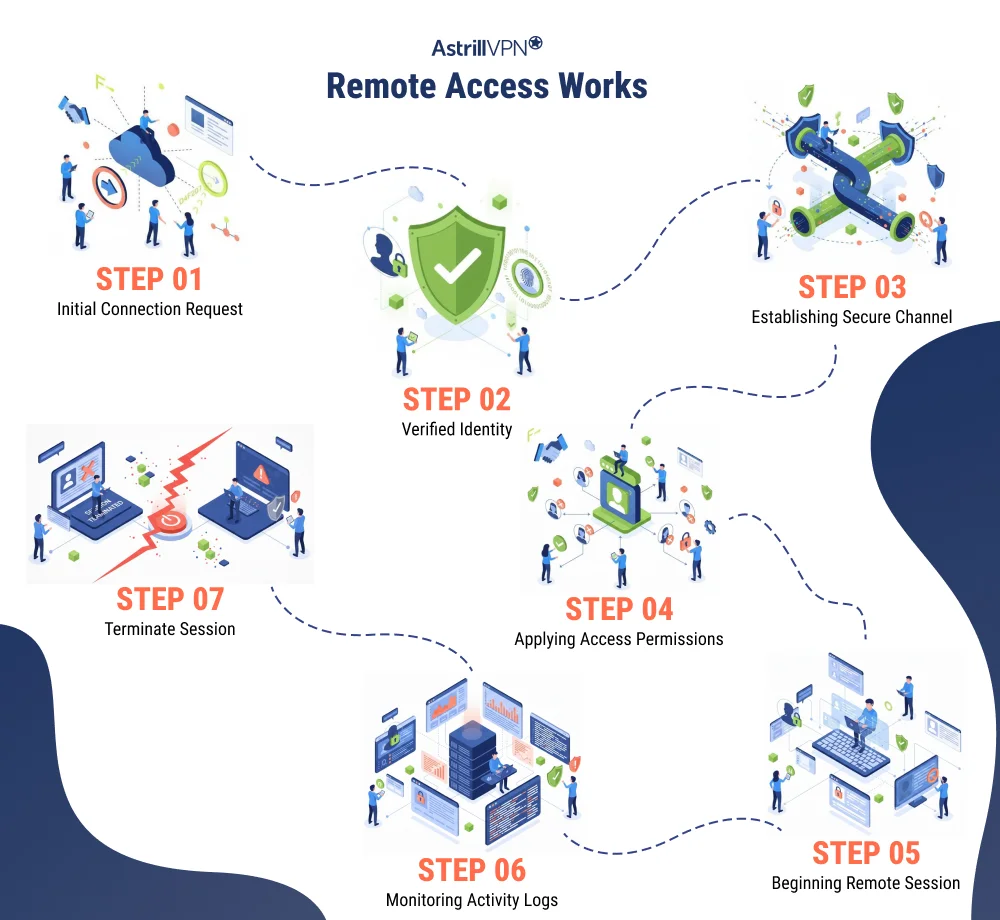
Step 1: Connection request is initiated
A user opens a remote access application, portal, or client and attempts to connect to a company network, server, or system over the internet.
Step 2: Identity is verified
The system prompts the user to authenticate. This usually involves credentials such as a username and password and, in secure environments, an additional verification factor like a mobile prompt, hardware key, or one time code.
Step 3: Secure channel is established
Once authentication succeeds, an encrypted tunnel or secure session is created. This protects data in transit from interception or alteration.
Step 4: Access permissions are applied
The system checks what the user is allowed to access. This determines which applications, files, or network segments they can reach.
Step 5: Remote session begins
The user gains access to approved resources. All communication between the user and the internal system flows through the secure connection.
Step 6: Activity is monitored and logged
Well-designed remote access environments track sessions, record connection activity, and monitor behavior to detect misuse or anomalies.
Step 7: Session is terminated
When the user disconnects or a timeout is reached, the secure session is closed and access to internal systems ends.
Remote Access Security vs Standard Remote Access
| Aspect | Standard Remote Access | Remote Access Security |
|---|---|---|
| Primary focus | Enables users to connect to systems from outside a local network | Protects remote connections through layered security and continuous control |
| Authentication | Often relies only on usernames and passwords | Enforces strong authentication, such as multi-factor verification and identity validation |
| Data protection | May use basic or inconsistent encryption | Uses strong, end to end encryption to protect all data in transit |
| Access control | Broad or static access once connected | Granular access based on roles, context, and least privilege principles |
| Network exposure | Can place users directly inside the internal network | Limits exposure by isolating resources and restricting lateral movement |
| Monitoring and logging | Minimal or no session visibility | Continuous monitoring, logging, and anomaly detection |
| Threat prevention | Reactive and dependent on perimeter defenses | Proactive with built in safeguards against unauthorized access and misuse |
| Compliance support | Limited support for regulatory and audit needs | Designed to align with security policies, audits, and regulatory standards |
| Risk level | Higher risk of credential abuse and network compromise | Significantly reduced risk through layered security controls |
| Overall objective | Make systems reachable | Make systems reachable and protected |
Key Risks and Threats in Remote Access Security
Remote access environments are prime targets for attackers because they sit directly at the edge of internal systems. When remote connections are poorly protected, they offer one of the fastest and quietest ways to bypass traditional defenses. Understanding the most common risks is the first step toward building secure remote access practices.
Compromised Credentials
Stolen usernames and passwords remain one of the most common entry points into remote systems. Phishing campaigns, malware, leaked databases, and password reuse make it easy for attackers to obtain valid credentials. Once those credentials are used to log in remotely, attackers can appear as legitimate users, often bypassing basic security alerts.
Without strong authentication and session monitoring, compromised accounts can remain active in an environment for long periods before detection.
Insecure Networks and Intercepted Connections
Remote users frequently connect from home networks, public WiFi, hotels, and mobile hotspots. These networks are rarely hardened. Attackers on the same network can attempt to intercept traffic, manipulate connections, or redirect users to malicious services.
If remote access sessions are not properly encrypted and verified, sensitive data such as credentials, files, and internal communications can be exposed in transit.
Exposed Remote Services
Remote desktop services, VPN gateways, and administrative portals are often exposed directly to the internet. If they are misconfigured, outdated, or left unpatched, they become easy targets for scanning. Automated bots constantly scan for open ports and vulnerable services that enable brute-force attempts or direct exploitation. Many large-scale breaches begin with a single exposed remote service that was never intended to be publicly reachable.
Excessive Access and Poor Privilege Control
When remote users are given broad network access, a single compromised account can escalate into a complete environment takeover. Poor access segmentation allows attackers to move laterally, discover systems, and reach sensitive assets that were never necessary for that user’s role.
Remote access that is not governed by least privilege principles dramatically increases the impact of any successful intrusion.
Unmonitored Sessions and Silent Abuse
Without proper logging and monitoring, remote access activity often goes unseen. Attackers can explore systems, extract data, and establish persistence without triggering alerts. This lack of visibility slows incident response and makes containment more difficult. Secure remote environments treat every session as an auditable event, not just a successful login.
Endpoint-Based Threats
Remote access security is only as strong as the devices being used. Compromised laptops, outdated systems, and unmanaged personal devices can introduce malware, keyloggers, or remote control tools directly into internal environments.
When endpoint posture is ignored, the remote connection itself becomes a delivery channel for threats.
What Are Remote Access Standards?
Remote access standards are formal guidelines developed by cybersecurity authorities, standards organizations, and government bodies. Their role is to define minimum security requirements and best practices for enabling access to systems from outside controlled networks.
They typically address authentication, encryption, device trust, access segmentation, monitoring, and incident response. More importantly, they help organizations align remote access security with broader governance, risk, and compliance objectives.
NIST Guidance on Secure Remote Access
One of the most widely referenced frameworks is published by the National Institute of Standards and Technology. NIST guidance focuses on protecting telework and remote access architectures across enterprise environments.
It emphasizes strong authentication, secure tunneling, controlled access to internal resources, continuous monitoring, and risk-based design. NIST also highlights the importance of separating remote access systems from core infrastructure and regularly assessing remote exposure. Enterprises and security teams frequently use this guidance to design scalable, auditable, and resilient remote access programs.
ISO and International Security Standards
ISO standards such as ISO/IEC 27001 and ISO/IEC 27002 form the foundation of many organizational security programs worldwide. While they are not limited to remote access, they define controls that directly shape secure remote connectivity.
These include access control policies, identity management, encryption requirements, logging, vendor access governance, and secure system configuration. Organizations that follow ISO standards integrate remote access security into their broader information security management systems rather than treating it as a standalone function.
Government and Regulatory Frameworks?
Many governments and regulatory bodies publish their own remote-access standards for public-sector systems and critical industries. These often define how remote users may connect, what controls must be enforced, and how remote activity must be audited.
They place strong emphasis on secure authentication, session recording, device validation, and strict segmentation. In regulated sectors, these standards are mandatory. They directly influence compliance, procurement, and operational policies.
Why Remote Access Standards Matter?
Remote access standards bring structure to what would otherwise be an inconsistent security surface. They help organizations avoid ad hoc implementations, close common security gaps, and build environments that can withstand both real-world attacks and formal assessments.
When standards are followed, remote access becomes part of a unified security strategy. Access is documented, controls are consistently enforced, and security teams have clear benchmarks to measure effectiveness and drive improvement.
Remote Access Security Controls
Remote access security controls are the mechanisms that protect remote connections from abuse, interception, and unauthorized entry. They define how users are verified, how data is protected, what systems can be reached, and how remote activity is governed. Without these controls, remote access becomes a high-risk gateway into internal environments.
Adequate remote access security is never built on a single safeguard. It relies on layered controls that work together to verify identity, restrict exposure, protect communication, and maintain visibility.
Identity and Authentication Controls
Authentication is the first and most critical control. It determines who is allowed to initiate a remote session. Strong remote access environments go beyond passwords. They use multi-factor verification, device-based authentication, and contextual checks to ensure that a legitimate user is requesting access from an acceptable environment.
Access Authorization and Privilege Controls
Once identity is confirmed, authorization controls define what a user is allowed to access.
Remote access should be limited to only the systems and services required for a user’s role. This principle prevents broad network exposure and limits the damage that can result from an account compromise.
Well-designed access controls include role-based permissions, time-based access, and approval workflows for sensitive systems.
Encryption and Secure Communication Controls
Using strong encryption for remote connections is crucial for keeping data safe from prying eyes and tampering. It protects sensitive information, internal traffic, file transfers, and administrative activities, especially when connecting from public or untrusted networks.
VPN and Secure Tunneling Technologies
VPN and secure tunneling technologies are essential for remote access security, creating a protected communication channel between remote users and internal systems. They encrypt data, ensuring it remains private and secure from unauthorized access on public networks.
When a secure tunnel is established, all traffic is encrypted before leaving the user’s device and remains protected until it reaches its destination, preventing credential interception and data manipulation. Additionally, these technologies provide controlled access to private environments, acting as managed gateways rather than open doors.
Overall, VPN and tunneling controls serve three key purposes: protecting confidentiality through encryption, preserving integrity by preventing data tampering, and supporting access control by linking remote access to verified identities and permissions.
Network and Session Isolation Controls
Network controls determine how remote users are placed within an environment.
Rather than allowing full internal access, secure remote access systems isolate users into restricted segments. They limit lateral movement, prevent unnecessary system discovery, and contain sessions within defined boundaries.
Endpoint and Device Security Controls
The security of a remote connection depends heavily on the device initiating it.
Endpoint controls evaluate a device’s compliance with security requirements before granting access. This includes checking the operating system, security software, configurations, and device identity. These measures help prevent compromised or unmanaged devices from posing internal threats.
Monitoring, Logging, and Response Controls
Remote access must always have visibility—monitoring and logging track connections, system access, and session behavior, supporting threat detection and compliance. When suspicious activity is detected, response controls can terminate sessions, revoke access, and enable quick intervention by security teams.
What Are Remote Access Security Solutions?
Remote access security solutions are tools and platforms that enforce protection across remote connections. They sit between the user and internal systems, validating access requests, encrypting traffic, and applying policies that determine what is allowed and what is not.
Some solutions focus on securing the transport layer by protecting traffic in transit. Others focus on controlling access at the application or privilege level. Together, they form the foundation of a secure remote access strategy by reducing blind trust and replacing it with verified, controlled connectivity.
VPN and Secure Tunneling Technologies
VPN and secure tunneling technologies protect remote access by encrypting traffic as it moves across external networks. They create protected communication paths that prevent third parties from intercepting credentials, internal data, or administrative activity.
These technologies are widely used to support remote work, secure administration, and safe connectivity on public or hostile networks. Their value lies in confidentiality and integrity. They ensure that what leaves the user’s device cannot be read or manipulated before reaching its destination.
VPN based access is most effective when it is tightly scoped. When combined with strong authentication, segmentation, and monitoring, secure tunnels act as controlled gateways into private environments rather than broad entry points.
Secure Remote Desktop and Remote Support Tools
Secure remote desktop and remote support solutions enable users and IT teams to access specific machines remotely while enforcing strict session controls.
Unlike network-level access tools, these platforms usually confine users to individual systems or environments. Authentication, encrypted sessions, permission-based access, and activity tracking are built into their design. This makes them well-suited for support operations, maintenance tasks, and remote troubleshooting where full network access is unnecessary.
Their strength lies in containment. They allow organizations to grant remote capabilities without exposing internal networks or expanding lateral movement opportunities.
Zero Trust Network Access (ZTNA)
Zero Trust Network Access (ZTNA) shifts from traditional network access to granting permission directly to specific applications after validating identity, device trust, and contextual signals. ZTNA continuously evaluates access, limiting exposure, and restricting user movement post-authentication.
By enforcing application-level connectivity rather than broad network access, ZTNA reduces the effectiveness of credential theft and other intrusion techniques, making it ideal for cloud-driven environments and distributed workforces.
Privileged Access Management (PAM)
Privileged Access Management focuses on protecting high-impact remote access such as administrative accounts, infrastructure management, and sensitive system control.
These solutions ensure that privileged credentials are stored, issued, and used securely. They introduce approval workflows, session restrictions, and oversight mechanisms that replace permanent elevated access with controlled, time-bound use.
PAM platforms also improve accountability by monitoring and recording privileged sessions. This reduces the risk associated with remote administration and limits the damage that can occur if a privileged account is targeted or abused.
Cloud native and SaaS Remote Access Platforms
Cloud-native remote access platforms provide secure connectivity through centralized management. They integrate identity systems, access policies, and logging into a unified layer applicable across users, devices, and locations. Ideal for global teams and rapidly scaling organizations, these platforms offer simplified deployment and centralized policy enforcement. When effectively implemented, they offer flexibility while maintaining control, making them a solid foundation for long-term remote access strategies.
Best Practices for Secure Remote Access
Secure remote access is built on consistent security practices that protect identities, communications, and systems from exposure. As organizations rely more heavily on external connectivity, these best practices help reduce the risk of unauthorized access, credential abuse, and silent intrusion.
Enforce Strong Authentication Across All Entry Points
Every remote access pathway should be protected by strong authentication. Passwords alone are no longer sufficient, as phishing and credential theft remain primary attack methods. Multi-factor authentication significantly reduces the success rate of unauthorized access attempts by requiring an additional form of identity verification.
Authentication controls should be centralized and applied consistently across VPN connections, remote desktop services, cloud platforms, and administrative portals. This prevents weak links where attackers often concentrate their efforts.
Apply Least Privilege and Role-Based Access
Remote access should be limited to only what users need to perform their responsibilities. Granting broad or permanent access increases the impact of a single compromised account.
Permissions should be assigned by role, restricted to specific systems or applications, and reviewed regularly.
Sensitive operations should require additional approval and time-limited access. This approach reduces internal exposure and limits how far an attacker can move inside an environment.
Keep Remote Access Infrastructure Fully Patched
Remote access systems are continuously scanned by automated tools looking for exposed or outdated services. Unpatched VPN appliances, remote desktop services, and access gateways are frequent entry points in major breaches.
All remote access components should follow strict patch management schedules. Deprecated protocols should be disabled, unused services should be removed, and configurations should be reviewed regularly to prevent accidental exposure.
Protect All Sessions With Strong Encryption
Encryption is a foundational requirement for remote access security. All remote connections must protect data in transit, especially when users connect from public or untrusted networks.
Strong encryption safeguards login credentials, internal communications, and transferred files from interception and manipulation. Secure tunnels and encrypted sessions ensure that even if traffic is observed, it cannot be read or altered.
Monitor, Log, and Review Remote Access Activity
Remote access should never operate without visibility. Authentication attempts, session activity, and access patterns should be logged and reviewed.
Monitoring allows organizations to detect unusual behavior, investigate incidents, and respond quickly when access appears suspicious. Logging also supports compliance requirements and provides accountability for sensitive access.
Harden Remote Desktop and Administrative Services
Remote desktop and administrative access paths carry a higher risk because they provide interactive control over systems. These services should not be directly exposed and must be protected by additional safeguards.
Access should pass through secured gateways, require multi-factor authentication, and be limited to approved users and devices. Sessions should be time-bound, and high-risk activities should be closely monitored.
Include Endpoint Security in Remote Access Decisions
Remote access security depends heavily on the devices connecting to systems. Compromised or outdated endpoints can introduce threats even when network-level controls are strong.
Organizations should verify device security posture before granting access. This may include operating system status, active security tools, and configuration requirements. High-risk devices should receive restricted access or be blocked.
Strengthen the Human Layer Through Training
Users remain a primary target in remote access attacks. Security awareness training helps reduce successful phishing attempts, social engineering, and unsafe access behavior.
Training should focus on recognizing suspicious login prompts, protecting credentials, securing personal devices, and using public networks safely. An informed user base strengthens every technical control.
Steps to Implement Secure Remote Access the Right Way
Secure remote access should be built as a controlled system, not a convenience feature. The goal is to clearly define access paths, enforce identity, restrict exposure, and maintain continuous oversight.
1. Identify and Eliminate Unnecessary Remote Access
Start by creating a complete inventory of all remote access methods in use. This includes VPN services, remote desktop exposure, cloud management portals, support tools, and vendor access channels.
Each access path should be reviewed for business relevance, ownership, and security controls. Any remote service that is unused, undocumented, or unsupported should be disabled. This step establishes visibility and removes silent entry points that attackers often exploit.
2. Enforce Strong and Centralized Authentication
All remote access points must use centralized identity management and strong authentication. Multi-factor authentication should be mandatory across VPNs, remote desktops, administrative consoles, and cloud services.
Legacy access mechanisms that cannot support strong authentication should be isolated or replaced. This step directly reduces the risk of credential-based intrusions.
3. Define Clear Access Boundaries
Before deploying or expanding remote access, organizations must define exactly what each user role is allowed to access.
Access should be restricted to specific systems or applications rather than entire networks. Administrative access should be separated from standard user access. Sensitive connections should be time-limited and subject to additional approval. This ensures that a successful login does not automatically translate into broad internal exposure.
4. Secure the Connection Layer
Every remote connection must be protected by strong encryption and secured gateways. Weak protocols and outdated cryptographic methods should be disabled. Internal services should not be directly exposed to the internet. Access should flow through protected entry points that enforce authentication, encryption, and policy controls. This protects credentials and internal communications from interception and manipulation.
5. Enable Monitoring and Session Visibility
Remote access systems must generate logs and telemetry that security teams can use. Authentication attempts, active sessions, accessed resources, and abnormal patterns should all be visible.
Monitoring enables early detection of misuse and supports rapid response when suspicious behavior occurs. It also provides accountability for sensitive access.
6. Test Controls and Maintain Ongoing Reviews
Remote access controls should be validated through regular testing. Organizations should confirm that unauthorized access attempts are blocked, compromised accounts are disabled quickly, and sessions are terminated in real time.
Access rights must also be reviewed on a recurring basis. Dormant accounts, outdated permissions, and unused access paths should be removed to prevent the accumulation of risk.
Conclusion
Remote access is now embedded in how organizations operate. It supports distributed teams, cloud infrastructure, and global operations, but it also introduces one of the most direct paths into internal systems. Without proper controls, remote access becomes an open attack surface rather than a productivity tool.
Effective remote access security is built on clear standards, strong authentication, encrypted connections, restricted access, and continuous visibility. When these elements work together, remote connectivity shifts from a liability to a controlled, resilient capability.
As remote work, cloud services, and third-party access continue to expand, organizations must treat remote access as a core security function, not an add-on. The security of remote connections increasingly defines the security of the entire environment.
FAQs
Remote access security is important because remote connections provide a direct path into internal systems. Without proper protection, attackers can use stolen credentials, exposed services, or insecure networks to bypass perimeter defenses. Strong remote access security protects identities, encrypts communication, restricts system exposure, and enables monitoring, which reduces the risk of data breaches, ransomware, and unauthorized system control.
Companies can enhance remote access security by implementing multi-factor authentication, encrypting connections, restricting access by role, and monitoring sessions. Regularly patch remote access systems, remove unused services, and assess device security before granting access. Additionally, security awareness training is crucial to mitigate phishing and credential theft.
Remote access standards are frameworks that define how to secure remote connectivity, focusing on best practices for authentication, encryption, access control, monitoring, and governance. Examples include NIST guidance and international standards like ISO/IEC 27001 and ISO/IEC 27002. These standards help organizations create consistent, auditable, and resilient remote access environments.
The most common remote access security risks include stolen or weak credentials, exposed remote services, unpatched access systems, insecure public networks, excessive access permissions, and compromised user devices. These weaknesses are frequently exploited to gain unauthorized entry, move laterally within networks, and maintain persistent access.
Zero Trust remote access is a security approach that does not automatically trust any user or device, even after login. Instead of providing network-level access, it grants access only to specific applications or services after verifying identity, device trust, and contextual factors. Access is continuously evaluated, which limits exposure and reduces attackers’ ability to move within environments.
A VPN improves remote access security by encrypting traffic between the user and the destination system. This protects credentials, files, and communications from interception on public or untrusted networks. VPNs also provide controlled access gateways that prevent direct exposure of internal systems and support the enforcement of authentication and access policies.











No comments were posted yet