




Signs of Malware on a Computer: Warning Symptoms You Should Never Ignore

Malware attacks continue to rise at an alarming rate, affecting individuals, businesses, and government organizations worldwide. Cybersecurity researchers report that more than 560,000 new pieces of malware are detected every day, showing how rapidly cybercriminals develop new threats. Another recent study found that nearly 94% of malware is delivered through email, making phishing campaigns one of the most common infection methods.
Many users do not realize their computer has been infected until serious damage has already occurred. Malware can quietly steal passwords, monitor online activity, slow down systems, corrupt files, and even lock users out of their own devices. In some cases, infections remain hidden for weeks while attackers collect sensitive information in the background.
Recognizing the signs of malware on a computer is essential for preventing data theft, financial loss, and long-term system damage. This guide explains the most common malware symptoms, how infections happen, and the best prevention strategies to keep your computer secure.
Table of Contents
What Is Malware?
Malware is malicious software designed to damage systems, steal information, spy on users, disrupt operations, and give attackers unauthorized access to devices. Malware can infect desktops, laptops, servers, and even connected smart devices.
Common types of malware include:
How Malware Infects a Computer?
Malware infections usually happen through unsafe online activity, weak security practices, and deceptive cyberattacks.
- Cybercriminals often send fake emails containing infected attachments, malicious links, and fake invoices designed to trick users into downloading malware.
- Free software, pirated applications, cracked programs, and fake installers frequently contain hidden malware payloads.
- Visiting compromised websites may trigger automatic malware downloads through browser vulnerabilities.
- Attackers sometimes create fake update notifications that install malware instead of legitimate security patches.
- Infected external drives can spread malware from one device to another without the user noticing.
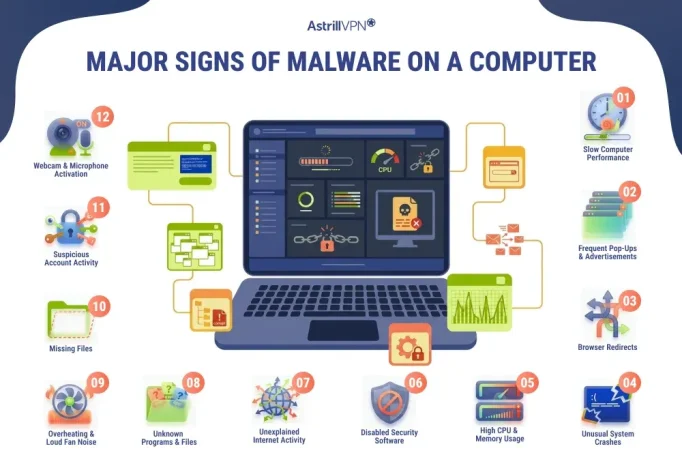
Major Signs of Malware on a Computer
Recognizing malware indicators early can reduce the risk of identity theft, financial loss, and permanent data damage.
Slow Computer Performance
A sudden decrease in computer speed is one of the most common signs of malware infection. Malware often runs hidden processes in the background that consume CPU power, memory, and storage resources. As a result, applications may load slowly, files may take longer to open, and the entire system may become unresponsive during normal use.
Frequent Pop-Ups and Advertisements
Constant pop-up advertisements and fake warning messages can indicate the presence of adware. Some malware displays fake virus alerts designed to trick users into downloading harmful programs and paying for fake security services. Unwanted browser tabs opening automatically are also a common warning sign.
Browser Redirects
If your browser constantly redirects searches to suspicious websites, malware may have infected your browser settings. Browser hijackers can change the homepage, replace the default search engine, and force users onto unsafe websites filled with advertisements and scams.
Unusual System Crashes
Malware can interfere with operating system functions, causing programs to crash unexpectedly. Frequent freezing, blue-screen errors, and random restarts may occur when malicious software corrupts system files and overloads the computer’s resources.
High CPU and Memory Usage
A computer infected with malware may show unusually high CPU, RAM, and disk usage even when no major applications are running. Hidden malware processes often work continuously in the background to steal data, mine cryptocurrency, and communicate with remote servers.
Disabled Security Software
Some advanced malware attempts to turn off antivirus software, firewall protection, and security updates to avoid detection. If your security tools suddenly stop working without explanation, malware could be interfering with the system.
Unexplained Internet Activity
Malware may secretly send stolen information to cybercriminals through the internet. Increased data usage, slower internet speeds, and unknown network connections can indicate hidden malicious activity running in the background.
Unknown Programs and Files
The appearance of unfamiliar applications, files, and desktop shortcuts may indicate a malware infection. Some malicious programs install additional software without user permission and hide dangerous files throughout the system.
Overheating and Loud Fan Noise
Malware can place a heavy strain on system resources, leading to overheating. Constant fan noise during light usage may indicate hidden malware processes consuming excessive processing power.
Missing Files
Certain malware types, especially ransomware, can encrypt, delete, and hide files. If documents suddenly become inaccessible and display unusual file extensions, the computer may be infected with ransomware.
Suspicious Account Activity
Malware designed to steal credentials may lead to unauthorized logins, password changes, and unusual account behavior. Users may notice strange emails sent from their accounts and suspicious financial transactions linked to stolen information.
Webcam and Microphone Activation
Spyware infections may secretly access webcams and microphones without permission. Unexpected camera lights and microphone activity can indicate the presence of unauthorized surveillance malware on the device.
How Can AstrillVPN Help in Preventing Malware?
AstrillVPN helps improve online security by encrypting internet traffic and protecting users on public Wi-Fi networks. It can reduce the risk of malware attacks by blocking suspicious websites, preventing data interception, and securing online activity from hackers. Features such as DNS leak protection and a kill switch also help keep browsing safer. However, a VPN should be used alongside antivirus software, regular updates, and safe browsing habits for stronger malware protection.
Malware Prevention Strategies
There are some important malware prevention strategies discussed below,
Keep Software and Operating Systems Updated
Regular software updates are one of the most effective ways to prevent malware infections. Cybercriminals often exploit outdated applications and operating systems that contain known security vulnerabilities. Installing the latest updates and security patches helps close these weaknesses and improve overall device protection.
Use Reliable Antivirus Software
Trusted antivirus software can detect, block, and remove many types of malware before they infect a system. Real-time protection features continuously monitor suspicious activity, scan downloads, and warn users about potential threats. Keeping antivirus definitions up to date is essential for protection against newly discovered malware.
Avoid Suspicious Emails and Links
Phishing emails remain a major source of malware infections. Users should avoid opening unexpected attachments, clicking unknown links, and downloading files from suspicious messages. Cybercriminals often disguise malware as invoices, delivery notifications, job offers, and urgent security alerts.
Download Software From Trusted Sources
Installing applications from unofficial websites increases the risk of downloading infected software. Users should only download programs from verified developers, official app stores, and trusted platforms to reduce exposure to malicious files and fake installers.
Use Strong Passwords and Multi-Factor Authentication
Weak passwords make it easier for attackers to access accounts and spread malware. Creating strong, unique passwords for every account significantly improves security. Multi-factor authentication adds an extra layer of protection by requiring additional verification during login attempts.
Back Up Important Files Regularly
Regular backups help protect against ransomware attacks and accidental data loss. Storing backups on external drives and secure cloud services allows users to recover important files without paying ransom demands after an infection.
Be Careful When Using Public Wi-Fi
Public Wi-Fi networks can expose users to cyberattacks and malware distribution. Using a secure VPN connection helps encrypt internet traffic and reduces the risk of attackers intercepting sensitive information on unsecured networks.
Remove Unnecessary Browser Extensions
Malicious browser extensions can track browsing activity, display harmful advertisements, and redirect users to dangerous websites. Regularly reviewing installed extensions and removing suspicious add-ons helps improve browser security.
Scan External Devices Before Use
USB drives and external storage devices can spread malware between systems. Scanning removable devices before opening files helps prevent infections from spreading to the computer.
Educate Users About Cybersecurity Risks
Human error remains one of the leading causes of malware infections. Learning how phishing scams, fake websites, malicious downloads, and social engineering attacks work can help users recognize threats and avoid dangerous online activity.
Conclusion
Malware infections can cause major damage to personal devices, business systems, and sensitive information. While some infections display obvious warning signs, others remain hidden for long periods while stealing data and compromising security.
Understanding the signs of malware on a computer is essential for detecting threats before they become catastrophic. Strong cybersecurity habits, updated software, reliable antivirus protection, and cautious online behavior remain the most effective ways to reduce malware risks and keep your computer protected from evolving cyber threats.
FAQs
Here are some of the frequently asked questions.
A possible symptom of malware infection is sudden, unusual behavior on your device. This may include slow performance, unexpected pop-ups, browser redirects, overheating, unknown applications appearing on the system, disabled antivirus software, and rapid battery drain. In some cases, malware also causes suspicious account activity and unauthorized logins.
Early warning signs of malware often include slower startup times, unexpected program freezes, excessive fan noise, increased internet usage, frequent advertisements, and changes to browser settings. Many infections also trigger unusual error messages and random crashes before more serious damage occurs.
Yes, constant pop-ups are among the most common signs of malware, especially adware. Fake virus alerts, suspicious advertisements, and automatically opening browser tabs may indicate malicious software running in the background. Some pop-ups are designed to trick users into downloading additional malware.
Yes, malware can interfere with normal system operations, causing frequent crashes, freezes, corrupted files, and error messages. Certain malware types consume large amounts of system resources, while others directly damage operating system files, making the computer unstable.

Secure your privacy instantly. Try AstrillVPN with zero risk.
About The Author










No comments were posted yet