
Why Every Household Needs a VPN in 2026? Privacy, Tracking & AI Threats

Bisma Farrukh
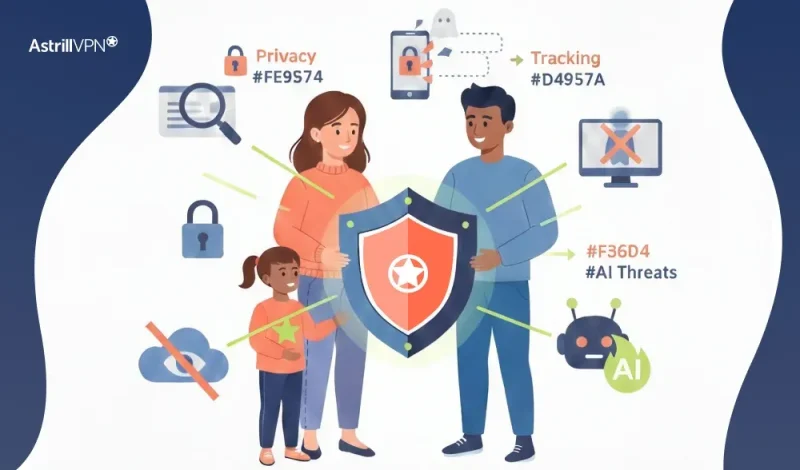
The internet of 2026 is innovative and fast. It is also more connected and invasive. Every search and app interaction leaves a data trail. This trail is continuously analyzed and monetized. Sometimes, it is exploited. Technology has advanced, but privacy protections haven’t. This gap affects everyday households. A Virtual Private Network (VPN) is essential in 2026. It is not just for tech-savvy users. It is critical for entire families.
Table of Contents
The Reality of Online Privacy in 2026
Despite years of discussion around privacy rights, the modern internet still operates on large-scale data collection. Internet service providers, app developers, advertisers, and analytics companies collect behavioral data to build detailed user profiles. Even when regulations exist, enforcement varies widely by country, and many forms of metadata collection remain legal.
Major platforms like Google and Meta rely heavily on data-driven advertising models. While these companies implement privacy controls, tracking does not disappear; it simply becomes more complex and more challenging for users to see or manage. For households with children, seniors, and non-technical users, this lack of transparency creates real privacy risks.
What Is a VPN, and Why Does It Still Matter?
A VPN creates an encrypted tunnel between your device and the internet. Instead of your data traveling openly through your internet provider’s network, it is encrypted and routed through a secure server. This process hides your real IP address and makes your online activity unreadable to outside observers.
In 2026, this matters more than ever, as encryption during data transit remains one of the strongest defenses against surveillance, profiling, and interception. While many websites use HTTPS, that only protects data between your browser and the website, not from your internet provider or the network you are connected to.
How Tracking Has Evolved Beyond Browsers?
Tracking in 2026 is no longer limited to browser cookies. Mobile apps, smart TVs, gaming consoles, and even household appliances now generate telemetry data. Many of these devices communicate constantly in the background, often without precise user controls.
A VPN helps by masking your household’s IP address, which is one of the most persistent identifiers used across devices. While a VPN does not eliminate all tracking, it breaks the easiest and most scalable method companies use to link activity across devices inside a home.
The Digital Privacy Landscape in 2026
By 2026, internet use isn’t just about convenience; it’s an ongoing trade-off between privacy and data monetization. As more services become interconnected and more AI tools are used to analyze data, the amount of personal information generated daily has exploded. Online tracking is not just a marketing concern; it affects pricing, personal profiling, and, in some countries, even law enforcement access to your data, especially where data-retention laws are nonexistent.
VPN Usage Trends
- Over 1.3 billion people worldwide now use a VPN regularly, up 37% since 2025.
- 51% of users say protecting privacy on public Wi-Fi is the main reason they use a VPN.
- 44% use VPNs to browse anonymously due to concerns about tracking.
Online Safety Laws
Privacy regulations exist in many regions, but they often focus on how companies store data rather than on how much data they are allowed to collect in the first place. In several countries, internet providers can legally log connection metadata and retain it for extended periods. This creates a gap between what users expect, privacy by default, and what actually happens behind the scenes. A VPN acts as a user-controlled privacy layer that does not rely on laws and policy changes. It gives households direct control over what their internet provider can see.
Current privacy laws in many countries do not impose strict limits on how much user data can be collected or sold:
- ISPs in many regions can log and sell browsing metadata by default, even when not browsing through a VPN.
- Laws like net neutrality, where they still exist, are under pressure, enabling carriers to do more data profiling and tracking. This makes tools like VPNs not just optional privacy boosters, but critical defenses against commercial exploitation of personal information.
The Rise of AI-Driven Cyber Threats
Artificial intelligence has transformed cybercrime. In 2026, AI is used to automate phishing campaigns, generate convincing scam messages, and adapt attacks in real time. These threats often target families through email, messaging apps, and compromised websites. Organizations like the FBI and Europol have warned that AI-enhanced scams are more convincing and more complex to detect than traditional threats.
A VPN does not replace antivirus or threat detection software, but it plays an essential supporting role. By hiding network identifiers and encrypting traffic, a VPN reduces exposure to specific network-level attacks, malicious Wi-Fi hotspots, and traffic interception when family members connect from public places.
Expert Viewpoints
According to recent industry reporting:
- VPN encryption remains one of the most effective ways to limit ISP and hacker access to raw user data during transmission.
- VPNs are widely recommended by cybersecurity professionals for privacy-conscious consumers, even though they are not a silver bullet.
- Leading providers are now integrating evolving protections, like threat scanning and tracker blocking, to enhance privacy beyond traditional VPN features.
Why Mobile-First Households Still Need a VPN?
Many people believe VPNs are only helpful for browser-based activity. In reality, mobile apps constantly communicate with servers, sending usage data, analytics, and location signals. Your mobile carrier can still see which services your device connects to, even if the content is encrypted.
A VPN encrypts all internet traffic from your phone, including apps, background services, and system updates. In a world where smartphones are primary computing devices, VPN protection is just as important on mobile devices as on laptops.
What Your Internet Provider Can and Cannot See?
Without a VPN, your internet provider can see which websites your household visits, when devices connect, and how long each session lasts. While they may not see encrypted page content, this metadata alone is enough to build detailed usage profiles.
When a VPN is active, the provider can only see that your household is connected to a VPN server, not the destinations, apps, or services being used. This significantly limits behavioral profiling and reduces the long-term data trail associated with your home network.
Are VPNs Safe From Data Leaks in 2026?
As digital privacy concerns continue to grow, many users wonder whether VPNs can still be trusted to protect sensitive data in 2026. With increased online tracking, AI-driven cyber threats, and more complex internet infrastructure, the idea of “VPN data leaks” has become a common concern. The short answer is that modern VPNs are generally safe, but their effectiveness depends heavily on how they are designed, configured, and used.
What Does a VPN Data Leak Mean?
A VPN data leak does not usually mean that a VPN has been hacked. Instead, it refers to situations in which some internet traffic bypasses the VPN tunnel and becomes visible to third parties. This can expose information such as your real IP address, browsing destinations, or DNS requests. In most cases, these leaks occur due to technical gaps or user-side settings rather than a failure of the VPN’s encryption.
The Most Common Causes of VPN Data Leaks
The majority of VPN leaks in 2026 occur not because VPN technology is weak, but because of misconfiguration or improper use. Users may turn off critical features for convenience, use outdated apps, or rely on free VPN services with limited protections. In some cases, operating systems may temporarily suspend VPN connections, especially on mobile devices, causing brief exposure if safeguards are not enabled.
These scenarios highlight that VPN safety depends as much on user behavior as on the technology itself.
The Role of Kill Switches in Leak Prevention
Kill switches have become a standard safety feature in modern VPNs. They automatically block all internet traffic if the VPN connection drops unexpectedly. Without a kill switch, even a brief disconnection can expose confirmed IP addresses or unencrypted traffic.
Advanced kill switches in 2026 operate at the system level, ensuring that no data leaves the device unless the VPN tunnel is active. This feature significantly reduces the risk of accidental data leaks.
Are Free VPNs More Likely to Leak Data?
Free VPNs remain a higher risk in 2026. Many lack the infrastructure, security updates, and leak-prevention features found in paid services. Some free VPNs log user data, rely on third-party DNS servers, or monetize traffic through ads and tracking, increasing the risk of data exposure. Paid VPNs have more substantial incentives to maintain privacy standards, invest in security audits, and fix vulnerabilities quickly.
Can VPN Providers Themselves Leak Data?
A VPN provider can only leak data if it collects and stores user information in the first place. In 2026, privacy-focused VPNs emphasize strict no-logs policies, meaning they do not store browsing activity, connection timestamps, or IP addresses. When implemented correctly, this approach ensures there is no stored data to expose, even under external pressure or in the event of a system compromise.
Top Strategies for VPN Protection in 2026
Using a VPN in 2026 is no longer just about turning it on and forgetting it. As tracking methods, network behavior, and AI-driven threats become more advanced, users need to be more intentional about how they configure and use their VPNs. A VPN remains a powerful privacy tool, but its effectiveness depends on smart usage and proper setup.
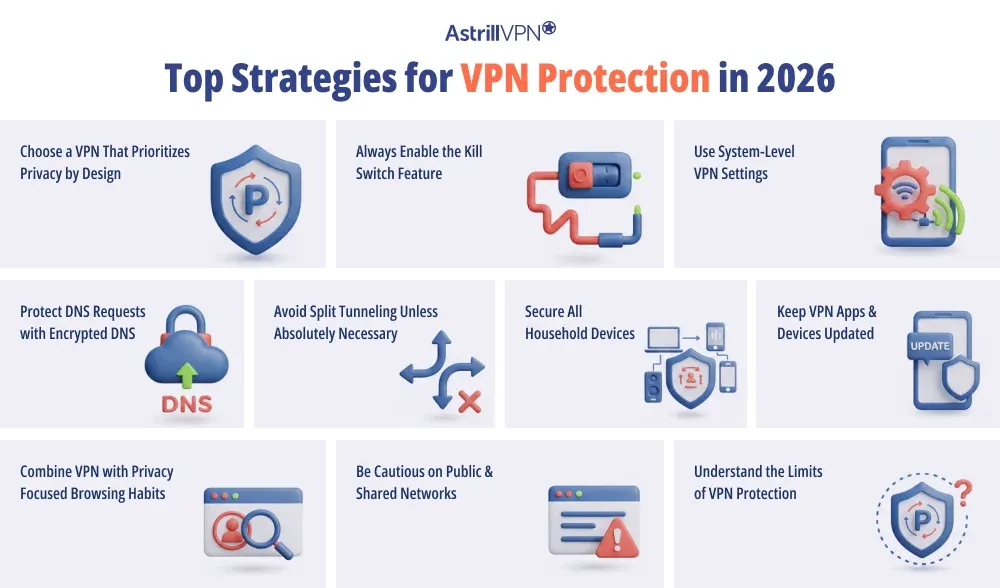
Choose a VPN That Prioritizes Privacy by Design
The foundation of VPN protection starts with the provider itself. In 2026, the most reliable VPNs are those built around privacy-first architecture rather than marketing features. This includes strict no-logs policies, independent security audits, and infrastructure that minimizes data retention by default.
A VPN that does not collect user data cannot expose or leak it later. Choosing a provider that clearly explains how it handles data, servers, and encryption is the most critical step in maximizing VPN protection.
Always Enable the Kill Switch Feature
A kill switch is essential in 2026, not optional. Internet connections can drop briefly due to network switching, sleep mode, or signal instability. Without a kill switch, even a few seconds of exposure can reveal your real IP address.
Enabling the kill switch ensures that all internet traffic is blocked the moment the VPN disconnects. Advanced kill switches now operate at the system level, preventing any app from bypassing the VPN tunnel.
Use System-Level VPN Settings
Modern operating systems offer system-level VPN options that lock all traffic to the VPN connection. In 2026, this is one of the most effective ways to prevent accidental leaks, especially on mobile devices.
Always-on VPN mode ensures that no data leaves your device unless the VPN is active. This is particularly important for smartphones, which constantly switch networks and run background processes without user interaction.
Protect DNS Requests with Encrypted DNS
DNS requests reveal which websites and services you access, even when content is encrypted. If DNS traffic is not routed through the VPN, your internet provider can still see your browsing destinations.
To maximize protection, users should ensure that DNS requests are handled by the VPN itself using encrypted DNS. This prevents DNS leaks and closes one of the most common privacy gaps in VPN usage.
Avoid Split Tunneling Unless Absolutely Necessary
Split tunneling allows some apps or services to bypass the VPN while others remain protected. While convenient, it significantly increases the risk of data exposure if misconfigured.
In 2026, split tunneling should be used only when there is an apparent technical reason, such as accessing a trusted local service. For most households, routing all traffic through the VPN provides the safest and simplest setup.
Secure All Household Devices
VPN protection is strongest when applied consistently across devices. Laptops, phones, tablets, smart TVs, and even gaming consoles all generate internet traffic that can be tracked.
Using a VPN on multiple devices or installing it directly on a home router ensures that every connected device benefits from encrypted traffic. This approach is beneficial for smart home devices that do not support VPN apps but still constantly communicate with external servers.
Keep VPN Apps and Devices Updated
Outdated software is one of the most overlooked security risks. VPN apps receive regular updates to fix bugs, improve compatibility, and patch vulnerabilities.
In 2026, automatic updates should be enabled wherever possible. Keeping both the VPN app and the device’s operating system up to date ensures compatibility with newer security features and reduces the risk of leaks caused by software conflicts.
Combine VPN Use with Privacy-Focused Browsing Habits
A VPN protects data in transit, but it does not control how websites or apps collect information once you are connected. Even with logged-in accounts, cookies, and device fingerprinting, activity can still be tracked.
To maximize protection, VPNs should be paired with privacy-focused browsers, tracker-blocking settings, and careful permission management. This layered approach addresses both network-level and application-level tracking.
Be Cautious on Public and Shared Networks
Public Wi-Fi networks remain a significant risk in 2026. Hotels, airports, cafés, and shared workspaces often use unsecured or poorly monitored networks.
A VPN should always be active when connecting to public Wi-Fi. This prevents traffic interception, man-in-the-middle attacks, and malicious hotspots from accessing personal or household data.
Understand the Limits of VPN Protection
Maximizing VPN protection also means understanding what a VPN cannot do. VPNs do not remove malware, prevent phishing emails, or stop tracking inside logged-in apps. Expecting a VPN to solve every security problem leads to a false sense of safety. When users understand these limits, they can make more informed choices and combine VPNs with other tools as needed.
Conclusion
In 2026, privacy is no longer just about hiding; it’s about regaining control. As tracking becomes more sophisticated and threats more automated, households need tools that work quietly in the background to reduce exposure and risk. A VPN is not a magic shield, but it remains a foundational privacy tool that protects data in transit, limits profiling, and adds a critical layer of security for families navigating an increasingly complex digital world.
FAQs
Here are some frequently asked questions.
A VPN reduces tracking by hiding your IP address and encrypting your traffic, making it harder to link activity to your household. However, it does not block tracking via logged-in accounts, cookies, or device fingerprinting. For best results, a VPN should be combined with privacy-focused browsers and tracker-blocking tools.
A VPN protects data in transit and reduces exposure to network-level attacks, but it does not detect malware or phishing on its own. It should be viewed as one layer in a broader security setup that includes device security software and safe online habits.
Yes. Apps generate internet traffic just like browsers do. A VPN encrypts app traffic, background connections, and system communications, preventing carriers and network operators from monitoring usage patterns.
Most modern VPN services support multiple devices under one subscription. Some households also use router-level VPN setups to protect every connected device without individual installations automatically.
A VPN prevents your provider from seeing the websites you visit and the services you use. They can only see that a VPN connection exists, not what happens inside it.

Secure your privacy instantly. Try AstrillVPN with zero risk.
About The Author


No comments were posted yet