




Pharming Attack: What It Is, How It Works, and How to Prevent It?

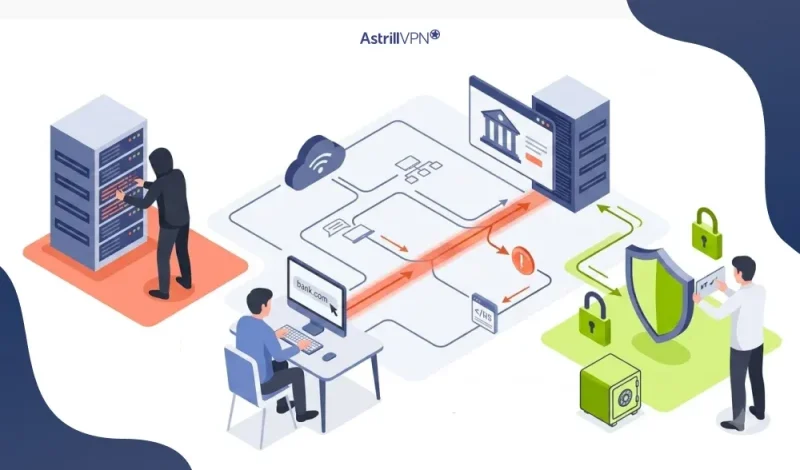
As cyber threats evolve, hackers are moving beyond deceiving users with fake emails and now attacking the systems that control how we access websites. Pharming is one of the most perilous and covert types of cybercrimes. Statistics reveal that vulnerability exploitation and credential attacks combined account for more than 70% of breach entry points, which often result in pharming-style redirection attacks.
In contrast to phishing, which tricks users into clicking harmful links, pharming redirects users to counterfeit websites even when they type the correct web address. Therefore, it is not only difficult to spot but also very dangerous for individuals and organizations alike. This blog will discuss pharming in detail, demonstrate how it operates through real-world examples, outline the risks, and suggest measures to safeguard against it.
Table of Contents
What Is Pharming?
Pharming is a type of cyberattack in which users are automatically redirected to fraudulent websites even when they enter the correct URL in their browser.
The goal is usually to steal sensitive information such as:
- Login credentials
- Banking details
- Personal identification data
Pharming is considered more advanced than phishing because it does not require user interaction, such as clicking a malicious link.
What Is Pharming in Cyber Security?
In cybersecurity, pharming is a domain-based attack that manipulates how internet traffic is routed. It primarily exploits weaknesses in the Domain Name System (DNS). Instead of attacking the user directly, cybercriminals target the infrastructure that connects domain names (like example.com) to IP addresses. Once compromised, users are silently redirected to fake websites that look identical to legitimate ones.
What Is a Pharming Attack?
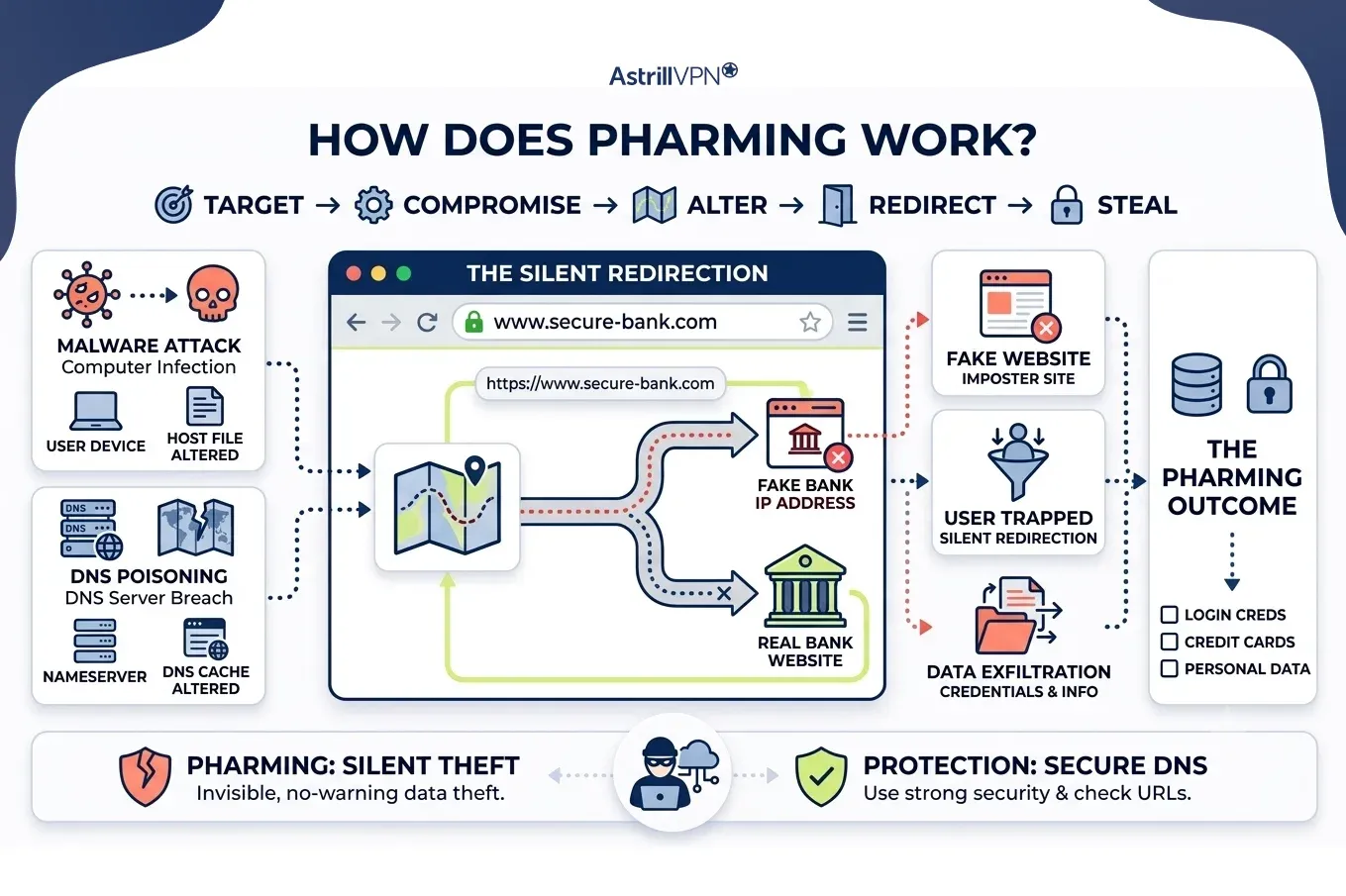
A pharming attack occurs when hackers alter DNS records and infect a user’s computer to redirect traffic from a legitimate website to a fake one.
There are two main types of pharming attacks:
1. Local Pharming
- Occurs when malware infects a user’s device
- Changes local host files and browser settings
- Redirects websites to fake versions
2. DNS Server Pharming
- Targets DNS servers directly
- Affects multiple users at once
- More dangerous and large-scale
How Does Pharming Work?
Pharming attacks follow a hidden but structured process:
1: System and DNS Compromise
Attackers either:
- Infect a user’s computer with malware, or
- Breach a DNS server
2: DNS Manipulation
The system’s domain mapping is altered so that a legitimate website URL points to a malicious IP address.
3: User Redirection
When a user types a correct web address, they are silently redirected to a fake website.
4: Data Theft
The fake website collects sensitive user information such as:
- Login credentials
- Credit card details
- Personal data
This entire process happens without the user noticing anything unusual.
Pharming Attack Examples
Here are some common scenarios of pharming attacks:
Banking Website Fraud
A person types a bank website correctly, but they are diverted to a bogus bank login page. The hacker gains access to their banking credentials.
E-commerce Fraud
Shoppers who dangle to visit a store website are steered to a mirror-image site where their financial details are pilfered.
Corporate Targeting
Staff members are rerouted to fictitious company webpages that result in the misappropriation of corporate login credentials and the exposure of sensitive data.
Pharming Cyber Attack Risks
There are several risks associated with a Pharming attack.
Financial Loss
One of the most serious risks of pharming attacks is financial loss. When users are silently redirected to fake banking and payment websites, they may unknowingly enter sensitive information such as login credentials, card details, and transaction data. Attackers can then use this information to carry out unauthorized transfers, online purchases, and drain digital wallets. Since fake websites often look identical to legitimate ones, victims usually realize the fraud only after the money has already been stolen.
Identity Theft
Pharming attacks also create a major risk of identity theft because they are designed to collect personal information without the user’s awareness. Once redirected to a fake site, users may enter details such as national ID numbers, email passwords, phone numbers, and address information. Cybercriminals can use this stolen data to impersonate victims, open fake accounts, and commit fraud in their name, leading to long-term personal and financial consequences.
Corporate Data Breaches
In organizational environments, pharming attacks can lead to severe data breaches. Employees who are redirected to fake company login portals may unknowingly give away their credentials, allowing attackers to access internal systems. This can result in the theft of sensitive business data, intellectual property, financial records, and even customer information. In some cases, a single compromised account can give attackers access to an entire corporate network.
Large-Scale User Impact
Unlike many cyberattacks that target individuals one by one, pharming attacks can affect large groups of users simultaneously. If DNS servers and network infrastructure are compromised, thousands of users can be redirected to malicious websites simultaneously. This large-scale impact makes pharming particularly dangerous for internet service providers, businesses, and online platforms, as the attack can spread silently and quickly across entire systems.
Loss of Trust in Online Services
Pharming attacks can significantly damage trust in legitimate online services. When users unknowingly interact with fake websites that look real, they may lose confidence in online banking, shopping platforms, and digital services in general. Even after the attack is resolved, restoring user trust can take a long time, and businesses may suffer reputational damage that affects customer loyalty and engagement.
Difficult Detection and Delayed Response
One of the most concerning risks of pharming attacks is how difficult they are to detect. Since users often enter the correct website address but are still redirected to a fake page, they may not notice anything unusual. The fake websites are often carefully designed to replicate real ones, making detection even harder. This delay in recognizing the attack gives cybercriminals more time to collect sensitive data before any countermeasures are taken.
Malware and System Compromise
Local pharming attacks often involve malware that infects a user’s device and modifies system settings, such as the host file and DNS configuration. This allows attackers to redirect the user without their knowledge. Beyond enabling fake website redirection, this type of malware can weaken overall system security and potentially open the door for additional cyber threats, including spyware.
Long-Term Security Exposure
Even after a pharming attack is detected and removed, systems may remain vulnerable if proper security measures are not put in place. Attackers may leave behind hidden backdoors and exploit unchanged weaknesses to regain access later. This creates long-term security risks, including repeated credential theft, ongoing monitoring by attackers, and repeated reinfection of the compromised system.
Pharming vs Phishing
Although often confused, pharming and phishing are different:
| Feature | Pharming | Phishing |
| Method | DNS/system manipulation | Fake emails/messages |
| User action required | No | Yes (click link) |
| Detection | Very difficult | Easier to identify |
| Scale | Large-scale possible | Usually targeted |
| Example | Redirecting bank website traffic | Fake email asking for login details |
How to Protect Against Pharming Attacks?
You can reduce the risk of pharming attacks using these methods:
Use Secure and Trusted Websites (HTTPS)
One of the simplest but most important defenses against pharming attacks is always to use secure websites that begin with HTTPS. The “S” indicates that the connection is encrypted, helping protect data from interception and alteration. While HTTPS alone cannot fully prevent pharming, it does make it harder for attackers to successfully impersonate legitimate websites without triggering browser warnings.
Keep Operating Systems and Browsers Updated
Regular updates to your operating system, browser, and applications are essential for protection. Cybercriminals often exploit security vulnerabilities in outdated software to install malware that can modify DNS settings and system files. By keeping everything up to date, you reduce the risk of attackers gaining control of your device.
Use Reliable Antivirus and Anti-Malware Software
Strong antivirus and anti-malware programs can detect and block malicious activities linked to pharming attacks. These tools help identify suspicious changes in system files, browser behavior, and DNS configurations. Many modern security suites also include real-time protection that can stop malware before it causes damage.
Use Secure DNS Services
One of the most effective defenses is to use trusted, secure DNS services instead of default and unprotected ones. Secure DNS providers help prevent unauthorized changes and reduce the risk of being redirected to fake websites. They add an extra layer of validation before connecting you to a website, making it harder for attackers to manipulate traffic.
Avoid Suspicious Downloads and Links
Pharming attacks often begin with malware infections. These infections can come from downloading unsafe software, opening unknown attachments, and visiting untrusted websites. Being cautious about what you download and avoiding suspicious links significantly reduces the risk of system compromise.
Enable Firewall Protection
A firewall acts as a barrier between your device and potential threats from the internet. It monitors incoming and outgoing network traffic and can block unauthorized changes to DNS settings and suspicious connections. Keeping your firewall enabled adds an important layer of defense against pharming-related malware.
Monitor Browser and Website Behavior
Pay attention to unusual behavior when visiting websites. If a site looks slightly different, loads unexpectedly, and repeatedly asks for login details, it could be a sign of a pharming attack. Checking for spelling errors in URLs and unexpected redirects can help you identify threats early.
Use Multi-Factor Authentication (MFA)
Even if attackers manage to steal login credentials through a fake website, multi-factor authentication can prevent them from accessing your accounts. MFA adds an extra verification step, such as a one-time code and biometric check, making unauthorized access much more difficult.
Educate Users and Employees
Awareness is a critical defense against pharming attacks. Users and employees should be trained to recognize suspicious website behavior, understand the risks of DNS manipulation, and follow safe browsing practices. In organizations, regular cybersecurity training can significantly reduce the success rate of such attacks.
Regularly Check DNS and System Settings
Advanced users and IT teams should periodically review DNS configurations and system host files for unauthorized changes. Unexpected modifications can be an early indicator of a pharming attack. Early detection helps minimize damage and restore security quickly.
Conclusion
Pharming attacks represent one of the most dangerous forms of cyber threats because they operate silently and target the very foundation of how the internet works. Unlike phishing, users may not even realize they are being attacked, making prevention critical.
By understanding how pharming works and implementing strong security practices, such as using secure DNS, keeping systems up to date, and relying on trusted security tools, individuals and organizations can significantly reduce their risk.
In a world where cybercrime is constantly evolving, awareness remains the first and most powerful line of defense.
FAQs
Here are some of the most frequently asked questions.
The main goal is to steal sensitive information such as login credentials, banking details, and personal data by redirecting users to fake websites.
Risks include identity theft, financial loss, unauthorized access to accounts, and large-scale data breaches.
The Domain Name System (DNS) is often the primary target in pharming attacks. Attackers manipulate DNS records to redirect users to malicious websites.
Common signs include:
The website looks slightly different than usual
Unexpected login prompts
Security warnings from browsers
Strange redirects even when typing correct URLs
Yes, in many cases, antivirus software can detect local pharming attacks caused by malware. However, DNS-level attacks may require additional network security measures.

Secure your privacy instantly. Try AstrillVPN with zero risk.
About The Author










No comments were posted yet