




What Is an Eavesdropping Attack in Cyber Security? Types, Techniques and Prevention


Picture this. You are sitting in a coffee shop, working through emails on the free Wi-Fi because your mobile data ran out three days ago. A few tables over, someone with a laptop and a bit of free software is quietly watching everything that leaves your device. That is eavesdropping in cyber security in its simplest form, and it happens far more often than most people assume.
This guide breaks down what eavesdropping actually means, the different forms it takes, how attackers pull it off, and what you can do to keep your own conversations and data away from prying eyes. No jargon overload, just a clear look at a threat that is easy to miss because, by design, it almost never announces itself.
Table of Contents
What Is Eavesdropping in Cyber Security?
So what is eavesdropping, in plain terms? It is the unauthorized interception of communication, whether that communication is a phone call, an email, a file transfer, or something as routine as browsing a website. Someone listens in or captures the data in transit, and neither party in the actual conversation has any idea it is happening.
To answer what eavesdropping is in cybersecurity a bit more precisely, think of it as data interception that happens somewhere along the path between two points. That path could be your laptop and a website’s server, your phone and a cell tower, or two systems inside the same company network talking to each other. The attacker is not breaking down a digital door. They are standing by an open window that nobody remembered to close.
When people search for what an eavesdropping attack is, they usually mean the deliberate version, where someone is actively trying to harvest information rather than stumbling across a stray signal by accident. It is also worth drawing a distinction between an eavesdropping attack and phishing or malware. Phishing tricks someone into willingly handing over data. Malware forces its way into a device to take it. Eavesdropping needs neither. It just needs an unprotected channel and enough patience to wait for something useful to pass through it.
How Does an Eavesdropping Attack Work?
Every eavesdropping attack follows a fairly similar pattern, even though the technical details change depending on the target.
- The attacker finds a weak point. This is usually an unsecured network, an unencrypted communication channel, or a device running outdated security settings.
- They position themselves somewhere on the data’s path, whether that means setting up a fake Wi-Fi hotspot, installing a sniffing tool on a network, or physically tapping a phone line.
- Traffic gets captured. The attacker quietly logs the data moving through that channel, often without altering anything, so there is nothing obvious for the victim to notice.
- The data gets sorted and used. Captured traffic is filtered for anything valuable, login credentials, card numbers, internal business details, and then used directly or sold on to someone else.
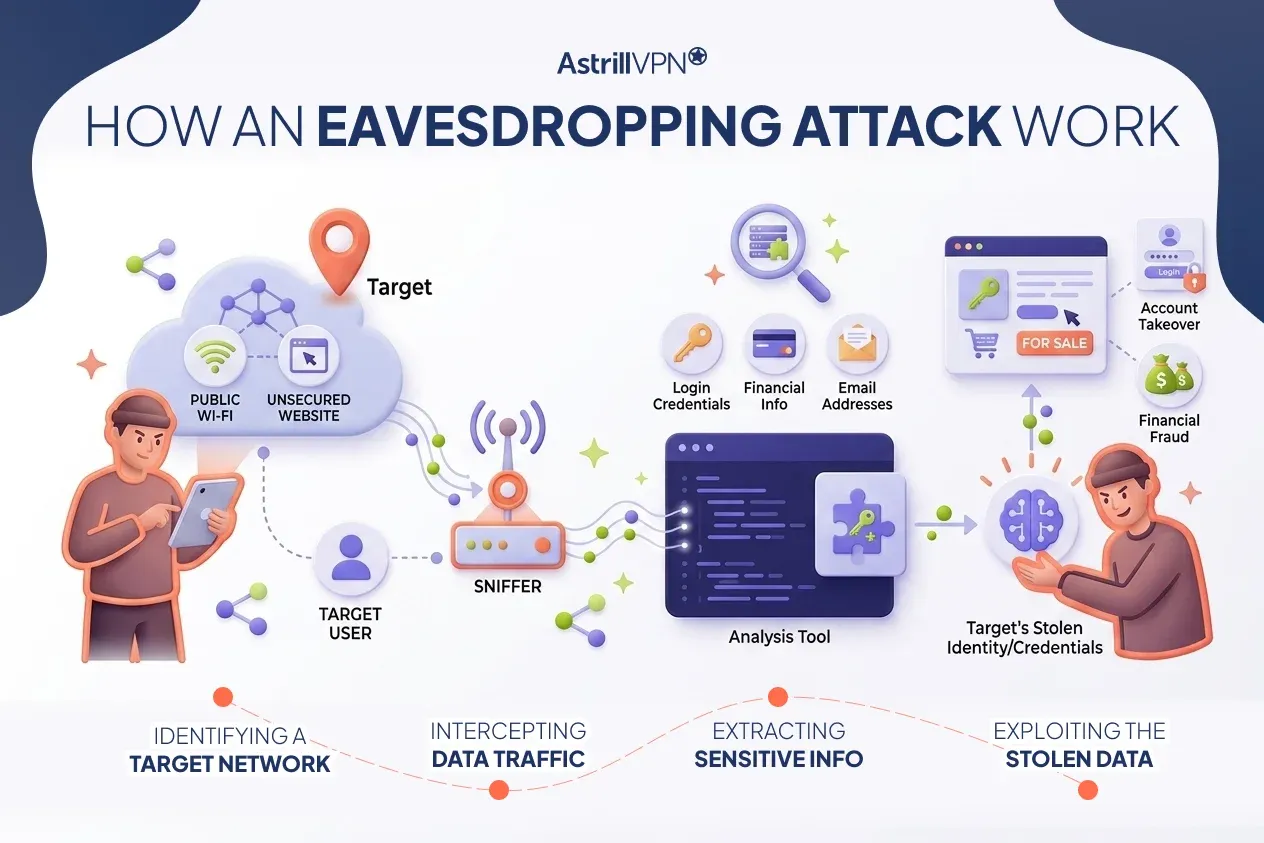
What makes this genuinely unsettling is that the first three steps require absolutely nothing from the victim. No clicked link, no downloaded file, no mistake on their part. Just an open network and someone nearby with the right tools.
Types of Eavesdropping Attacks
Eavesdropping attacks generally fall into two broad categories before they even get split into specific methods, and understanding this split matters because it shapes how easy, or nearly impossible, an attack is to catch.
| Aspect | Passive Eavesdropping | Active Eavesdropping |
| What happens | The attacker only listens and records, without changing the data in any way. | The attacker intercepts the data and may alter it or inject something new into the conversation. |
| How easy it is to detect | Extremely difficult, since nothing about the network or the traffic changes. | Easier to catch, since tampering or rerouted traffic often leaves a trace. |
| Typical method | Packet sniffing on an open or poorly secured network. | Man-in-the-middle attacks, where traffic is rerouted through the attacker. |
| What attackers usually want | Quiet, long-term data collection without raising suspicion. | Immediate manipulation, theft of an active session, or injected malware. |
Network Eavesdropping
This is the most common form people run into, and it usually plays out on local networks, whether that is an office LAN or a shared Wi-Fi network. An attacker who gains access to the network can use packet-sniffing tools to monitor data moving between devices, identifying anything sent without encryption.
Wireless and Public Wi-Fi Eavesdropping
Public hotspots, airports, hotels, and cafes are a favorite hunting ground because the traffic on them is often unencrypted by default. Attackers can also set up a rogue access point with a legitimate-looking name, wait for someone to connect, and capture everything that passes through it.
VoIP Eavesdropping
Voice over IP calls travel as data packets, just like everything else online, which makes them targets, too. An attacker who intercepts a VoIP stream can record or replay entire conversations, something that is particularly damaging for businesses discussing sensitive deals or client information over the phone.
Physical Eavesdropping
Not every eavesdropping attack happens entirely in software. Physical bugs, hidden microphones, and wiretapped phone lines are still very real tools, especially in corporate espionage or surveillance situations. It is the oldest version of this threat, just updated with smaller and harder-to-detect hardware.
Common Eavesdropping Techniques Hackers Use
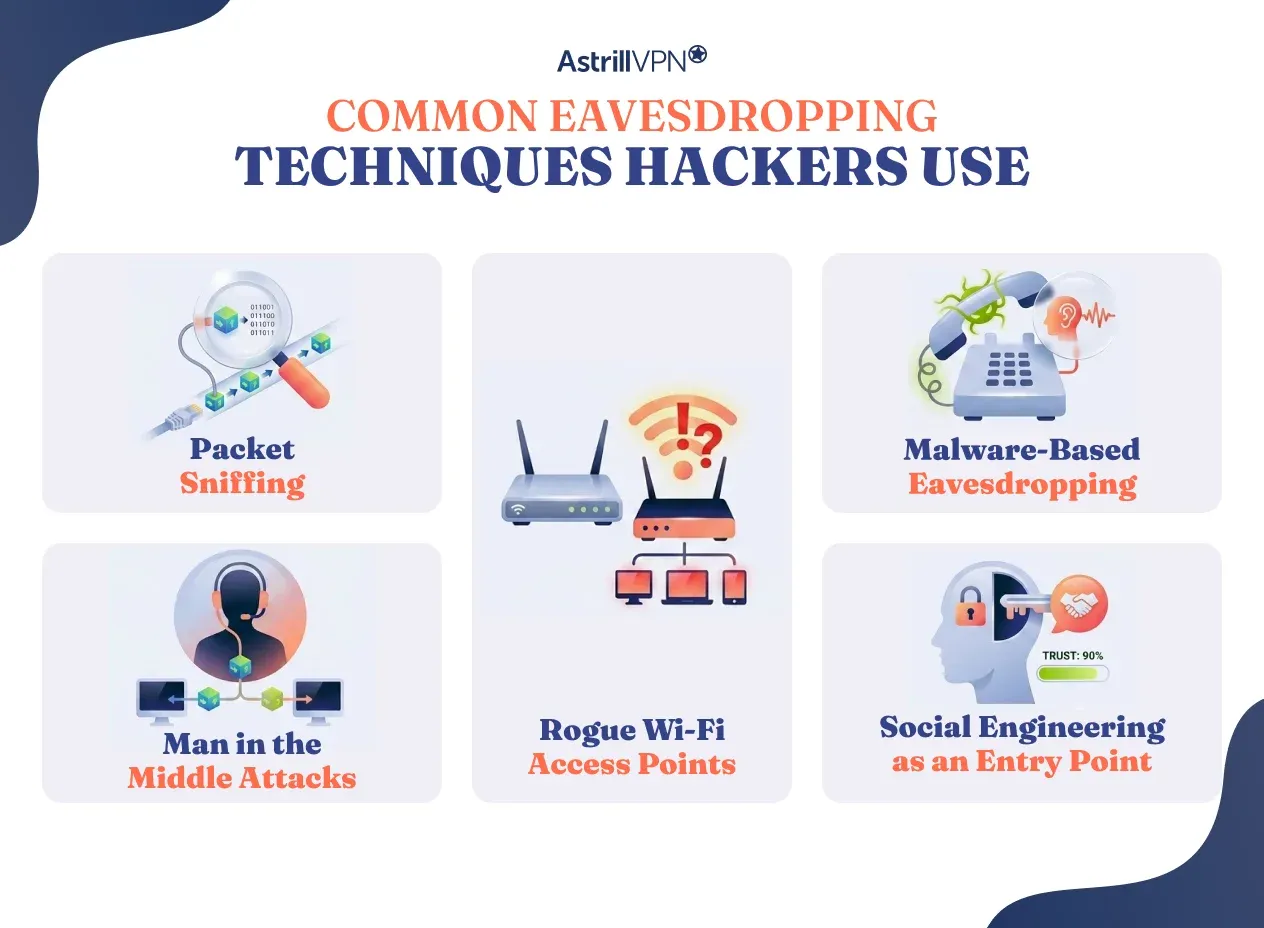
Beyond the broad categories above, there is a specific toolkit attackers reach for again and again. These eavesdropping techniques appear in almost every type of attack mentioned so far.
Packet Sniffing
Packet sniffers capture data as it travels across a network, then break it down into something readable. On an unencrypted connection, this can expose usernames, passwords, and full message content without much effort on the attacker’s part.
Man in the Middle Attacks
In a man-in-the-middle attack, the attacker quietly inserts themselves between two parties who believe they are talking directly to each other. Every message passes through the attacker first, so it can be read, copied, or even altered before it reaches its destination.
Rogue Wi-Fi Access Points
Setting up a fake hotspot with a believable name, something like an airport’s free Wi-Fi, is a remarkably effective way to get a steady stream of victims to connect voluntarily. Once someone joins, every bit of unencrypted traffic they send is fair game.
Malware-Based Eavesdropping
Spyware and stalkerware can be installed on a device, often disguised as a harmless app, and then quietly monitor calls, messages, microphone activity, or keystrokes in the background.
Social Engineering as an Entry Point
Eavesdropping rarely starts with pure technical skill. Attackers often use social engineering first, convincing someone to connect to a malicious network or install something they should not, thereby opening the door to actual interception.
Real World Eavesdropping Attack Examples
Reading through a few eavesdropping attack scenarios makes the risk feel much more concrete than reading definitions alone.
Public Wi-Fi session hijacking
Back in 2010, a tool called Firesheep made headlines by showing just how easy session hijacking on open Wi-Fi could be. It let someone sitting in the same cafe quietly capture session cookies from people browsing on that same network, logging into their accounts without ever needing a password. It is an older example, but the underlying weakness, unencrypted sessions on shared networks, is still being exploited today in updated forms.
Corporate VoIP interception
Businesses that route sensitive calls over poorly secured VoIP systems have had entire negotiations or client conversations picked up by attackers monitoring the network from the inside. Security researchers have repeatedly shown, through penetration testing engagements, how easily an unsecured VoIP setup can be tapped once a network has been compromised.
Rogue hotspot credential theft
Conferences and airports are common targets for fake access points named to look official. Travelers connect, assuming it is the venue’s real network, and end up handing over login credentials and browsing data to whoever set the trap, often without noticing anything was wrong until much later.
Why Eavesdropping Attacks Are Hard to Detect
Passive eavesdropping, in particular, is built to be invisible. It does not slow your connection down, does not change how your apps behave, and does not trigger antivirus software, because in most cases, nothing is actually being installed on your device. That said, there are a few subtle signs worth paying attention to.
- Unexpected certificate warnings while browsing, which can indicate someone is intercepting your traffic.
- Unfamiliar devices showing up on your home or office network.
- Strange latency, static, or echoing during calls, particularly VoIP calls.
- A device’s battery is draining noticeably faster than usual, which can sometimes point to hidden monitoring software running in the background.
None of these is proof on its own, but together they are worth investigating rather than brushing off.
Impact of Eavesdropping Attacks
The damage from a successful eavesdropping attack rarely stays contained to the original stolen data.
- Financial loss, through drained accounts, stolen credentials, or business information sold to competitors.
- Identity theft occurs when captured personal details can be reused to open accounts or apply for credit elsewhere.
- Regulatory and reputational fallout, especially for businesses handling customer data, where a breach can mean fines and lost trust.
- A foothold for bigger attacks, since eavesdropped credentials or internal details are often just the first move toward a much larger intrusion.
Industry research has repeatedly shown that the average cost of a data breach now runs well into the millions of dollars globally, and eavesdropping is frequently the quiet first step that makes everything after it possible.
Eavesdropping Attack Prevention: How to Protect Your Data
The good news is that preventing eavesdropping attacks does not require a security degree. Most of it comes down to a handful of habits and tools applied consistently.
Use Strong Encryption
Encrypting data, whether through TLS for web traffic or end-to-end encrypted messaging apps, means that even if someone intercepts it, they are left with scrambled, unreadable information.
Avoid Unsecured Public Wi-Fi
If you have to use public Wi-Fi, treat it as untrusted by default. Avoid logging into sensitive accounts on it unless your traffic is encrypted via a VPN, which we will get into shortly.
Stick to Secure Network Protocols
Look for HTTPS instead of HTTP, and use SSH instead of older, unencrypted remote access protocols. These small protocol differences create a genuinely protected channel instead of an open one.
Keep Software and Firmware Updated
Many eavesdropping attacks exploit known vulnerabilities in outdated software or router firmware. Regular updates close those gaps before attackers can exploit them.
Train Employees and Stay Aware
For businesses, this might be the single most overlooked step. People need to know what an open network looks like, why a random hotspot named after their hotel is not automatically trustworthy, and how to spot the early signs of an attack.
Secure Physical Access
Lock server rooms, secure network cabinets, and restrict physical access to communication lines. It sounds basic, but a surprising number of eavesdropping incidents start with someone simply walking into an unsecured space.
How a VPN Helps Prevent Eavesdropping
A VPN tackles eavesdropping at the exact point where most attacks succeed, the gap between your device and the network you are connected to. Once your traffic is wrapped in an encrypted tunnel, packet sniffers and rogue access points capture nothing but unreadable noise, since the encryption happens before your data ever leaves your device.
This is especially useful on public Wi-Fi, where you have no control over who else is on the network or what they might be running in the background. Using a tool like AstrillVPN on an airport or cafe connection means that even if someone is actively trying to intercept your traffic, what they get is meaningless without the decryption key. It will not stop every form of eavesdropping. A VPN cannot prevent someone from planting a physical bug in a room. But for the network-based attacks that make up the vast majority of real-world cases, it closes the door before an attacker even gets started.
Frequently Asked Questions
Passive eavesdropping is just listening and recording, with nothing about the data or the network changed along the way, which is exactly why it is so hard to catch. Active eavesdropping goes a step further. The attacker intercepts the communication and may also alter it or inject new content, which tends to leave small traces that make detection easier.
Pretty much anything sent over an unprotected channel is fair game. That includes login credentials, banking and card details, private messages and emails, business documents, call recordings, and even browsing habits. For companies, it can stretch to internal strategy discussions, client data, or trade secrets, which is part of why a single eavesdropping incident can snowball into a much bigger breach.
Most public networks either skip encryption entirely or use weak protections, which give an attacker on the same network an easy way to capture traffic using basic packet-sniffing tools. Some go a step further and set up a rogue access point with a convincing name, so anyone who connects is handing their data straight to the attacker without realizing the network was never legitimate in the first place.
Eavesdropping is the broader category, simply intercepting data without authorization. A man-in-the-middle attack is a specific, active form of eavesdropping where the attacker also inserts themselves into the communication and can alter what is being sent, rather than just listening in.
AstrillVPN encrypts your traffic before it ever leaves your device, so even on an open or compromised network, anyone trying to intercept it only gets scrambled, unreadable data. This closes off the network-based methods attackers rely on most, like packet sniffing and rogue access points, which are especially useful on public Wi-Fi, where you have no way of knowing who else is on the network.
Encrypted messaging apps go a long way toward protecting the content of your conversations, since end-to-end encryption makes intercepted messages unreadable without the right key. They do not cover everything, though. Metadata like who you are talking to and when, along with anything happening outside the app, such as unsecured browsing or a compromised device, can still leave you exposed. Pairing encrypted apps with a VPN and good device hygiene gives much more complete coverage.

Secure your privacy instantly. Try AstrillVPN with zero risk.
About The Author










No comments were posted yet