




Instagram Vanish Mode: Everything You Need to Know

Instagram has introduced Vanish Mode to address privacy concerns among social media users. This feature gives individuals greater control over their messaging by enabling temporary, disappearing chats that mirror the ephemeral nature of in-person conversations. This guide will delve into the functionality and purpose of Instagram’s Vanish Mode, answering frequently asked questions about this privacy-oriented messaging tool.
Table of Contents
What Is Vanish Mode on Instagram?
Vanish Mode is a privacy feature on Instagram that lets messages automatically disappear after they are viewed and the chat is closed. Once enabled, any text messages, images, videos, and emojis sent in the conversation will vanish without a trace.
This feature is ideal for casual chats and sensitive discussions when you don’t want a permanent message history. Unlike regular Instagram DMs, Vanish Mode ensures your conversation leaves no digital footprint after it ends.
How Does Vanish Mode Work on Instagram?
Instagram Vanish Mode works by temporarily changing the chat environment to a disappearing message format. Here’s how it functions:
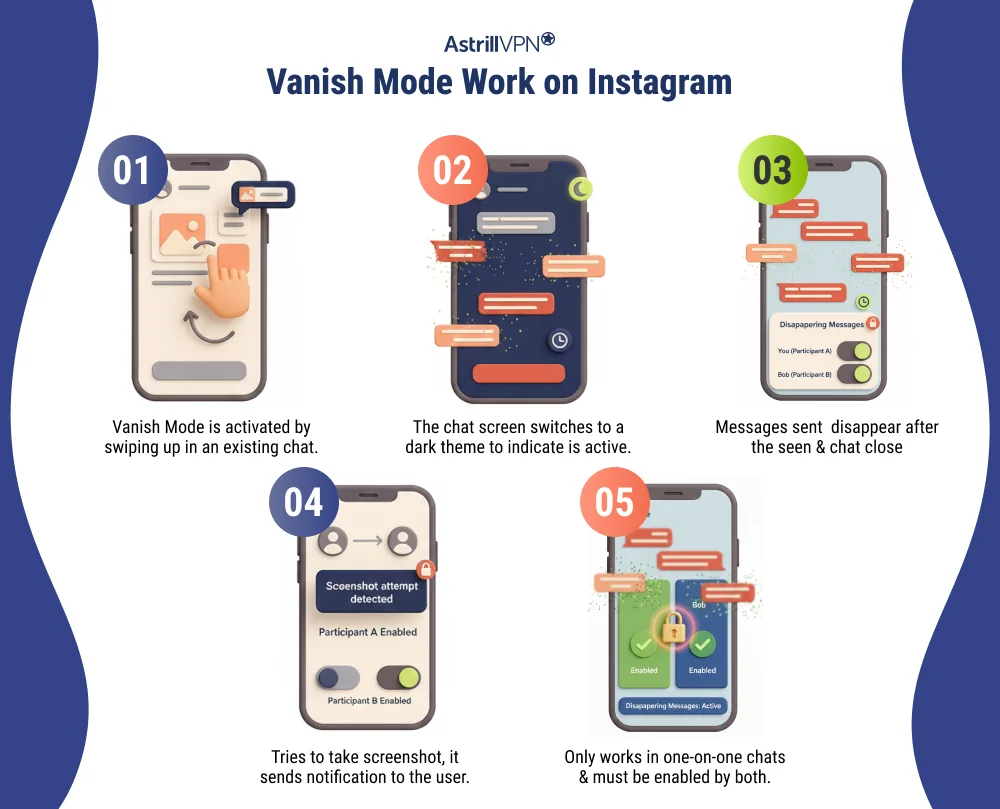
- Vanish Mode is activated by swiping up in an existing chat.
- Once turned on, the chat screen switches to a dark theme to indicate Vanish Mode is active.
- Messages sent during Vanish Mode disappear automatically after the recipient sees them and closes the chat.
- If someone tries to take a screenshot, Instagram sends a notification to the other user.
- Vanish Mode only works in one-on-one chats and must be enabled by both participants.
Why Use Instagram Vanish Mode?
Instagram Vanish Mode is useful for several reasons:
- Enhances privacy in personal conversations
- Prevents message history from being saved
- Ideal for sharing temporary thoughts, jokes, and confidential information
- Reduces digital clutter in DMs
- Alerts users when screenshots are taken
It’s important to remember that Vanish Mode does not make conversations entirely immune to misuse if someone uses another device to capture the screen.
Limitations of Vanish Mode
While Instagram Vanish Mode offers enhanced privacy, it is not a foolproof solution. Users should understand its limitations before relying on it for sensitive communication.
1. Screenshots Are Still Possible
Although Instagram sends a notification when someone takes a screenshot, it cannot physically prevent screenshots. Users can capture messages without detection using another device, such as by taking a photo of the screen.
2. No Support for Group Chats
Vanish Mode only works in one-on-one conversations. It cannot be enabled in group chats, limiting its usefulness for private discussions involving multiple people.
3. Mobile App Only
Vanish Mode is available exclusively on the Instagram mobile app for Android and iOS. Users cannot access this feature on the desktop or web versions of Instagram.
4. Messages Can Be Reported
If a conversation is reported, Instagram may retain Vanish Mode messages for review, though they disappear from the chat. This means messages are not always permanently erased from Instagram’s systems.
5. Requires Mutual Participation
Both users must be able to use Vanish Mode. If one account does not support the feature, Vanish Mode may not work correctly.
6. No Control Over Message Timing
Messages disappear after being viewed, and the chat closes. Users cannot customize how long messages stay visible, unlike some other disappearing-message platforms.
7. Not End-to-End Encrypted
Instagram Vanish Mode does not provide end-to-end encryption, meaning messages are still processed through Instagram’s servers, raising concerns about highly sensitive conversations.
Is vanish mode worth using?
Vanish mode is a messaging feature available on platforms like Instagram, WhatsApp, and Facebook Messenger that automatically deletes messages after they’ve been seen and the chat is closed. While it sounds appealing from a privacy standpoint, whether to use vanish mode depends on how and why you communicate.
Why would someone turn on vanish mode on Instagram?
People turn on vanish mode on Instagram for several practical and personal reasons. The feature is designed for temporary conversations, giving users more control over privacy and message visibility. While it doesn’t guarantee complete security, it offers a sense of discretion and freedom that standard messaging does not.
To Keep Conversations Temporary
One of the main reasons someone enables vanish mode is to keep messages from staying in chat history. Once the conversation is viewed and the chat is closed, messages automatically disappear. This is useful for short discussions that don’t need to be saved later.
To Protect Personal Information
Users can enable vanish mode when sharing personal details, such as contact information, one-time passwords, or private thoughts. Since the messages vanish quickly, there is less risk of sensitive information being stored long-term, even though screenshots are still possible.
To Reduce Chat History Clutter
Some people prefer clean inboxes without long message trails. Vanish mode helps prevent unnecessary buildup of old conversations, making it easier to manage direct messages and focus on active chats.
To Have More Casual Conversations
Vanish mode encourages relaxed communication. Knowing that messages won’t remain permanent can make people feel more comfortable being open, spontaneous, and playful without worrying that their words will be revisited later.
To Share Disappearing Photos or Videos
Instagram users often enable vanish mode to send photos or videos meant to be viewed once. This is ideal for quick reactions, behind-the-scenes moments, or content that doesn’t need to exist beyond the moment it’s shared.
To Feel More Private
While vanish mode doesn’t make users fully secure, it does create a feeling of increased privacy. Instagram also notifies users if screenshots are taken in vanish mode, which adds a small layer of accountability and trust between participants.
To Avoid Awkward Message History
Some people use vanish mode to avoid old messages resurfacing later, especially in emotionally sensitive conversations. This can help prevent misunderstandings in the future.
Key Statistics about Vanish Mode
- Over 10 million daily active users of vanish mode globally (~25% of Instagram users).
- An estimated 3 billion people use messaging apps like Instagram, Snapchat, WhatsApp, and Messenger daily, showing the massive scale of conversational messaging globally.
- Surveys indicate that 50%+ of users prefer messaging platforms that support self-deleting messages.
How do I turn on and turn off vanish mode on Instagram?
Instagram’s vanish mode is easy to turn on and off, but it only works in one-on-one chats. Knowing how to control it helps you decide when you want messages to disappear and when you want to keep a normal chat history.
How to Turn On Vanish Mode on Instagram?
- To turn on vanish mode, open the Instagram app and go to your Direct Messages (DMs).
- Select the one-on-one chat where you want to enable vanish mode.
- Once inside the chat, swipe up from the bottom of the screen and release.
- The screen will turn dark, and a message will appear confirming that vanish mode is active.
- From this point on, any messages, photos, videos, or reactions sent in that chat will disappear after they are seen and the conversation is closed.
How to Turn Off Vanish Mode on Instagram?
Turning off vanish mode is just as simple. B qdssssssssssssssssssb qdsqn
- Open the same chat where vanish mode is enabled, then swipe up from the bottom of the screen again and release.
- The chat will return to its normal appearance, and Instagram will notify both users that vanish mode has been turned off.
- Any new messages sent after this will be added to the chat history.
What Happens When Vanish Mode Is On or Off?
When vanish mode is on, messages automatically disappear after being viewed, and Instagram sends alerts if someone takes a screenshot. When vanish mode is turned off, messaging returns to normal, and messages remain saved unless manually deleted. It’s important to note that vanish mode does not affect messages sent before it was enabled or after it’s turned off.
Conclusion
Instagram Vanish Mode is a brilliant addition for users who value privacy and prefer conversations that don’t live forever online. While it’s not foolproof, it offers a practical way to keep chats temporary and more secure. If you often share personal thoughts, quick reactions, or sensitive information, Vanish Mode can help you communicate with greater peace of mind. Just remember to use it wisely.
FAQs
Here are some frequently asked questions.
In Vanish Mode, the following content disappears after being seen:
Text messages
Photos and videos
Voice messages
Emojis, stickers, and GIFs
Turning on Vanish Mode is simple:
Open the Instagram app on your phone
Go to your Direct Messages (DMs)
Open an existing one-on-one chat.
Swipe up from the bottom of the screen.
Release to activate Vanish Mode
No, Vanish Mode does not work in group chats. It is only available for one-on-one conversations. Instagram limits this feature to private chats to maintain better control over privacy and notifications.
No, Instagram Vanish Mode only works on the mobile app (Android and iOS). It is not available on Instagram’s desktop or web version, as the feature relies on app-specific gestures and security controls.
Yes, screenshots are technically possible, but Instagram will notify the other person if a screenshot is taken while Vanish Mode is active. This helps discourage misuse and promotes transparency between users. However, Instagram cannot prevent someone from using another device to capture the screen, so complete privacy cannot be guaranteed.

Secure your privacy instantly. Try AstrillVPN with zero risk.
About The Author










No comments were posted yet