




Does a VPN Work Without Wi-Fi? Everything You Need to Know

A Virtual Private Network (VPN) is widely used to protect online privacy, secure data, and bypass geo-restrictions. But many users wonder whether a VPN requires Wi-Fi to function. The short answer is: no, a VPN does not specifically need Wi-Fi, but it does require an internet connection. In this blog, we’ll break down how VPNs work, whether they can be used without Wi-Fi, and answer common related questions.
Table of Contents
Do You Need Wi-Fi for a VPN?
A VPN does not require Wi-Fi specifically. What it needs is an active internet connection. This connection can come from:
- Wi-Fi networks
- Mobile data (3G, 4G, 5G)
- Wired connections (Ethernet)
As long as your device is connected to the internet through any of these methods, a VPN can function normally. Wi-Fi is simply one of many ways to access the internet.
Can You Use a VPN Without Wi-Fi?
Yes, you can absolutely use a VPN without Wi-Fi by relying on mobile data. If you’re using your smartphone with cellular data enabled, you can turn on your VPN app and browse securely. The VPN will encrypt your data and route it through a secure server, just like it would on a Wi-Fi network.
This is especially useful when:
- You’re traveling
- You don’t trust public Wi-Fi networks
- Wi-Fi is unavailable
Does a VPN Work Without Wi-Fi?
A VPN does not require Wi-Fi to function; it only requires an active internet connection. This connection can come from mobile data (3G, 4G, or 5G), a wired Ethernet connection, or Wi-Fi. The VPN works by routing your internet traffic through a secure server, so as long as your device is connected to the internet, the VPN can operate normally.
If there is no internet connection, the VPN cannot operate. It cannot create a secure tunnel without a network. A weak mobile data signal can cause VPN disconnections or slower speeds, even though it technically still works.
Is using Wi-fi secure with VPN?
When you connect to Wi-Fi and turn on a VPN, it creates an encrypted tunnel between your device and the VPN server. Even if you’re using public Wi-Fi at a café, airport, or hotel, a fast connection VPN such as AstrillVPN significantly reduces the risk of data theft. This means:
- Your internet traffic is encrypted
- Hackers on the same Wi-Fi network can’t easily spy on your activity
- Your real IP address is hidden
- Sensitive data (passwords, banking info) is protected
How a VPN Works Without Wi-Fi?
A VPN works by creating an encrypted tunnel between your device and a remote server. This process doesn’t depend on Wi-Fi; it depends on internet connectivity.
Here’s how it works:
- Your device connects to the internet (via mobile data)
- The VPN app encrypts your data
- Your data is sent through a secure VPN server
- The destination website sees the VPN server’s IP instead of yours
What is a VPN data cap?
A VPN data cap is a limit on the amount of data you can use through a VPN service within a specific time period, usually per day or per month. Once you reach this limit, the VPN either stops working, slows your speed, or requires you to upgrade to a paid plan.
When you connect to a VPN, all your internet traffic passes through its servers. VPN providers track how much data you use (downloads and uploads combined). If your plan includes a data cap, every activity, like browsing, streaming, and downloading, counts toward that limit.
Does a VPN give you unlimited free internet?
No, a VPN does not give you unlimited free internet. This is a common misconception. A VPN can change how you access the internet, but it cannot provide internet access on its own or bypass your ISP and mobile carrier’s data limits. Some VPN services advertise unlimited bandwidth, but this only means:
- The VPN itself won’t limit your usage
- You can use as much data as your internet plan allows
How does a VPN work on cellular data?
A VPN works on cellular data the same way it does on Wi-Fi; it secures your internet connection by encrypting your data and routing it through a remote server. The only difference is that instead of using Wi-Fi, your device connects to the internet through mobile data (3G, 4G, or 5G).
How does it work?
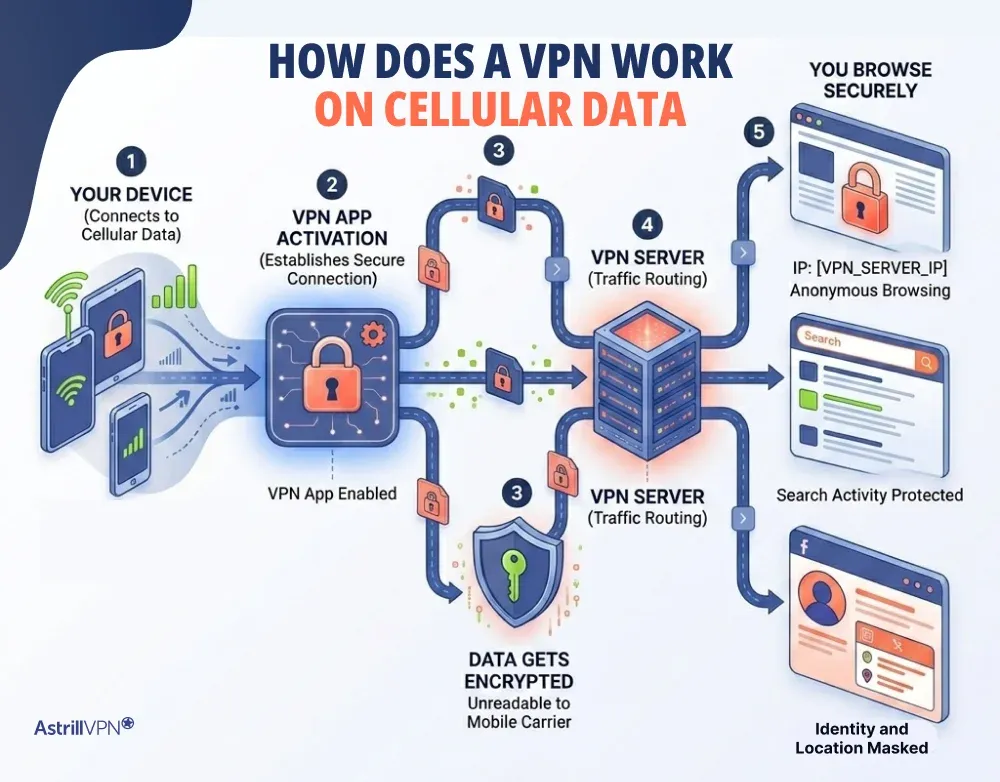
1. You Connect to Cellular Data
Your smartphone or tablet connects to your mobile carrier’s network using cellular data.
2. You Turn On the VPN
When you enable the VPN app, it establishes a secure connection between your device and a VPN server.
3. Data Gets Encrypted
All your internet traffic is encrypted before it leaves your device. This makes it unreadable to anyone trying to intercept it, even your mobile carrier.
4. Traffic Is Routed Through a VPN Server
Your encrypted data travels through your carrier’s network to the VPN server. From there, it accesses the internet on your behalf.
5. You Browse Securely
Websites and apps see the VPN server’s IP address instead of your real one, helping protect your identity and location.
Using a VPN without Wi-Fi: Your connection options
A VPN doesn’t need Wi-Fi to work; it just needs an active internet connection. If you’re not connected to Wi-Fi, there are still several reliable ways to use a VPN securely.
Mobile Data (3G, 4G, 5G)
Using a VPN over cellular data is the most common alternative to Wi-Fi. Once your mobile data is active, the VPN encrypts your traffic and routes it through a secure server just like normal.
This option is ideal for:
- Browsing on the go
- Accessing apps securely outside your home
- Maintaining privacy while traveling
Keep in mind that all VPN activity will count toward your mobile data usage, and speeds may vary depending on signal strength.
Wired Ethernet Connection
If you’re on a desktop or laptop, you can connect to the internet using an Ethernet cable. A VPN works seamlessly over this type of connection and often delivers more stable, consistent speeds than Wi-Fi.
This option is best for:
- Work setups
- Streaming or downloading large files
- Situations where stability matters
Mobile Hotspots
A mobile hotspot allows one device to share its cellular data with others. When you connect to a hotspot, you can still use a VPN on your device for added security.
This is useful for:
- Connecting laptops or tablets without Wi-Fi
- Securing connections on shared networks
- Temporary internet access in remote areas
USB Tethering
USB tethering lets you connect your smartphone to a computer using a cable and share your mobile data connection. Once connected, you can run a VPN on either the phone or the computer.
Advantages include:
- More stable connection than Wi-Fi hotspots
- Lower latency in some cases
- Easy setup with most smartphones
Conclusion
A VPN does not depend on Wi-Fi; it depends on internet access. Whether you’re using mobile data, Ethernet, or Wi-Fi, a VPN will work as long as you are connected to the internet. However, without an internet connection, a VPN cannot function. For users who want privacy on the go, using a VPN with mobile data is a reliable and secure option.
FAQs
Here are some frequently asked questions.
No, a VPN cannot work without an internet connection. It relies on the internet to create a secure tunnel between your device and the VPN server.
No, a VPN cannot help you access a Wi-Fi network without the password. It only works after you are already connected to the internet.
Yes, mobile data is generally safer than public Wi-Fi. When combined with a VPN, it becomes even more secure because your data is encrypted and protected from interception.
Yes, a VPN can use slightly more mobile data due to encryption and routing processes. However, the increase is usually minimal and worth the added security.

Secure your privacy instantly. Try AstrillVPN with zero risk.
About The Author










No comments were posted yet