




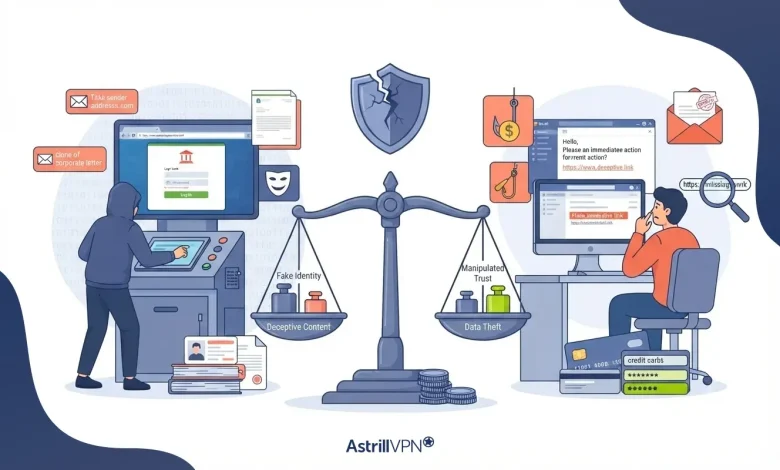
Cybercriminals use many tactics to trick people into revealing sensitive information, downloading malware, and giving away access to valuable accounts. Two of the most common techniques are spoofing and phishing. Although these terms are often used together, they are not the same thing. Understanding the difference between phishing and spoofing is essential for recognizing online threats and protecting personal and business data.
Spoofing is the act of impersonating someone, while phishing is a social engineering attack that tricks victims into taking harmful actions. In many cyberattacks, spoofing is used to make phishing attempts appear legitimate and trustworthy. This guide explains the differences between spoofing and phishing, how these attacks work, their key differences, common examples, and how to stay protected.
Table of Contents
What Is Spoofing?
Spoofing is a cyberattack technique in which attackers impersonate trusted sources by falsifying information such as email addresses, phone numbers, IP addresses, websites, and caller IDs. The primary purpose of spoofing is to make malicious communication appear legitimate. Spoofing itself does not always involve directly stealing information. Instead, it creates a false sense of trust, so victims are more likely to interact with the attacker.
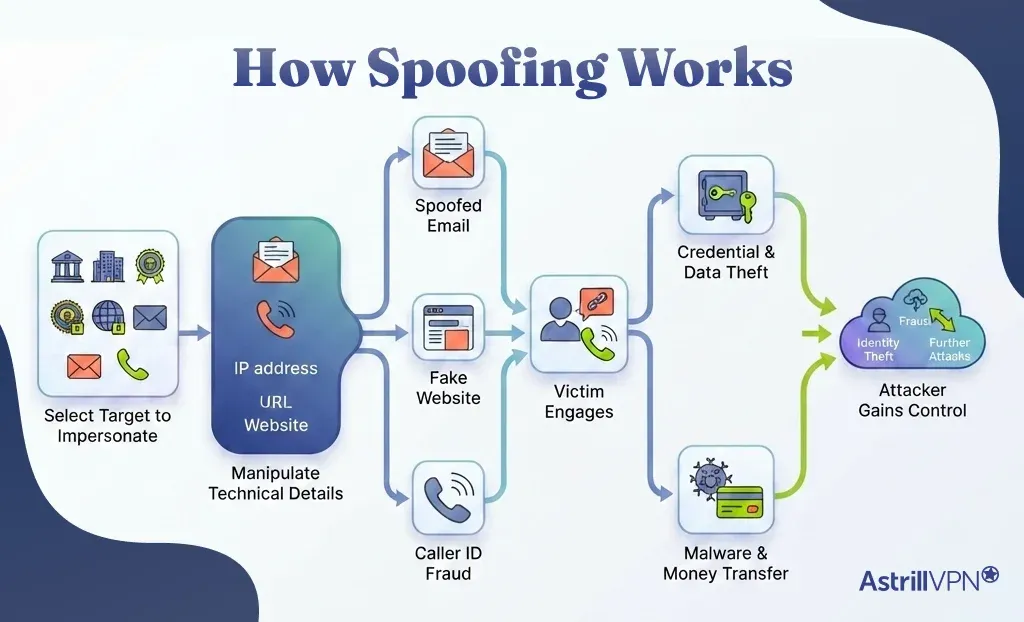
How Spoofing Works?
- Cybercriminals first select a legitimate source to impersonate, such as a bank, company, government agency, website, email address, and phone number.
- Attackers manipulate technical details like email headers, caller IDs, IP addresses, and website domains to make their communication appear authentic.
- The attacker sends spoofed emails, creates fake websites, and initiates calls that closely resemble legitimate communications.
- Because the spoofed identity looks trustworthy, victims are more likely to open emails, answer calls, click links, and share sensitive information.
- Victims may be encouraged to enter login credentials, download malware, transfer money, and reveal confidential data.
- Once the victim responds, attackers can steal passwords, financial details, personal information and gain unauthorized access to accounts and systems.
- Cybercriminals often use compromised information for identity theft, fraud, malware distribution, and additional phishing campaigns.
Common Types of Spoofing Attacks
These are some of the common types of spoofing attacks.
Email Spoofing
In email spoofing, attackers forge the sender’s email address so the message appears to come from a trusted person or organization. This is often used to support phishing campaigns.
Website Spoofing
Attackers create fake websites that closely resemble legitimate ones. Victims may unknowingly enter their usernames, passwords, and payment information on these fraudulent sites.
Caller ID Spoofing
Scammers manipulate phone systems so a fake number appears on the recipient’s caller ID. This technique is commonly used in scam calls pretending to be from banks, tech support, and government agencies.
IP Spoofing
Cybercriminals disguise their IP address to hide their identity or impersonate another system. IP spoofing is often used in network attacks and distributed denial-of-service (DDoS) attacks.
GPS Spoofing
Attackers send fake GPS signals to manipulate location-based systems and devices.
What Is Phishing?
Phishing is a cyberattack that uses deception and psychological manipulation to trick victims into revealing sensitive information, downloading malware, and transferring money. The attacker typically pretends to be a trusted entity to gain the victim’s confidence. Phishing attacks often target login credentials, banking details, personal data, and company information.
How Phishing Works?
A phishing attack usually begins with a fraudulent message sent through email, text message, social media, or phone call. The message creates a sense of urgency to pressure the victim into taking immediate action. Once the victim responds, attackers can steal information, compromise accounts, and install malware.
Victims may be asked to:
- Click a malicious link
- Download an infected attachment
- Enter login credentials
- Verify account information
- Make a payment
- Share confidential data
Common Types of Phishing Attacks
These are some of the common types of phishing attacks.
Email Phishing
Attackers send fake emails impersonating legitimate organizations, such as banks, online services, and delivery companies.
Spear Phishing
This is a targeted phishing attack aimed at a specific person and organization using personalized information.
Whaling
Whaling attacks target executives, business owners, and high-level employees.
Smishing
Smishing uses fraudulent text messages to trick victims into clicking on malicious links or sharing information.
Vishing
Vishing involves voice calls in which scammers impersonate trusted entities to manipulate victims.
Spoofing vs Phishing: Key Differences
The difference between phishing and spoofing mainly lies in their objectives and execution methods. Spoofing focuses on impersonation. The attacker disguises their identity to appear trustworthy. Phishing, on the other hand, focuses on deception and manipulation. It aims to convince victims to perform actions that benefit the attacker. Although spoofing and phishing are closely related, they serve different purposes in cybercrime.
| Feature | Spoofing | Phishing |
| Definition | Faking an identity or source | Tricking victims into revealing information or taking action |
| Main Goal | Create trust and disguise identity | Steal data, money, and access |
| Technique Type | Technical impersonation | Social engineering attack |
| Victim Interaction | May not always require interaction | Usually requires the victim’s action |
| Common Channels | Email, phone, websites, IP addresses | Emails, texts, calls, websites |
| Purpose | Make communication appear legitimate | Manipulate victims into responding |
Similarities Between Spoofing and Phishing
Spoofing and phishing share several similarities because both are designed to deceive victims.
- Attackers exploit trusted brands, organizations, and individuals to appear credible.
- These attacks often result in stolen credentials, financial loss, and identity theft.
- Cybercriminals manipulate human behavior to increase the chances of success.
- Email remains one of the most frequently used channels for both spoofing and phishing campaigns.
How AstrillVPN Protects You From Phishing Attacks?
AstrillVPN helps protect users from phishing attacks by encrypting internet traffic and securing online connections, on public Wi-Fi networks where cybercriminals often target victims. Its encrypted VPN tunnel helps prevent hackers from intercepting sensitive information, redirecting users to fake websites, and performing DNS hijacking attacks commonly used in phishing campaigns.
By masking users’ IP addresses and improving online privacy, AstrillVPN reduces exposure to targeted phishing attempts. Although a VPN alone cannot completely stop phishing attacks, AstrillVPN adds an important layer of cybersecurity protection when combined with safe browsing habits, strong passwords, and multi-factor authentication.
Dangers of Spoofing and Phishing Attacks
Both spoofing and phishing can have serious consequences for individuals and organizations.
Financial Loss
Spoofing and phishing attacks can lead to significant financial damage for both individuals and businesses. Cybercriminals may steal banking credentials, credit card information, and trick victims into sending money through fraudulent transactions.
Identity Theft
Attackers often collect personal information such as names, addresses, passwords, and social security numbers. This stolen data can be used for identity theft, account takeovers, and illegal activities conducted in the victim’s name.
Data Breaches
Phishing emails and spoofed communications can give attackers access to sensitive company systems and confidential information. This may result in large-scale data breaches affecting customers, employees, and organizations.
Malware Infections
Many phishing attacks contain malicious links and infected attachments that install malware, ransomware, spyware, and trojans on victims’ devices. These infections can damage systems, steal data, and lock files for ransom.
Reputation Damage
Businesses targeted by spoofing or phishing attacks suffer reputational harm if customers lose trust in their services or security practices. Brand impersonation attacks can also damage customer relationships and public image.
Unauthorized Account Access
Cybercriminals can use stolen login credentials to access email accounts, banking platforms, social media profiles, and business systems without permission.
Business Disruption
Organizations affected by phishing or spoofing attacks experience downtime, operational delays, and productivity losses while responding to security incidents and recovering compromised systems.
Emotional Stress and Privacy Risks
Victims of cyberattacks often experience stress, anxiety, and privacy concerns after discovering their personal and financial information has been compromised.
How to Identify Spoofing and Phishing Attacks?
Recognizing warning signs can help prevent cyberattacks.
Check the Sender’s Information Carefully
Look closely at email addresses, phone numbers, and website URLs. Attackers often use slight misspellings and fake domains that appear similar to legitimate organizations.
Watch for Urgent Messages
Phishing attacks commonly create a sense of urgency by claiming your account will be suspended, hacked, and locked unless you act immediately.
Inspect Links Before Clicking
Hover your cursor over links to preview the actual destination URL. Suspicious links may redirect to fake websites.
Be Cautious With Attachments
Unexpected attachments, especially from unknown senders contain malware files designed to compromise your device.
Look for Poor Grammar and Spelling
Many phishing and spoofing messages contain grammatical mistakes, awkward wording, and unusual formatting that legitimate organizations usually avoid.
Verify Requests for Sensitive Information
Legitimate companies rarely ask for passwords, banking details, or personal information through email, text messages, and phone calls.
Check Website Security Indicators
Before entering sensitive information, verify that the website uses HTTPS encryption and has a valid security certificate.
Watch for Unusual Communication Behavior
Unexpected login alerts, strange requests from coworkers, and unfamiliar messages from known contacts indicate spoofing attempts.
Be Alert to Generic Greetings
Phishing emails often use generic greetings like “Dear Customer” instead of your actual name because attackers send messages to many victims at once.
Confirm Suspicious Messages Independently
If you receive a suspicious email and call, contact the organization directly using official contact information instead of responding to the message.
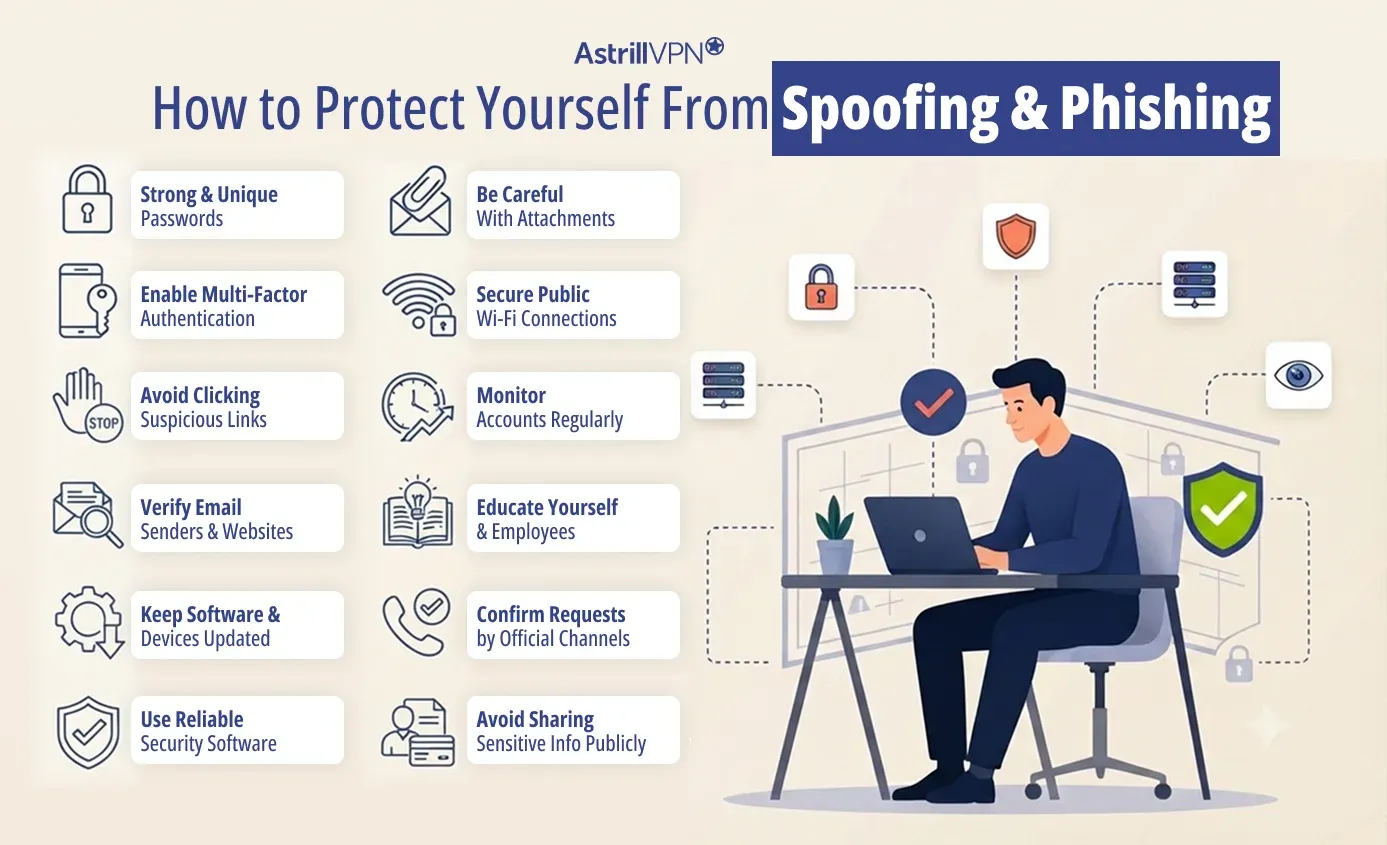
How to Protect Yourself From Spoofing and Phishing?
Taking proactive cybersecurity measures can significantly reduce risk.
Use Strong and Unique Passwords
Create strong passwords for all accounts and avoid reusing the same password across multiple platforms. Using a password manager can help securely store and generate complex passwords.
Enable Multi-Factor Authentication (MFA)
Multi-factor authentication adds an extra layer of security by requiring additional verification beyond just a password. This helps protect accounts if login credentials are stolen.
Avoid Clicking Suspicious Links
Do not click links in unexpected emails, text messages, and social media messages. Always verify links carefully before opening them.
Verify Email Senders and Websites
Check email addresses, website URLs, and domain names for spelling errors and unusual variations that indicate spoofing attempts.
Keep Software and Devices Updated
Install security updates regularly for operating systems, browsers, and applications to protect against known vulnerabilities that attackers exploit.
Use Reliable Security Software
Antivirus, anti-malware, spam filters, and web protection tools can help detect and block malicious websites, phishing emails, and malware infections.
Be Careful With Attachments
Avoid downloading attachments from unknown senders, as they contain malware scripts.
Secure Public Wi-Fi Connections
Use a trusted VPN service when accessing public Wi-Fi networks to encrypt your internet traffic and reduce the risk of cyberattacks.
Monitor Accounts Regularly
Check bank accounts, email accounts, and online services for unusual activity and unauthorized access attempts.
Educate Yourself and Employees
Cybersecurity awareness training helps individuals and organizations recognize phishing emails, spoofed communications, and other social engineering tactics.
Confirm Requests Through Official Channels
If you receive requests for payments, passwords, and sensitive information, contact the organization directly using verified contact details instead of responding immediately.
Avoid Sharing Sensitive Information Publicly
Limiting personal information shared online can reduce the chances of attackers creating targeted phishing and spoofing attacks.
Spoofing vs Phishing: Which Is More Dangerous?
Both spoofing and phishing are dangerous, but phishing is generally considered more harmful because it directly targets victims for data theft, financial fraud, and malware infections. However, spoofing significantly increases the effectiveness of phishing attacks by making them appear legitimate.
The level of danger depends on the attack type, target, and the information compromised. A sophisticated spoofing campaign combined with phishing can lead to severe financial and security consequences.
Conclusion
Understanding the difference between spoofing and phishing is essential for recognizing modern cyber threats. While spoofing involves impersonating trusted sources, phishing focuses on manipulating victims into revealing sensitive information or taking harmful actions. The two techniques are often used together to create highly convincing cyberattacks.
By learning the difference between phishing and spoofing, recognizing warning signs, and following cybersecurity best practices, individuals and businesses can better defend themselves against online scams and data breaches.
FAQs
Here are some of the frequently asked questions.
Spoofing and phishing are closely connected because spoofing is often used to support phishing attacks. Attackers spoof email addresses, websites, and phone numbers to make phishing attempts appear trustworthy and legitimate.
The primary goal of phishing attacks is to trick victims into revealing sensitive information, downloading malware, and transferring money to attackers.
The purpose of spoofing attacks is to disguise the attacker’s identity and create trust by pretending to be a legitimate source or system.
Email spoofing involves falsifying the sender’s email address to appear legitimate. Phishing emails are designed to manipulate victims into taking harmful actions such as clicking on malicious links.
Phishing is generally considered more dangerous because it directly aims to steal information, money, and access. However, spoofing can make phishing attacks far more convincing and effective.

Secure your privacy instantly. Try AstrillVPN with zero risk.
About The Author











No comments were posted yet