




Smart Mode vs Full VPN Tunnel: Which Should You Choose?

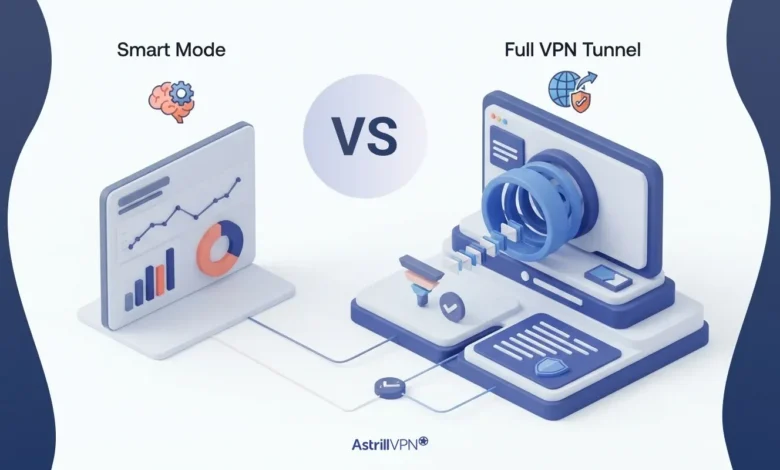
The masses switch on their VPNs, delight in watching the VPN connection icon turn green, and naïvely believe that from then on all bytes that depart their PC’s or mobile phones will be refrained from reaching any servers on Earth. For a while everything seems to work, but then the bank may decide to freeze one’s account due to a “suspicious login from Amsterdam”, or a local food delivery service may decide not to load because it detected that the user is browsing from another country.
So, in summary, two different options to solve two different problems. Let’s explore them in more detail.
Table of Contents
What Smart Mode actually does
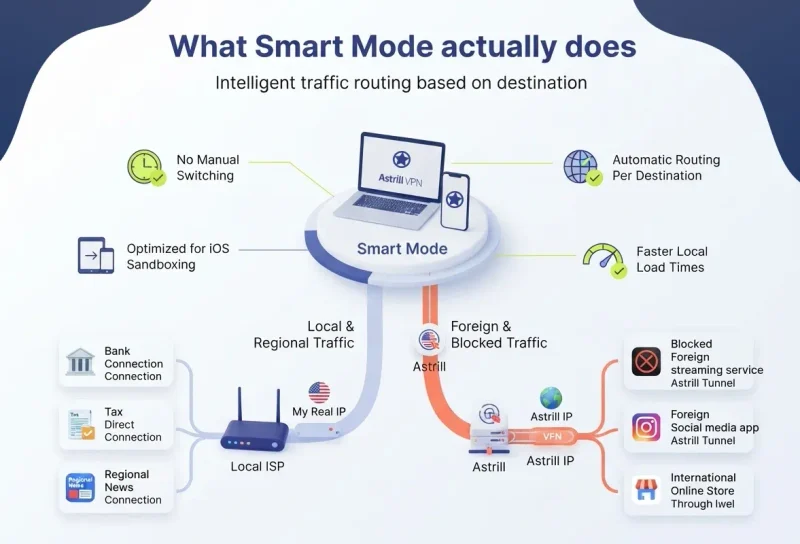
Smart Mode sorts all traffic by destination (local vs. foreign). Thus traffic from your region goes directly to your ISP with your real IP address, whereas traffic to foreign destinations, even if it is restricted there, goes through an Astrill server. Therefore you don’t have to switch a VPN switch on and off all day. Instead, the traffic routing happens automatically per destination while you are running one VPN connection in the background.
In GFW Mode (heavily filtered regions) Astrill would route blocked foreign sites through the tunnel and local traffic via your domestic connection so your traffic appears normal to outside observers instead of a VPN connection.
In practice, that gives you a few things:
- Your banking portal, tax site, or regional streaming service sees a normal residential connection from the right country
- International sites see an Astrill address rather than yours
- Local pages tend to load faster, since they are no longer taking a detour through a distant server
- On iPhone and iPad it handles most of the routing work, because Apple sandboxing stops apps from managing the traffic of other apps the way desktop and Android filters can
How Can I Use Smart Mode on Astrill?
- Log in to your AstrillVPN app and go to the settings menu.
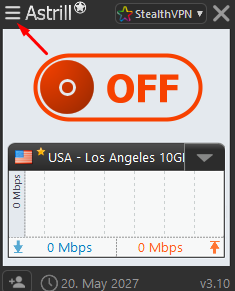
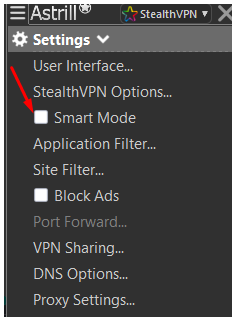
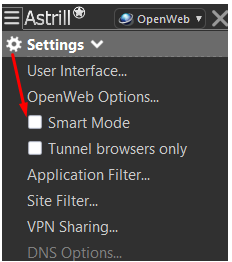
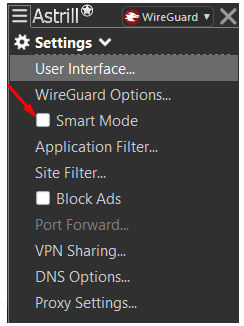
- Over here you will see the Smart mode option, enable it.
- When using StealthVPN protocol, this is how it will look like:
- When using OpenWeb protocol, you’ll find the Smart mode option here:
- If you’re using Wireguard protocol, you’ll find the Smart mode option here:
- Once you enable it, the Smart mode will be activated.
What a full tunnel does
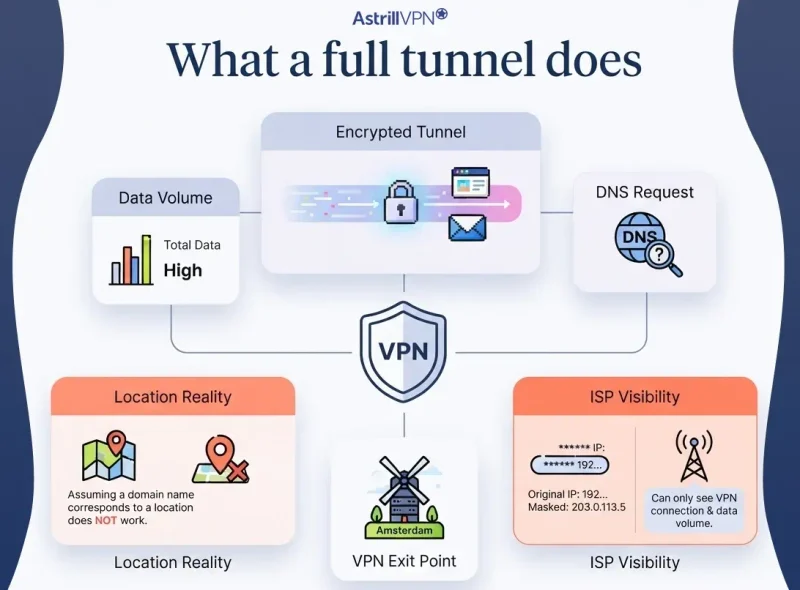
As opposed to a ‘full’ tunnel (which is simply traffic sent to a server of your choice and exiting from said server) all your DNS traffic is also sent through the tunnel. Your ISP can only tell that you are connecting to a VPN endpoint and get a rough idea of the total amount of data you are transferring.
None of your troubles are solved by you assuming that a domain name or URL corresponds to a location on the planet. All VPNs do is mask your real IP address.
The two modes side by side
| What you are weighing | Smart Mode | Full VPN tunnel |
|---|---|---|
| How traffic is routed | Split by destination, local goes direct and international goes through Astrill | Every connection travels through the encrypted tunnel |
| What your ISP can see | The domestic sites you reach directly, alongside one encrypted stream | An encrypted link to a single server and very little else |
| IP your bank sees | Your real local address | The address of whichever server you selected |
| Speed on local pages | Quick, since nothing detours abroad | Depends on how far the server sits from you |
| Public Wi-Fi coverage | Partial, because direct traffic stays exposed | Complete across everything you do |
| Blending in on filtered networks | Strong, the pattern resembles ordinary browsing | Weaker, since all traffic points at one foreign endpoint |
| Best suited to | Home use, local banking, regional services, faster everyday browsing | Sensitive work, untrusted networks, maximum privacy |
Does traffic outside the tunnel stay protected?
No, this traffic is normal internet traffic. The Smart Mode traffic that is sent directly via your Internet connection is not being touched by your VPN, not encrypted, and is not being hidden from anyone who is able to look.
Just because traffic is sent via Smart Mode does not mean that it has been encrypted by the VPN. Therefore, HTTPS still protects the contents of your messages and other online data, but your ISP will still be able to see which domains you visit and when, for example, a hotel, an airport lounge or even an individual café online. This type of data is known as metadata and is surprisingly revealing after a few weeks of data has been collected.
Smart Mode is a trade-off, not a loophole. You get convenience and speed for a portion of your traffic, and you’re told exactly what that portion is.
Banking, payments, and local services
This scenario is exactly what I wrote Smart Mode for: dealing with foreign IP addresses that online banks and payment services will sometimes distruster. A full tunnel to a server hundreds of kilometers away and on a different time zone can either block connections entirely or trigger additional verification at the worst time. Often, government portals, local insurance companies’ websites, and video streaming services will behave poorly when detecting a foreign IP address.
A single exception: when on public Wi-Fi (audience) don’t use the tunnel to access your banking online. Connect to the local server first and then tunnel fully. The bank will see a local IP address. The router to which you are connected in the cafe (audience) won’t.
International sites, streaming, and restricted networks
Here’s how Smart Mode generates value for us: Foreign traffic goes through Astrill and local traffic does not. Thus we stop paying speed taxes for traffic that was never geo-restricted in the first place. In countries where simply using a VPN gets attention, a mixed traffic stream attracts far less attention than a single foreign endpoint for extended periods.
Which mode is stronger on privacy?
Ranked purely on privacy, the full tunnel wins hands down.
The typical voyeur is after information to invade your privacy. A full tunnel to your browsing traffic doesn’t yield much for them as all they get is one encrypted stream of traffic to your ISP. But with our Smart Mode they get to understand part of what you do online, and that information can be used against you by data brokers, your employer if they own the network for your workplace, and even governments going after your browsing history. If you are concerned about these types of threats then Smart Mode shouldn’t be your default setting.
Yes, the benefits of higher speed and better compatibility are worth giving up some visibility for though.
When to switch between them
Reach for the full tunnel when:
- You are on public or borrowed Wi-Fi of any description
- You are handling sensitive work, client records, or anything covered by an NDA
- You are researching topics you would rather your ISP never associated with your name
- You want the kill switch to actually mean something across your entire connection
Lean on Smart Mode when:
- You are at home on a network you trust and manage yourself
- Your bank, tax portal, or local service keeps rejecting foreign addresses
- Domestic pages feel sluggish and the tunnel is clearly the reason
- You are in a censored region where blending in matters more than blanket coverage
- You are on iOS and want automatic routing without fiddling with per-app control
The honest answer
It’s a tradespace, neither mode ‘wins’ in the long run. Everyone who tries to tell you otherwise wants to sell you something. Most people end up switching between the two modes depending on where they are in their premises, and they’re right to be doing so. A trusted network with good local services to reach calls = Smart Mode. Anything else, unknown, sensitive, private etc etc = full tunnel every time.
Until you get better at deciding, just default to the full tunnel. Yes, it’s slower but you’re getting the level of protection you thought you were getting with Smart Mode in the first place.
FAQs
It is a kind of split tunneling, with the difference being that it makes the routing call for you based on where each connection is headed, so you never have to build lists of sites by hand. For people who would rather pick specific apps or websites themselves, Astrill keeps the Application Filter and Site Filter available as a manual option.
It hides whatever passes through the tunnel, so your ISP loses sight of the international sites you visit. The domestic sites that Smart Mode sends directly remain visible to your provider by domain and timing, and that holds true even when HTTPS protects what sits on the page itself.
It beats running with no VPN at all, although it leaves your direct traffic open to whoever manages that network, which is the exact situation a VPN exists to shield you from. On hotel, airport, or café Wi-Fi, the full tunnel is the better habit, and choosing a server in your own country keeps banking apps and local sites from complaining about a foreign address.
Plenty of people keep it on at home, and on a network you trust that is a fair choice if speed and local access matter to you every day. The trouble begins when the setting quietly follows you out the door, so it helps to think of the full tunnel as your traveling mode and keep Smart Mode for the network you actually control.











No comments were posted yet