


Remote Work Network Security: How to Protect Employees Working From Home?

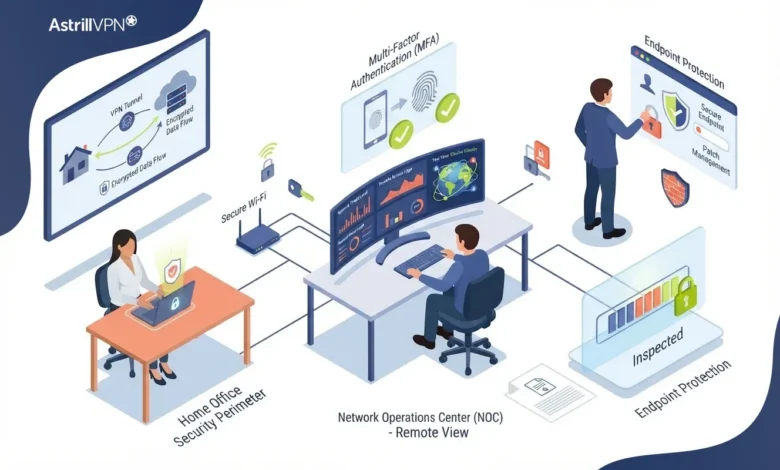
While remote work is reshaping workplaces for employees, the responsibility of protecting company resources and information has been with them all along, even before the era of working from home.
If improperly secured, a laptop connected to a home router could serve as an easy entry point to corporate resources, cloud services, sensitive data stored within companies, and other internal systems. This is an example of how even the slightest oversight can become very costly.
A well-thought-out defense plan needs to tackle threats at several different levels. The vulnerability rate was 31% according to the Verizon 2026 Data Breach Investigations Report, and it was deemed the primary initial vector in their analysis. Credential abuse and exploitation of vulnerability accounted for 22% and 20% of breaches, respectively, in their 2025 report.
Thus, secure remote work should not be limited to setting up a secure channel, e.g., installing a VPN. A combination of various components, such as safe home networks used for remote work, updated devices, robust authorization, regulated access, trained staff, and continuous surveillance, is necessary for secure remote work.
Table of Contents
What Is Remote Work Network Security?
Remote work network security is the combination of technologies, policies, and practices used to protect employees, devices, networks, applications, and company data when work happens outside the traditional office.
It covers several layers of protection, including:
- Home Wi-Fi and router security
- Secure remote access to company systems
- VPNs and encrypted connections
- Multifactor authentication (MFA)
- Endpoint protection and software updates
- Access controls and least privilege
- Secure cloud applications
- Employee security awareness
- Monitoring and incident response
- BYOD security
NIST guidance emphasizes that remote-access environments should be secured as a complete system rather than protecting only the connection itself. That includes client devices, remote-access infrastructure, and the internal resources employees access remotely.
How to Secure the Home Wi-Fi Network?
The following are the ways to secure the home Wi-Fi Network.
Use WPA2 or WPA3 Encryption
The home router is the foundation of home network security for remote workers. Employees should use WPA2 or WPA3 encryption rather than outdated wireless security protocols.
NIST specifically recommends checking that home Wi-Fi uses WPA2 or WPA3 and choosing a strong wireless password. Employees should also avoid using simple passwords based on names, birthdays, addresses, or easily guessed phrases.
Change the Router’s Default Administrator Password
The Wi-Fi password and router administrator password serve different purposes. Changing the Wi-Fi password alone is not enough if the router still uses its default administrative credentials.
Organizations should instruct remote employees to:
- Change the router’s default administrator username and password where supported.
- Use a long, unique administrator password.
- Keep router firmware updated.
- Disable unnecessary remote administration.
- Review connected devices periodically.
Government guidance for mobile and remote workers similarly recommends changing default router administrator credentials, keeping firmware up to date, using strong wireless encryption, and limiting network access to trusted devices.
Keep Personal and Work Devices Separated
A home network may contain laptops, smartphones, smart TVs, gaming consoles, cameras, printers, and smart-home devices.
Whenever possible, employees should place work devices on a separate network from less-trusted IoT devices. A guest network can provide useful isolation for personal or smart-home equipment, although organizations should follow their IT department’s specific configuration requirements. Network segmentation reduces the potential impact if another connected device becomes compromised.
How to Protect Your Remote Work Network and Business Systems
Several options are used for protecting remote access to business systems.
Use Secure Remote Access Solutions
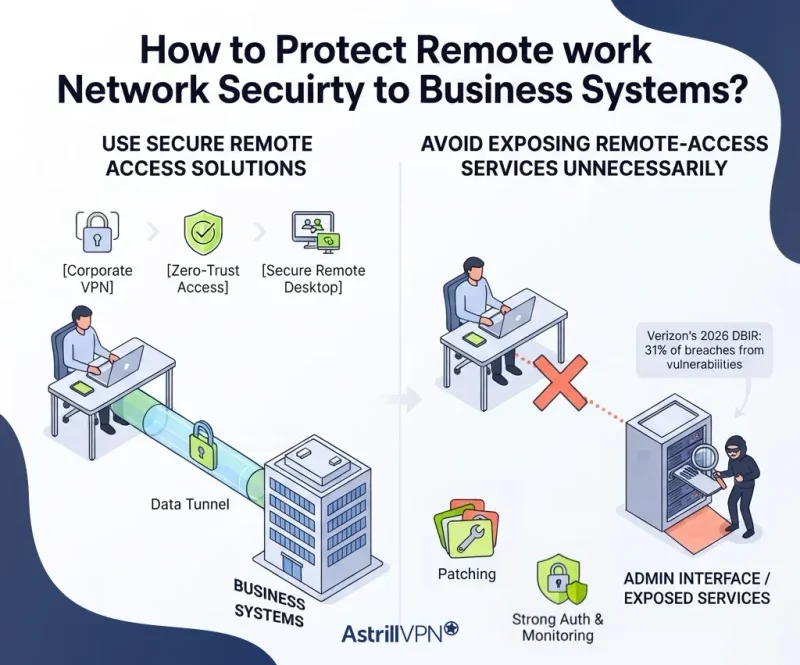
Employees should access company resources through approved remote-access systems rather than exposing internal services directly to the public internet.
Depending on the organization’s architecture, secure remote access might involve a corporate VPN, zero-trust network access, secure remote desktop infrastructure, or identity-aware application access.
NIST recommends considering the security requirements and threats associated with the entire remote-access solution, including remote clients and the systems being accessed.
Avoid Exposing Remote-Access Services Unnecessarily
Businesses should minimize internet exposure of administrative interfaces, remote desktop services, VPN gateways, and other remote-access infrastructure.
Internet-facing systems need continuous patching, strong authentication, monitoring, and appropriate access restrictions. This is particularly important because the exploitation of vulnerabilities has become a major initial entry point for attackers. Verizon’s 2026 DBIR reported that exploitation of vulnerabilities accounted for 31% of analyzed breaches.
Use a VPN as One Layer of Protection
A VPN can be an important component of secure remote access, particularly when employees work from networks they do not fully control.
Astrill VPN encrypt traffic between the employee’s device and the VPN service or organizational endpoint. This can help reduce exposure to network-level eavesdropping when employees use potentially untrusted networks.
However, businesses should treat a VPN as one layer rather than the entire security strategy.
A VPN does not replace:
- MFA
- Endpoint security
- Security patches
- Strong passwords
- Access controls
- Employee training
- Malware protection
- Monitoring
- Secure router configuration
For employees who regularly work from cafés, hotels, airports, or other public networks, a reputable VPN can provide an additional layer of protection. Organizations should prioritize their approved corporate VPN when one is provided.
Make Multifactor Authentication Mandatory
Protect Accounts Beyond Passwords
Passwords are valuable targets because attackers can steal them through phishing, malware, credential stuffing, and data breaches.
Verizon reported that compromised credentials were an initial access vector in 22% of breaches examined in its 2025 DBIR. MFA adds another layer of verification, making a stolen password less useful on its own.
CISA recommends requiring MFA for systems such as email, file storage, and remote access, with particular attention to privileged and administrative accounts. It also recommends using phishing-resistant MFA where possible.
Prioritize High-Risk Accounts
Organizations should especially require strong MFA for:
- Administrators
- IT personnel
- Employees handling sensitive information
- Cloud administrators
- Remote-access users
- Financial and HR systems
- Business owners and executives
Where available, phishing-resistant authentication methods should be considered instead of relying exclusively on SMS-based codes.
Keep Remote Devices Updated
The following are the ways to keep remote devices updated.
Patch Operating Systems and Applications
An employee’s laptop can become an entry point when vulnerabilities remain unpatched.
Organizations should centrally manage updates on company-owned devices whenever possible. Automatic updates should be enabled for operating systems, browsers, security software, and other critical applications when business requirements allow.
The importance of patching is underscored by the rise in vulnerability exploitation documented by Verizon. The 2025 DBIR reported a 34% increase in the exploitation of vulnerabilities compared with the previous year.
Protect Endpoints
Remote employees should use approved endpoint security tools and keep them enabled.
Endpoint protection should cover common threats such as:
- Malware
- Ransomware
- Infostealers
- Malicious downloads
- Suspicious applications
- Unauthorized changes
Employees should also avoid disabling security software simply because it interferes with a download or application.
Control Access With Least Privilege
Not every remote employee needs access to every company resource. A sales employee may need CRM access but not access to financial databases. A contractor may need access to a single project but not to the organization’s entire internal network. Least-privilege access limits what an account can reach and reduces potential damage if credentials are compromised.
Organizations should regularly review:
- Who has access
- What resources can they access
- Whether access is still required
- Whether administrative privileges are necessary
- Whether former employees and contractors have been removed
This approach complements VPN and MFA controls by limiting what an attacker can do after gaining access to an account.
How AstrillVPN Can Help With Remote Work Network Security?
AstrillVPN can serve as one layer of a broader remote work security strategy, particularly when employees connect to business resources from home, hotels, cafés, airports, or other networks they do not fully control.
Protecting Traffic on Untrusted Networks
AstrillVPN encrypts internet traffic between the employee’s device and the VPN server, helping reduce the risk of network-level eavesdropping when employees use public or otherwise untrusted Wi-Fi. This can be useful for remote workers who frequently travel and need to access work applications.
Adding a Security Layer for Remote Employees
A VPN can create an additional barrier between an employee’s device and the local network. For businesses with employees working from different locations, this provides a consistent network protection layer rather than relying entirely on the security of each external network.
Protecting Remote Work on Public Wi-Fi
Employees may occasionally work from cafés, hotels, airports, coworking spaces, or other shared networks. AstrillVPN can help protect its internet traffic in these environments, reducing exposure to certain network-based attacks and interception by unauthorized parties.
Supporting Secure Access to Work Accounts
AstrillVPN should not replace MFA, endpoint protection, or access controls. Instead, businesses can combine VPN protection with MFA, strong passwords, device security, and least-privilege access to create multiple layers of defense around remote employee accounts.
Why Remote Work Network Security Requires More Than a VPN?
A VPN can encrypt network traffic between a device and a VPN endpoint, helping protect communications from interception. However, it does not automatically make the employee’s device secure.
For example, a remote employee could connect through a VPN while using an outdated laptop infected with malware. An attacker who has stolen the employee’s password could potentially authenticate to company services despite the encrypted connection. Similarly, an unsecured home router can create risks before traffic even reaches the VPN. This makes remote work security a layered problem. A business needs to protect its network, devices, identities, applications, and users rather than relying on a single security product.
Secure BYOD Policies
The following are the ways to secure BYOD Policies.
Personal Devices Create Additional Challenges
Bring-your-own-device programs can make remote work flexible, but personal devices may not have the same security controls as company-managed equipment.
NIST’s BYOD guidance specifically addresses the security considerations associated with employee-owned devices used for telework and remote access.
Companies using BYOD should establish clear rules covering:
- Supported operating systems
- Required security software
- Device encryption
- Screen locks
- Automatic updates
- Approved applications
- Company data storage
- Lost or stolen devices
- Remote wiping where appropriate
- Separation of personal and business data
Employees should never assume that a personal laptop is safe simply because it is newer or used only occasionally for work.
Train Employees to Recognize Remote-Work Threats
Technology cannot eliminate every remote-work security risk. Employees may receive phishing emails, fake Microsoft 365 login pages, malicious attachments, fraudulent support calls, or messages impersonating managers and coworkers.
Verizon’s 2025 DBIR found that 60% of breaches involved a human element, illustrating why employee behavior remains an important part of organizational security.
Security awareness training should teach employees how to:
- Verify unexpected login requests
- Identify suspicious links
- Report phishing attempts
- Avoid downloading unapproved software
- Verify unusual payment requests
- Recognize MFA fatigue attacks
- Report lost devices quickly
- Use company-approved storage services
Training should be continuous rather than a once-a-year checkbox.
Protect Work Accounts From Credential Attacks
The following are the ways to protect work accounts from Credential attacks.
Use Unique Passwords
Employees should never reuse their work password on personal websites.
If credentials from another service are leaked, attackers may attempt to use the same username and password against corporate applications.
Password managers can help employees generate and store unique passwords without requiring them to memorize dozens of credentials.
Monitor Suspicious Login Activity
Organizations should monitor authentication events for unusual patterns such as:
- Repeated failed logins
- Impossible-travel alerts
- New device registrations
- Unusual geographic locations
- Unexpected privilege changes
- Login attempts at unusual times
- Multiple authentication failures followed by success
Identity monitoring becomes particularly valuable for remote teams because employees routinely access business systems from different networks and locations.
Secure Video Meetings and Cloud Applications
Remote work frequently depends on cloud-based collaboration platforms. Organizations should configure these services carefully instead of relying on default settings.
Security controls can include:
- MFA
- Strong administrative controls
- Restricted external sharing
- Meeting passwords
- Waiting rooms
- Limited screen-sharing permissions
- Controlled file-sharing permissions
- Audit logs
- Session monitoring
Employees should also avoid sharing confidential information through personal accounts or unauthorized cloud-storage services.
Create a Secure Home Workspace
Network security also includes physical security.
Employees should lock their screens when stepping away and prevent unauthorized household members from using work devices. Sensitive documents should not be left visible or accessible to visitors.
Government remote-work guidance recommends using organizational equipment for work purposes, preventing family and friends from accessing work equipment, locking screens when devices are unattended, and securely storing work-related materials.
Employees should also be careful about discussing confidential information around smart speakers or other voice-enabled devices.
Monitor Remote Access Continuously
Remote work security should not stop once employees connect successfully. Security teams should monitor remote-access infrastructure, identity systems, endpoints, and cloud services for suspicious activity.
Useful security capabilities include:
- Centralized logging
- Endpoint detection and response
- Identity monitoring
- VPN authentication logs
- Security alerts
- Vulnerability scanning
- Incident-response procedures
- Regular access reviews
Monitoring can help security teams identify unusual behavior before it develops into a larger incident.
Build a Remote Work Security Policy
A formal policy gives employees clear expectations instead of leaving security decisions to individual judgment. A practical remote-work security policy should explain:
Approved Devices
Define whether employees can use company-owned devices, BYOD devices, or both.
Approved Connections
Specify whether employees must use a corporate VPN, zero-trust access platform, or another approved solution.
Authentication Requirements
Require MFA and define acceptable authentication methods.
Home Network Requirements
Explain minimum expectations for router security, Wi-Fi encryption, passwords, and firmware updates.
Data Handling
Specify where employees can store, download, print, and share company information.
Incident Reporting
Employees should know exactly how to report phishing, malware, lost devices, stolen credentials, or suspicious account activity.
Common Remote Work Security Mistakes
The following are some common remote work security mistakes.
Treating a VPN as Complete Protection
A VPN protects certain network communications, but it cannot compensate for compromised credentials, vulnerable endpoints, malware, or excessive account permissions.
Ignoring the Home Router
Employees may spend significant effort securing their laptops while leaving the router on outdated firmware with default credentials.
Allowing Shared Work Devices
Family members should not use company devices for gaming, browsing, installing applications, or other personal activities unless the organization’s policy explicitly permits it.
Delaying Security Updates
A delayed patch can leave a known vulnerability exploitable for longer than necessary.
Giving Employees Excessive Access
Broad access increases the potential impact of a compromised account. Remote employees should receive only the permissions required for their roles.
Conclusion
Effective remote-work network security requires more than just giving employees a VPN and asking them to work from home. Secure remote work depends on several layers working together: protected Wi-Fi, updated devices, strong MFA, secure remote access, least-privilege permissions, employee awareness, and continuous monitoring.
NIST’s telework guidance makes clear that remote-access security involves the entire environment, including client devices and organizational systems. Meanwhile, recent breach data demonstrates why organizations need to pay particular attention to vulnerabilities and stolen credentials.
For businesses, the goal should not be simply to make remote work possible. It should aim to create a security framework that enables employees to work from home productively while reducing opportunities for attackers to compromise networks, devices, identities, and company data.
FAQs
Here are some of the most frequently asked questions.
Remote work network security is the collection of controls used to protect employees, devices, networks, accounts, applications, and company data when people work outside the corporate office.
No. A VPN can protect network traffic, but it does not replace MFA, endpoint protection, software updates, secure Wi-Fi, access controls, employee training, or monitoring.
Use WPA2 or WPA3 encryption, create a strong Wi-Fi password, change the router’s default administrator credentials, install firmware updates, and consider separating work devices from smart-home and other personal devices.
Employees should follow their organization’s remote-access policy. If the business provides a corporate VPN, employees should use it as required. A reputable VPN can also provide an additional layer of protection when using untrusted networks, but it should not be treated as a complete security solution.
MFA provides an additional authentication factor beyond a password. This can make stolen credentials less useful to attackers and is particularly important for email, cloud applications, administrative accounts, and remote-access systems.
A properly secured home network can eliminate some risks associated with public networks, but it can still contain vulnerabilities such as outdated routers, weak passwords, and compromised IoT devices. Security controls are needed in either environment.
Companies should establish clear BYOD requirements covering supported devices, updates, encryption, authentication, endpoint protection, data storage, application use, and procedures for lost or compromised devices.
They should immediately follow the company’s incident-reporting procedure, notify IT or security personnel, change credentials when instructed, revoke suspicious sessions where possible, and avoid using a potentially compromised device for sensitive work until it has been assessed.

Secure your privacy instantly. Try AstrillVPN with zero risk.
About The Author










No comments were posted yet