




How Astrill VPN Routes Traffic in Countries With Heavy Internet Restrictions

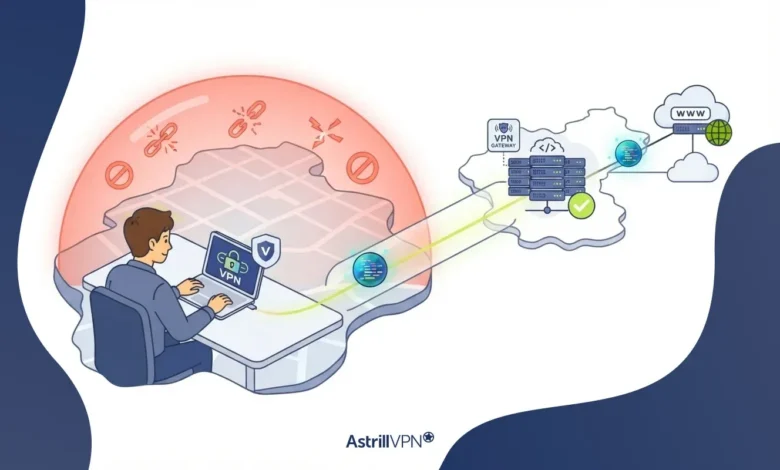
Every time you open a website, your request travels through a chain of networks before it reaches the server on the other end. In most places, that path is fairly neutral. In countries with heavy internet restrictions, it is not. The route passes through filtering systems that decide what you can reach, what gets slowed down, and what quietly fails to load.
A VPN changes that path. Instead of letting your local network decide where your traffic goes, it wraps your data in an encrypted tunnel and sends it to a server in another location first. But in tightly controlled networks, simply having a VPN is often not enough. Firewalls can spot standard VPN traffic and shut it down within seconds.
This guide explains how VPN routing works in plain terms, how censorship systems filter traffic, why ordinary VPN connections get caught, and what specialized routing does differently.
Table of Contents
What VPN Routing Means
Routing is just the path your data takes across the internet. Your device sends a request, your router passes it to your internet service provider (ISP), and the ISP forwards it through other networks until it reaches the destination server. The response travels back the same way.
VPN routing adds a new stop to that path. Your device encrypts the request and sends it to a VPN server. The VPN server decrypts it, forwards it to the website, receives the response, and sends it back to you through the same encrypted tunnel.
From your ISP’s point of view, three things change:
- It can see that you are connected to a remote server, but not which websites you open through it.
- It cannot read the content of your traffic, because the tunnel is encrypted.
- Websites see the VPN server’s IP address instead of yours, so they treat you as if you are browsing from the server’s location.
That last point matters a lot in restricted countries. If a website is blocked locally but reachable from the VPN server’s country, the VPN server can fetch it for you.
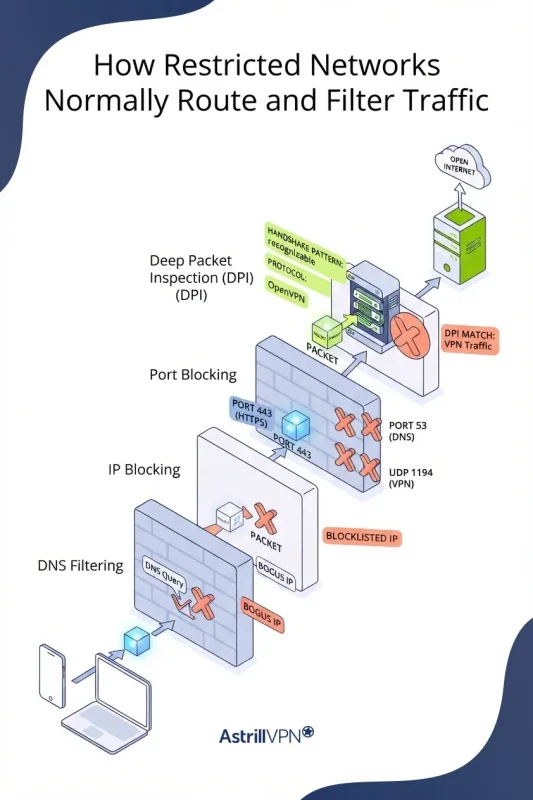
How Restricted Networks Normally Route and Filter Traffic
Censorship is rarely one single wall. Most restrictive networks stack several filtering methods, with each layer catching what the others miss. These are the main ones.
DNS Filtering
Before your browser can load a site, it asks a DNS server to translate the domain name into an IP address. In many restricted networks, ISP-run DNS servers return a fake address, an error, or a block page for banned domains. The site itself is still online. Your device just never learns where to find it.
DNS filtering is cheap and easy to deploy, which is why it is usually the first layer. It is also the easiest to get around, since switching DNS settings or using encrypted DNS can sidestep it. That is exactly why censors rarely rely on it alone.
IP Blocking
With IP blocking, the network drops any traffic headed to specific IP addresses. If a banned service runs on a known set of servers, the firewall simply refuses to deliver packets to them.
Censors use the same method against VPNs. Once they identify addresses that belong to VPN servers, they add them to blocklists. This is one reason VPN providers serving restricted regions have to add and rotate servers regularly.
The downside for censors is collateral damage. Many websites share IP addresses through hosting and CDN providers, so blocking one address can take unrelated sites offline too.
Port Blocking
Every type of network traffic uses a port number. HTTPS browsing normally runs on TCP port 443, DNS uses port 53, and many VPN protocols have their own default ports. OpenVPN commonly runs on UDP port 1194, and WireGuard is often set up on UDP port 51820.
A restrictive firewall can block those default ports outright. If your VPN only knows how to connect on its standard port, the connection fails before it starts. Blocking the ports used by everyday web traffic is much harder, because it would break normal browsing for everyone.
Deep Packet Inspection (DPI)
DPI is the most advanced filtering method and the one that gives VPN users the most trouble. Instead of only checking where a packet is going, DPI examines the packet itself: its structure, headers, handshake pattern, size, and timing.
Encryption hides what is inside your traffic, but it does not always hide what kind of traffic it is. Standard VPN protocols have recognizable fingerprints. The way an OpenVPN or IPSec connection starts, the shape of its packets, and the rhythm of its data flow can all give it away. A DPI system trained on those patterns can flag VPN traffic in real time and block or throttle it without reading a single byte of your content.
Some national firewalls go further with active probing. When they suspect a server is running a VPN, they send test connections to it and study the response. If the reply looks like a VPN server, the address gets blocked.
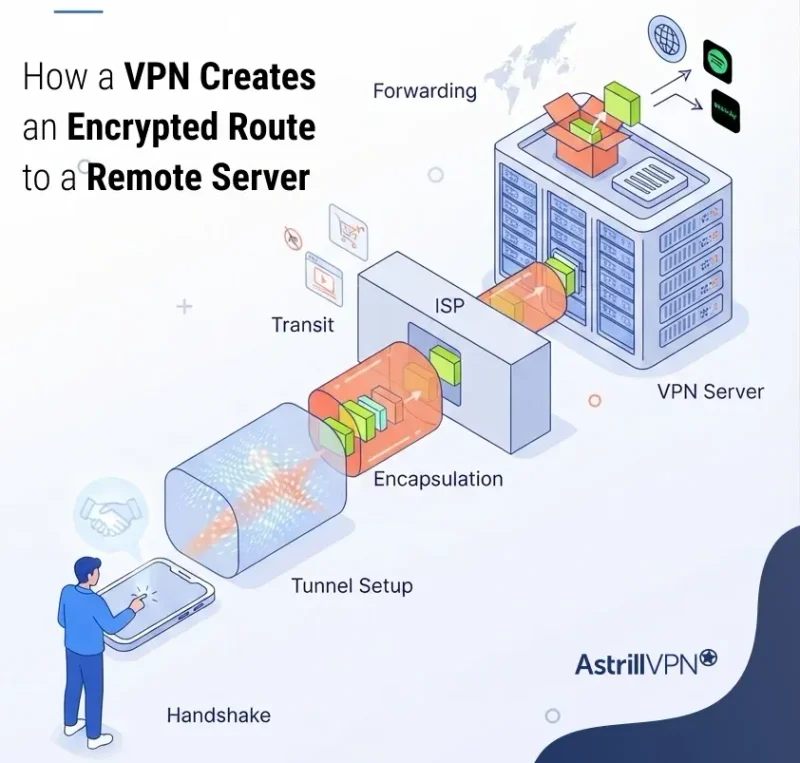
How Astrill VPN Creates an Encrypted Route to a Remote Server
Here is what happens from the moment you hit connect.
- Handshake. Your Astrill VPN app contacts the VPN server. Both sides verify each other and agree on encryption keys.
- Tunnel setup. The app creates a virtual network interface on your device, and your operating system starts sending traffic through it instead of straight to your ISP.
- Encapsulation. Each outgoing packet, including its original destination, is encrypted and wrapped inside a new packet addressed to the VPN server.
- Transit. Your ISP carries the wrapped packets to the VPN server like any other traffic. It sees the outer packet, not the one inside.
- Forwarding. The VPN server unwraps the packet, sends the request to the real destination, and returns the response through the tunnel.
Because the real destination is hidden inside the encrypted layer, DNS filtering and destination-based IP blocking stop working against individual sites. The firewall no longer knows you are visiting a banned website. It only knows you are talking to one server.
That is also the weak point. If the firewall can tell that the one server is a VPN, it can cut the whole tunnel.
Why Standard VPN Routing May Be Detected or Blocked
A standard VPN does a good job of hiding what you do online. It does a much weaker job of hiding that you are using a VPN at all. On a restricted network, that difference decides whether you get online.
Standard connections usually get caught for a few reasons:
- Predictable ports. Default VPN ports are well known and easy to block.
- Recognizable handshakes. Protocols like OpenVPN and IPSec open connections in distinctive ways that DPI systems can fingerprint.
- Known server addresses. Popular VPN server IPs end up on blocklists over time.
- Traffic patterns. Steady encrypted flows to a single foreign address, with consistent packet sizes, can stand out from ordinary browsing.
Users tend to notice this as a VPN that connects for a moment and then drops, a connection stuck on “connecting,” or speeds so low the tunnel becomes useless. Throttling is a common tactic because it frustrates people without creating an obvious block.
VPN rules also differ from country to country, so it is worth checking the VPN laws where you live or travel before relying on one.
How Astrill VPN Supports Users on Restrictive Networks
Astrill VPN was built with restrictive networks in mind, and several of its features line up directly with the problems covered above.
StealthVPN for DPI-Heavy Networks
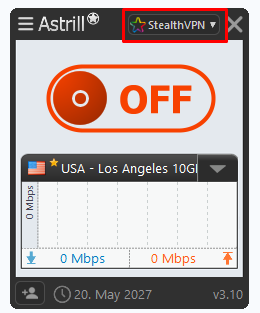
StealthVPN is Astrill’s proprietary protocol. It is inspired by OpenVPN but adds an extra layer of obfuscation that makes VPN traffic much harder for automated firewalls and DPI systems to identify. That targets the biggest weakness of standard protocols: their recognizable fingerprint.
StealthVPN works over both UDP and TCP. Fast (UDP) mode is the default and usually gives the best speed. If a network throttles or blocks UDP, switching to Reliable (TCP) mode often brings back a stable connection.
A note for iPhone and iPad users: protocol options depend on the app you use. The Astrill iOS app offers only UDP and TCP, and it does not let you choose a specific protocol. The Android app is more flexible and lets you select from different protocols, including StealthVPN. If you are on iOS, switching between UDP and TCP is your main way to adjust the connection when a network starts blocking or throttling it.
Flexible Port Selection
Port blocking only works if your VPN is stuck on a predictable port. With StealthVPN, you can pick from the full port range, so if one combination gets blocked, you simply try another. You can run the connection on TCP 443 so it sits alongside regular HTTPS traffic, or on UDP 53, the port used for DNS. Networks rarely block those without breaking everyday services.
OpenWeb for Fast Browsing
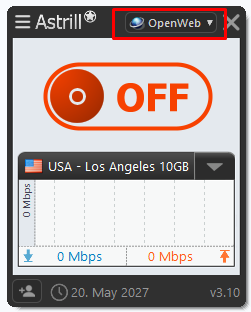
Astrill also offers OpenWeb, a lightweight proprietary protocol based on TCP. It is designed to perform well in heavily censored countries, and its traffic resembles regular web browsing, making it hard for DPI systems to single it out.
Smart Mode for Selective Routing
Smart Mode is Astrill’s answer to the full tunneling problem. When it is on, international websites travel through the VPN while local websites load directly with your real local IP. In practice, that means:
- Blocked foreign sites and services reach you through the encrypted tunnel.
- Local banking, payment, news, and streaming services see a normal domestic connection.
- Local browsing stays quick because it does not route abroad first.
For finer control, Astrill also offers Site Filter and Application Filter, which let you decide exactly which websites or apps use the tunnel and which connect directly.
What to Try When a Connection Is Blocked
If Astrill fails to connect on a restrictive network and you need to bypass VPN blocks, work through this order:
- Switch to StealthVPN if you are on a standard protocol. This option is available in the Android app, not the iOS app.
- Toggle between UDP and TCP. On iPhone and iPad, this is the main connection setting you can change.
- Change the port, starting with TCP 443 or UDP 53.
- Try a different server location.
- Turn on Smart Mode if local apps or sites stop working while you are connected.
How Obfuscation Helps Disguise VPN Traffic
Obfuscation is the answer to DPI. Its job is not to add more encryption. Its job is to change how the traffic looks, so filtering systems cannot easily classify it as VPN traffic.
Obfuscation techniques vary, but most combine a few of these:
- Scrambling protocol signatures so the handshake no longer matches known VPN patterns.
- Wrapping VPN traffic in a layer that resembles ordinary encrypted web traffic, such as HTTPS on port 443.
- Adjusting packet characteristics to avoid the patterns DPI tools look for.
- Running connections on ports that networks cannot block without breaking normal services.
The logic is simple. A censor can afford to block a VPN protocol. It cannot easily afford to block all HTTPS traffic, because banks, businesses, government portals, and everyday apps depend on it. The closer VPN traffic looks to normal web traffic, the more expensive it becomes to block.
Obfuscation is not magic, and no method works forever. Filtering systems get updated, and providers respond with updates of their own. That ongoing back-and-forth is why protocol choice and port flexibility matter as much as the obfuscation itself.
Full Tunneling vs Selective Routing
Once the tunnel is working, the next question is what should travel through it. This is the core of the split tunnel vs full tunnel choice.
Full Tunneling
With full tunneling, every app and website on your device uses the VPN. This gives you the most consistent privacy, since nothing slips out through your regular connection. It is the safer default on public Wi-Fi or whenever privacy is the priority.
The trade-off in restricted countries is practical. Local services often expect a local IP address. Domestic banking apps, payment platforms, delivery apps, and government portals may block foreign IPs, flag the login as suspicious, or load slowly because every request takes a detour abroad and back.
Selective Routing
Selective routing, often called split tunneling, sends only part of your traffic through the VPN while the rest uses your normal connection. In a restricted country, the usual setup looks like this:
- Blocked international sites and apps go through the VPN tunnel.
- Local sites and services connect directly through your ISP with your real local IP.
This removes most of the friction of full tunneling. Local banking and payment services see a normal domestic connection. Foreign sites load through the tunnel. Local content skips the unnecessary international round trip, so it stays fast.
The trade-off is that traffic outside the tunnel is not protected by the VPN and stays visible to your ISP as usual. For many people on restricted networks, that is a fair balance. Blocked and sensitive traffic goes through the tunnel, and routine local traffic stays local.
Final Thoughts
Routing in a restricted country is a contest between two systems. The censor tries to filter traffic by its destination, its port, and its shape. A VPN hides the destination inside an encrypted tunnel, and obfuscation hides the tunnel itself.
Standard VPN routing handles the first job well but often fails the second. That is why protocol choice, port flexibility, and smart routing matter so much on heavily filtered networks. With StealthVPN for obfuscated connections and Smart Mode for selective routing, Astrill VPN helps you stay connected to the wider internet without losing access to the local services you rely on every day.
FAQs
VPN routing is the process of sending your internet traffic through an encrypted tunnel to a VPN server before it reaches its destination. Websites see the VPN server’s IP address, and your ISP cannot see which sites you visit.
Yes. Standard VPN protocols can be identified through deep packet inspection, known ports, and blocklisted server IPs. Obfuscated protocols like StealthVPN are designed to make that detection much harder.
A regular VPN encrypts your traffic, but the connection can still look like VPN traffic. An obfuscated VPN also disguises the connection itself, so firewalls have a harder time recognizing and blocking it.
Full tunneling offers the most privacy. Split tunneling is often more practical, since it keeps local banking and payment apps working on your local IP while blocked foreign sites go through the VPN. Many users switch between the two depending on the task.
No. The Astrill iOS app lets you choose between UDP and TCP only. If you need to pick a specific protocol such as StealthVPN, the Android app offers that option.
Some slowdown is normal because your traffic takes an extra stop and gets encrypted. Choosing a nearby server, using UDP where it works, and enabling selective routing for local services can keep the difference small.

Secure your privacy instantly. Try AstrillVPN with zero risk.
About The Author










No comments were posted yet