




How do you stream FuboTV outside the US? [Updated]

![How do you stream FuboTV outside the US? [Updated]](https://www.astrill.com/blog/wp-content/uploads/2024/05/How-do-you-stream-FuboTV-outside-the-US-in-2024-800x470.jpg)
If you’re a sports fanatic who wants to catch all the action on Fubo TV outside the US as you’re heading out of the country for a while then don’t worry. With a few simple steps, streaming FuboTV outside the US is totally doable in 2024. Whether traveling for work or taking a dream vacation, you don’t have to miss a single game.
In this guide, you’ll learn how to access FuboTV anywhere using AstrillVPN. We’ll walk through everything from choosing the best VPN for streaming to setting it up on your devices. Soon you’ll be cheering on your favorite teams from anywhere in the world. Keep reading to learn how to watch FuboTV outside the US easily.
Table of Contents
Why Do You Need a VPN to Stream FuboTV Outside USA?
Without a VPN, FuboTV will detect you’re outside the US and block you from streaming due to geo-restrictions. It will display the message saying “ fuboTV content is currently not available in your location.”
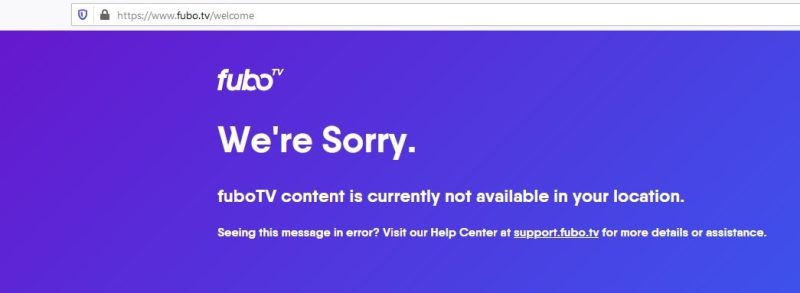
Due to licensing restrictions, FuboTV is only available in the US, Spain and Canada. To access FuboTV outside these locations, you must spoof your location using a VPN or virtual private network. A VPN masks your real IP address, making it appear like you’re accessing the internet from the US, so you can stream FuboTV just like you would if you were actually in US, Spain or Canada.
How to Watch FuboTV Without Cable?
FuboTV offers over 100 channels to stream live without a cable subscription. To access FuboTV, you must sign up for a subscription on their website or app.
Once subscribed, you can stream FuboTV on a variety of devices:
- On your computer via the FuboTV website
- On your phone or tablet with the FuboTV app (available for iOS and Android)
- On streaming devices like Roku, Fire TV, Chromecast, and Apple TV
- Some smart TVs offer the FuboTV app as well.
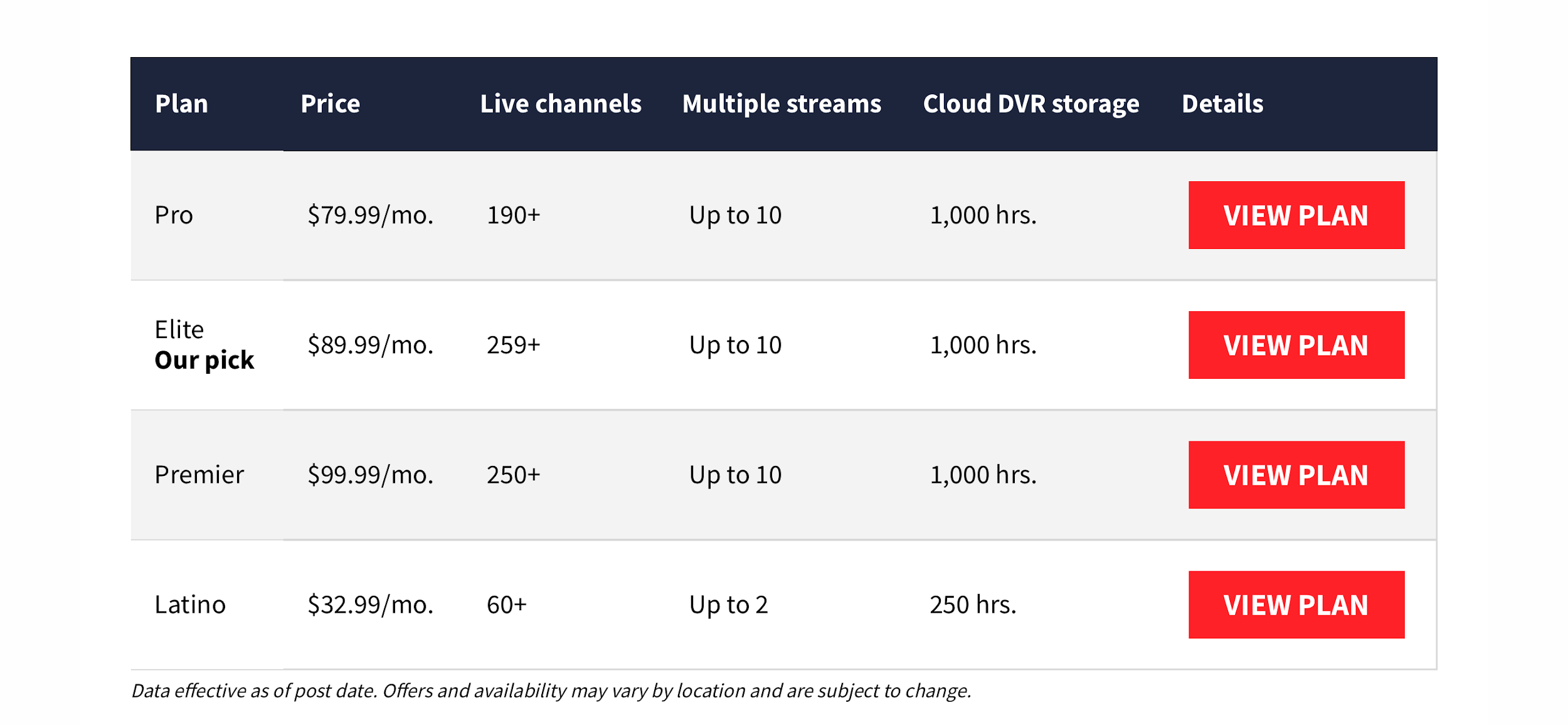
- The FuboTV Pro plan starts at $79.99/month for over 183 channels and 100 sporting events, with 1000 hours of cloud DVR storage. Add-on packages are available for sports, news, and more.
- The Fubo TV Elite plan starts at $89.99/month and offers over 254 channels and 130+ events in 4K. Fubo Extra offers 58 more channels.
- Fubo Premier plan starts at $99.99/month for over 263 channels of 130+ events in 4K.
Watch live sports on Fubo TV, news, and entertainment channels without the need for a cable subscription. You can stream live TV or record shows to watch later with the Cloud DVR feature. FuboTV offers a free 7-day trial to see if you like the service. After the trial, you can cancel anytime.
How to stream FuboTV Outside the US with AstrillVPN?
To stream FuboTV outside the US, you’ll want to use a VPN or virtual private network. A VPN masks your real IP address and tricks FuboTV into thinking you’re accessing the service from within the US.
- AstrillVPN works best with streaming services.
- Get a subscription and install the AstrillVPN app on your device.
- Register or sign in with credentials.
- Connect to a US VPN server. In the VPN app, choose a server located in the US. This will make FuboTV think you’re accessing it from within the US.
- Launch the FuboTV app or website.
- With the VPN running and connected to a US server, open the FuboTV app on your streaming device or visit fubo.tv in your browser.
- You should now be able to stream FuboTV as usual, even outside the US!
Bypass Geo-Blocks – Get AstrillVPN for FuboTV
How to Watch Fubo TV on PC or Mac?
To stream fuboTV on your computer, you must use a VPN. A VPN masks your real IP address and tricks websites into thinking you’re accessing them from the US.
Once you have a VPN, here are the steps:
- Sign up for a fuboTV account and subscription. You’ll have to provide a valid US billing address.
- Download AstrillVPN app on your PC or Mac and install it.
- Login with credentials and connect to a US server.
- Visit fuboTV.com and log in to your account. Your IP address will appear within the US, allowing you to access the service.
- Browse through fuboTV’s channel packages and add-ons to choose a subscription. They offer plans with major sports channels, such as NBA TV and NFL Network.
- Stream live TV or on-demand content from channels in your subscription. You’ll have access to the full fuboTV library of sports, news, and entertainment.
Related Article: Fubo vs YouTube TV: Which Streaming Service is Right for You?
How to watch Fubo TV on Smartphone or Tablet?
- To stream FuboTV on your mobile device, download the FuboTV app for Android or iOS on your smartphone or tablet.
- Download AstrillVPN app on your smartphone or tablet and connect to a US server.
- Once installed, open the app and login with your FuboTV credentials. Your full channel lineup and on-demand library will be available to stream live or on-demand.
- The FuboTV mobile app provides the same features as the desktop experience. You’ll have access to FuboTV’s live TV guide to see what’s currently airing and what’s coming up.
The FuboTV mobile app allows you to stream on the go wherever you have a WiFi or cellular data connection. You can pick up live streams or resume on-demand playback from where you left off on another device.
How to stream Fubo TV on Smart TV?
- To access FuboTV on your smart TV, you’ll first need to make sure you’re connected to strong Wi-Fi or Ethernet as streaming live TV requires a lot of bandwidth.
- Download AstrillVPN app on your smart TV and connect to a US server
- Simply download the FuboTV app on your smart TV. The FuboTV app is available on most major streaming platforms like Roku, Apple TV, Amazon Fire TV, Android TV, and Samsung Smart TV.
- Once you’ve downloaded the FuboTV app, open it, select “Sign In” and enter your FuboTV account information.
- Your FuboTV subscription will work across devices, so you can use the same login info you use on your phone, tablet or computer. Browse through the channel guide to see what’s on, or search for a specific show, movie or sports team. You can also pick up watching where you left off on another device.
How to watch Fubo TV on Amazon Firestick?
- To stream FuboTV on your Firestick, you must install the FuboTV app from the Amazon Appstore.
- Once installed, sign in with your FuboTV credentials or create a new account. The FuboTV app has a simple interface that makes it easy to find your favorite sports, news and entertainment channels.
If you’re outside the US, you must use a VPN to access FuboTV. Here are the steps:
- Sign up for AstrillVPN and download the app on your Firestick.
- Connect to a US server location like New York or Chicago.
- Sign in to your FuboTV account or create a new one.
- Enjoy watching FuboTV on your Firestick anywhere!
How to watch Fubo TV on a gaming console?
- To stream FuboTV on your gaming console, you’ll need to download the FuboTV app. FuboTV is available on Xbox One, Xbox Series X|S, PlayStation 4, and PlayStation 5.
- Get AstrillVPN which works on routers.
- Install AstrillVPN on your router. This lets your gaming consoles use your VPN connection. AstrillVPN has a router app, and it takes minutes to set up.
- Once you’ve downloaded the FuboTV app, you’ll sign in with your FuboTV account credentials. If you don’t have an account yet, you can sign up using the app. FuboTV offers over 100 channels streaming live TV, including sports networks like NFL Network, NBA TV, and MLB Network.
- After signing in, the interface will look very similar to the FuboTV mobile and web apps. You’ll see the full channel guide to browse live TV by genre, recently watched channels, and your custom favorites list.
Why AstrillVPN is best for Fubo TV 2024?
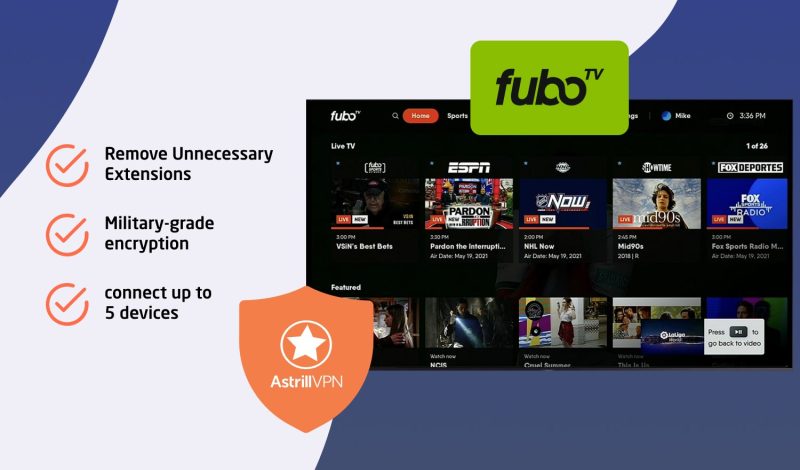
To access FuboTV outside the US, you’ll need a VPN. AstrillVPN is one of the best options for streaming FuboTV abroad.
- Its fast speeds are ideal for streaming live sports and events. It also has servers in over 58 countries, so you can choose a location near you for the best performance.
- AstrillVPN uses military-grade encryption to hide your online activity and location. This allows you to bypass FuboTV’s geo-restrictions and access your account from anywhere. You’ll get full access to FuboTV just like you would at home in the US.
- With AstrillVPN, you can connect up to 5 devices at once. So you can stream FuboTV on your phone, tablet, laptop, and more, all at the same time. AstrillVPN offers apps for iOS, Android, Windows, and Mac so you can use it on almost any device.
If you travel frequently or live abroad, AstrillVPN is a great companion for streaming FuboTV. It provides fast, reliable connections and robust security so you can enjoy FuboTV wherever you are. For uninterrupted streaming in 2024 and beyond, AstrillVPN is your best choice.
How to Watch FuboTV on Roku
Roku does not support VPN apps directly. Unlike Fire TV or Android TV, you cannot download a VPN from the Roku Channel Store, which means you need to route your VPN connection through your router or a Windows PC acting as a hotspot. Both methods work; choose whichever suits your setup.
Method 1: Install AstrillVPN on Your Router
This is the most reliable long-term solution. Once AstrillVPN is running on your router, every device connected to that Wi-Fi network, including your Roku, automatically gets a VPN connection.
- Log in to your router’s admin panel. This is usually done by entering 192.168.1.1 or 192.168.0.1 in your browser.
- Check whether your router supports VPN client mode. Most routers running DD-WRT, OpenWrt, or ASUS Merlin firmware do. Consult your router’s manual if you are unsure.
- Follow AstrillVPN’s router setup guide to configure the VPN on your router and connect to a US server.
- Once connected, make sure your Roku is connected to the same Wi-Fi network as the router.
- Open the FuboTV channel on your Roku. Your traffic will now route through AstrillVPN’s US server automatically.
Method 2: Share AstrillVPN from a Windows PC as a Hotspot
If your router does not support VPN configuration, you can use a Windows PC as a virtual router instead.
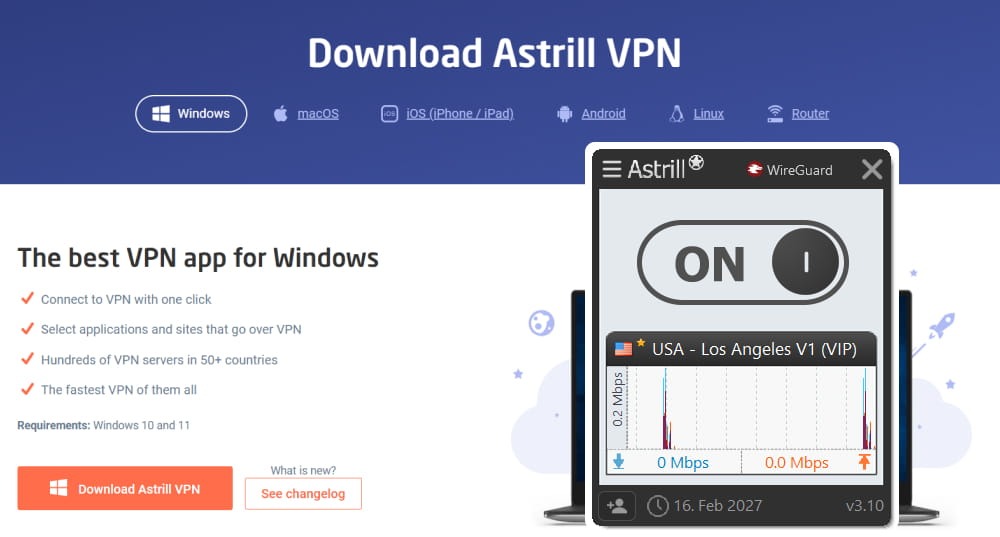
- Install AstrillVPN on your Windows PC and connect to a US server.
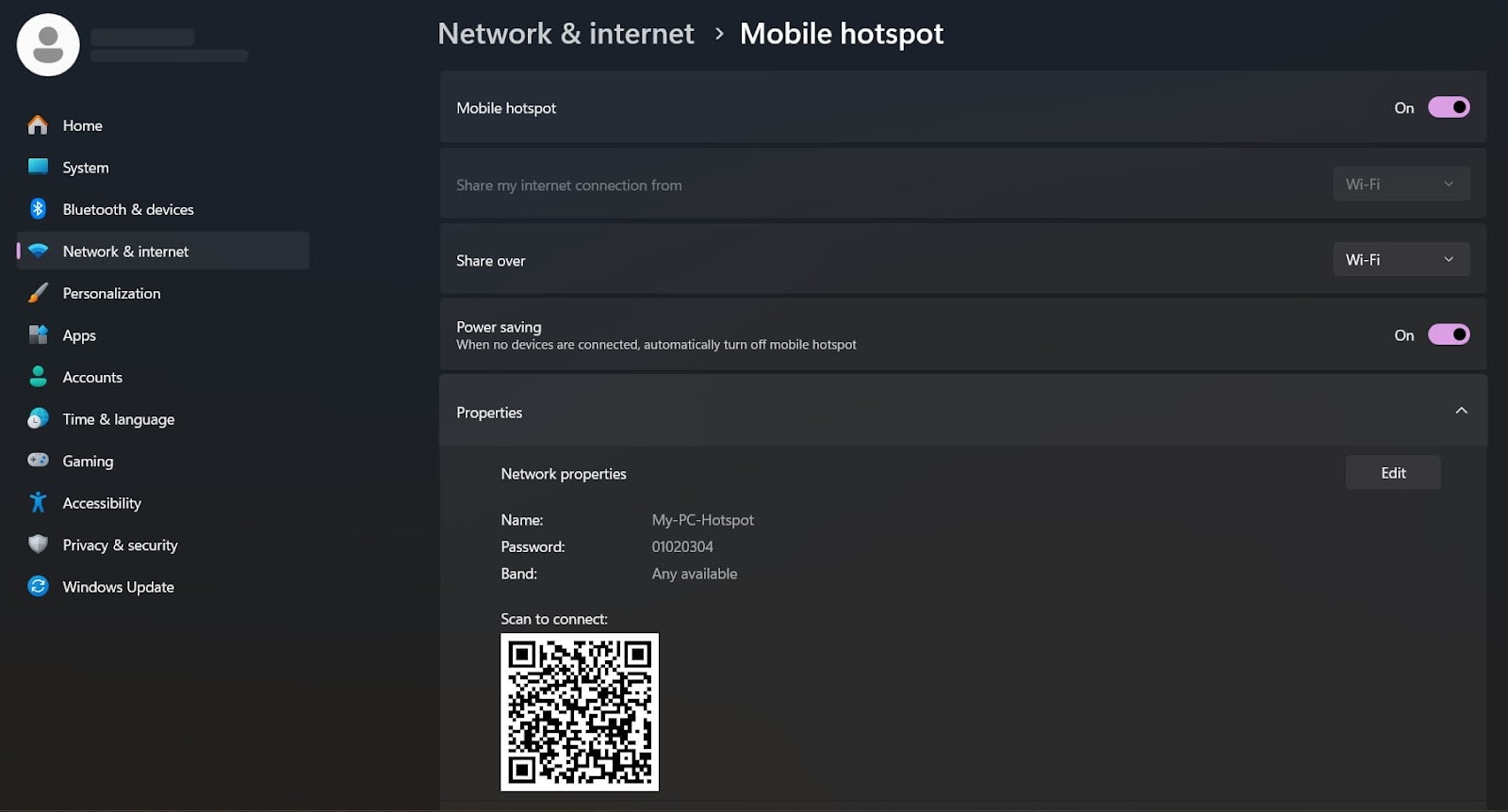
- Go to Settings, then Network and Internet, then Mobile Hotspot.
- Toggle on Mobile Hotspot and note the network name and password.
- On your Roku, go to Settings, then Network, then Wireless, and connect to the hotspot you just created.
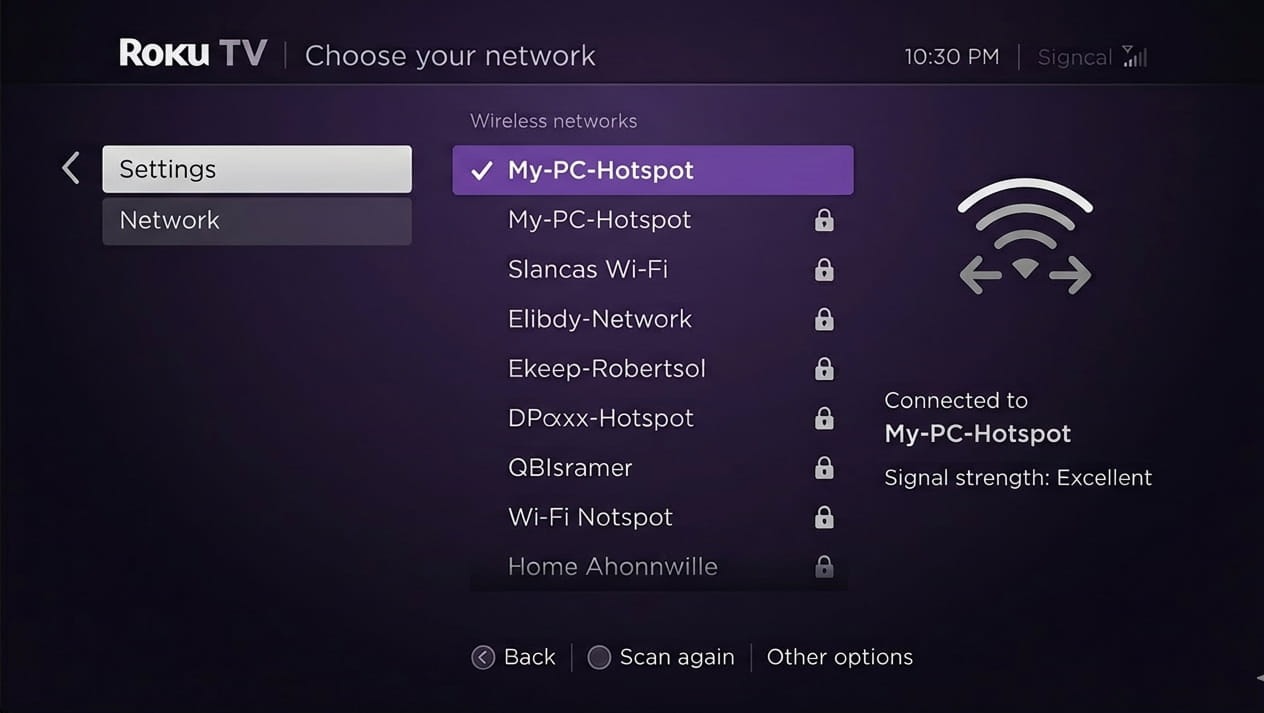
- Open FuboTV on your Roku. Your Roku is now using the VPN connection shared from your PC.
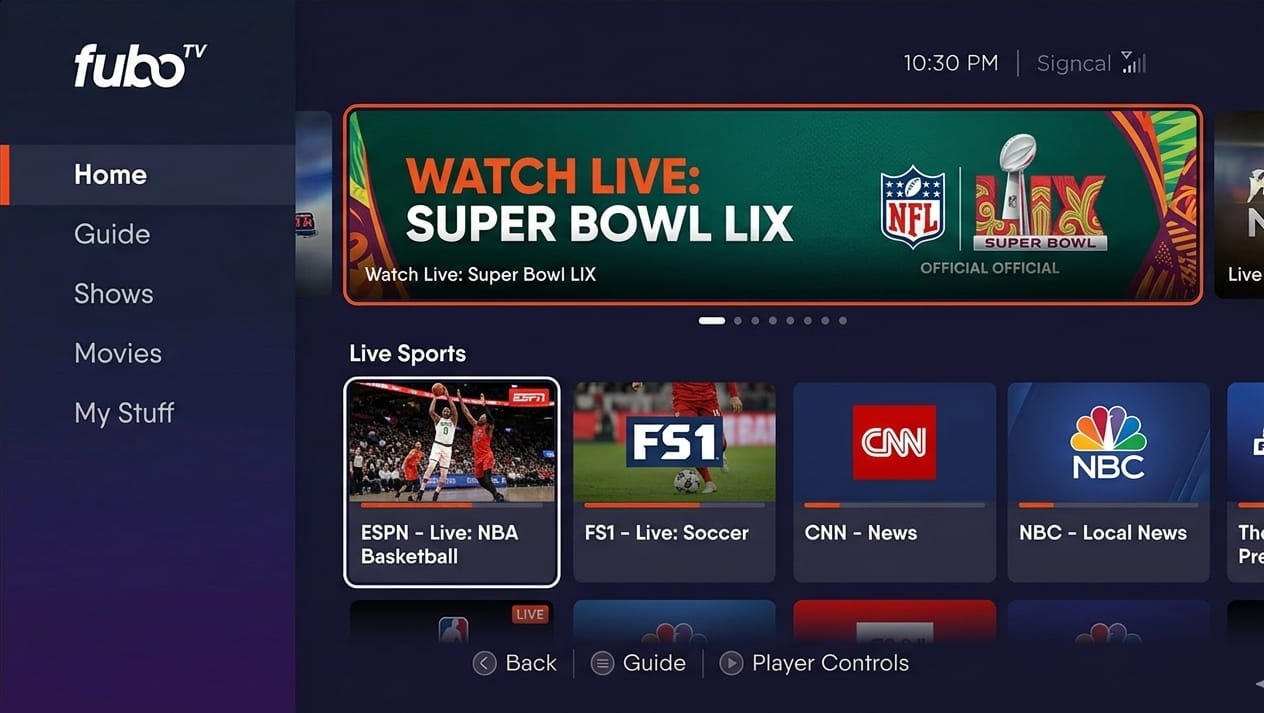
Note: Your PC needs to stay on and connected to AstrillVPN for as long as you are streaming on Roku.
How to Watch FuboTV on Apple TV
Apple TV now supports native VPN apps, which makes the setup straightforward compared to devices like Roku.
- On your Apple TV, open the App Store.
- Search for AstrillVPN and install the app.
- Open AstrillVPN, sign in with your credentials, and connect to a US server.
- Once connected, open the App Store on your Apple TV again and search for FuboTV.
- Download and install the FuboTV app.
- Sign in to your FuboTV account and start streaming.
Keep AstrillVPN running in the background the entire time you are watching. If you disconnect the VPN mid-session, FuboTV will detect your real location and block the stream.
How to Choose the Best VPN for Streaming fuboTV in 2024?
Finding a VPN that works seamlessly with streaming services can be tricky, but some stand out. When selecting a VPN for accessing fuboTV abroad, consider these factors:
- Reliability and speed are key. Look for a VPN with fast servers located near you that can handle HD streaming without buffering or lagging. Check reviews to see real users’ experiences accessing fuboTV.
- Strong security and privacy are important. Choose a VPN with robust encryption, a no-logging policy, and software that protects your data. Your viewing habits and personal info should remain private.
- The best VPNs offer apps for streaming devices like Fire TV, Android TV, Apple TV, Mac, Windows, iOS and Android. That way you can enjoy fuboTV wherever and whenever.
- If you run into issues accessing fuboTV or using the VPN, responsive 24/7 live chat support will quickly get you back up and streaming.
A VPN that checks all these boxes will provide a seamless experience streaming fuboTV internationally.
Where Is FuboTV Available?
FuboTV is currently available in the US, Canada, and Spain. In the US, FuboTV offers over 100 channels, depending on your chosen package. The base fuboTV plan includes major broadcast networks like ABC, CBS, FOX, and NBC along with cable channels like ESPN, FS1, NBCSN and more. FuboTV’s Sports Plus add-on includes NFL RedZone, NBA TV, MLB Network, and NHL Network.
In Canada, fuboTV offers a similar mix of sports, news, and entertainment channels, including TSN, Sportsnet, CBC, CTV, and Global. The FuboTV base plan in Canada starts at $24.99/month.
FuboTV launched in Spain in early 2020 and offers around 50 live channels including beIN Sports, DAZN, Movistar Deportes, and Real Madrid TV. fuboTV’s Entertainment Plus add-on also includes AMC, AXN, and FOX Life. Monthly plans in Spain start at $32.99.
While fuboTV isn’t available everywhere yet, it continues expanding into new markets. More countries in South America and Europe are likely on the horizon, so keep an eye out; your country could be next!
How to Sign Up for FuboTV from Outside the US
FuboTV requires a US payment method to complete sign-up. A card issued by a non-US bank will be declined at checkout, which stops many international readers before they even get to the streaming step. Here are two ways around it.
Option 1: Use a Virtual US Prepaid Card
Services like StatesCard and Wise allow you to create a virtual prepaid card with a US billing address. You load the card with funds and use it at checkout exactly like a regular debit card.
- Sign up for StatesCard or Wise and create a virtual US card.
- When registering the card, use a US address. You can use any valid US address, such as the address of a hotel or a publicly listed commercial address in the same state as the VPN server you plan to use.
- Connect AstrillVPN to a US server, then go to fubo.tv and begin the sign-up process.
- Enter the virtual card details and the US billing address you registered it with.
- When prompted for a ZIP code during sign-up, use one that matches the VPN server’s location.
Option 2: Use PayPal with a US Address
If you have a PayPal account, you can add a US address to it and use PayPal as your payment method at FuboTV checkout. PayPal is accepted by FuboTV and does not always require the underlying card to be US-issued.
- Log into your PayPal account and add a US address under your account settings.
- Connect AstrillVPN to a US server and go to fubo.tv.
- Proceed through sign-up and select PayPal at the payment step.
- Complete the payment through PayPal using your US address.
How to Watch FuboTV on Chromecast
The setup varies depending on which Chromecast generation you have.
Chromecast with Google TV (4K or HD)
Newer Chromecast devices running Google TV have the Google Play Store built in, which means you can install AstrillVPN directly on the device.
- On your Chromecast with Google TV, open the Google Play Store.
- Search for AstrillVPN and install it.
- Open AstrillVPN, sign in, and connect to a US server.
- Search for FuboTV in the Play Store, install it, and sign in to your account.
- Start streaming. Keep AstrillVPN running throughout your session.
Original Chromecast (1st, 2nd, or 3rd Generation)
Older Chromecast dongles do not run Google TV and do not support app installations. For these devices, you cast FuboTV from your phone or laptop, so your VPN needs to be active on the casting device, not the Chromecast itself.
- Install AstrillVPN on your iPhone, Android phone, or laptop.
- Connect AstrillVPN to a US server.
- Open the FuboTV app on your phone or the FuboTV website in Chrome on your laptop.
- Tap the cast icon in the FuboTV app or in your Chrome browser, and select your Chromecast device.
- Make sure your phone or laptop and your Chromecast are connected to the same Wi-Fi network for casting to work.
How Much Does FuboTV Cost per month?
The FuboTV base package, Fubo Starter, starts at $79.99 per month. It offers over 125 channels to choose from, including major broadcast networks like ABC, CBS, FOX, and NBC in most areas.
Why isn’t my VPN working with FuboTV?
FuboTV actively blocks many popular VPN services to prevent access outside the US. They can detect when you’re using a VPN and block your connection. There are a few reasons why your VPN may not be working:
- Your VPN service isn’t stealthy enough. Streaming services easily detect many VPNs. You’ll need a VPN that can mask your traffic and avoid detection.
- Cache or cookies need to be cleared so that loading and formatting issues on website don’t occur.
- It’s possible that protocol may not be the best one for that particular server so you can try connecting to another one.
- Your VPN’s IP addresses are blacklisted. FuboTV frequently bans IP addresses associated with VPN use. Switching to a VPN with many IPs or dedicated streaming IPs can help.
- Your VPN isn’t fast enough. If your VPN slows your connection too much, FuboTV may think you have a weak internet connection and block your access. Choose a VPN with fast speeds to stream FuboTV smoothly.
- You’re using the wrong VPN protocol. Some protocols like PPTP are easier to detect. Try using OpenVPN or IKEv2 for the best chance of accessing FuboTV.
Fubo GPS Detection and ZIP Codes
Connecting to a US VPN server changes your IP address, but it does not always change everything FuboTV checks. On mobile devices, FuboTV’s app reads your device’s GPS location directly, not just your IP. So if your phone’s GPS says you are in London while your IP address says you are in New York, FuboTV catches the mismatch and blocks access.
To fix this on Android, you need to enable Developer Options, install a mock location app, and set it to a US city that matches your VPN server. On iPhone, iOS restricts GPS spoofing more tightly, so the more reliable fix is to disable location permissions for the FuboTV app entirely. Go to Settings, find FuboTV, tap Location, and set it to Never. With location access removed, the app falls back to using your IP address, which your VPN is already handling.
The ZIP code issue is separate but equally important. FuboTV ties your content library, including regional sports networks and local broadcast channels, to the ZIP code registered on your account. Changing your IP to a US address is not enough if your account ZIP code is blank or set incorrectly, because FuboTV uses it to determine which channels you receive.
How to Update Your ZIP Code on FuboTV
- Log into your FuboTV account and go to Settings.
- Select the Location tab.
- Click Change Location and enter a valid US ZIP code that corresponds to the region your VPN server is in. For example, if you are connected to a New York server, use a New York ZIP code such as 10001.
- Save the changes.
Is Fubo tv free with Amazon prime?
FuboTV is not included for free with Amazon Prime. However, there are some ways you can access FuboTV content through Amazon’s services:
1 Fubo Sports Network on Amazon Freevee:
While a full FuboTV subscription isn’t included with Amazon Prime, you can watch the Fubo Sports Network for free on Amazon Freevee. This network offers live sports events, original shows, and content from various partners .
2. Fubo TV subscription:
To access the full range of FuboTV channels and features, you need to subscribe to FuboTV separately. FuboTV is a streaming service that started with a focus on soccer but has since expanded to include a wide variety of sports and other channels. It offers over 220 live channels, extensive cloud DVR storage, and a user-friendly interface
3. Amazon Prime Video Channels:
Currently, only the Fubo Sports Network is available through Amazon Prime Video Channels. This means you can’t add the full FuboTV service to your Amazon Prime subscription, but you can still enjoy some sports content through this channel.
Alternatives to FuboTV
If you’re looking for other options, consider these alternatives:
- Hulu+ Live TV Offers a mix of live and on-demand content with customizable channel packages.
- Sling TV provides a variety of channel packages to suit different preferences and budgets.
Can I use a free VPN to watch FuboTV?
Using a free VPN to access FuboTV outside the US is not recommended. Free VPN services often lack the security, speed, and reliability to access streaming services consistently. They may work initially, but FuboTV actively works to block VPNs, and is likely to block most free VPN IPs.
Paid VPN services that explicitly state they work with FuboTV are the best choice. They offer faster speeds more servers, and regularly rotate their IPs to avoid blocking – all necessary for accessing FuboTV abroad. While free VPNs may seem appealing for accessing streaming services, they frequently prove disappointing. It’s worth investing in a reputable paid VPN to ensure you can enjoy FuboTV without frustrating buffering, lag, or content blocks.
FAQs
No, FuboTV offers paid streaming service. They do offer a free 7-day trial though.
Yes, Fubo’s base plan, Fubo Standard, includes AMC, A&E, FX, FXX, and other channels.
FuboTV allows you to stream on up to two devices simultaneously on the same network. You can also set up to six profiles for family members. However, according to their terms of service, streaming from locations outside your home network is prohibited.
It depends on your needs. FuboTV focuses on live sports while YouTube TV has more entertainment and news channels. FuboTV also allows up to 500 hours of cloud DVR compared to YouTube TV’s unlimited storage. YouTube TV may have a slight edge due to its larger channel lineup and unlimited DVR.
Conclusion
With these tricks, you can unlock your FuboTV account and enjoy all your favorite sports, shows, and movies, no matter where you are in the world. A VPN is the key that opens the door to streaming freedom. Just sign up, download the app, connect to a US server, and watch March Madness from Madrid or the Super Bowl from Sydney in no time. And the best part? It’s easy, affordable, and legal. So what are you waiting for? Stop letting geo-restrictions dictate what you can watch. Take control of your entertainment options and start streaming FuboTV worldwide today!

Secure your privacy instantly. Try AstrillVPN with zero risk.
About The Author










No comments were posted yet