




Why Some Apps Stop Working With a VPN and How App Filtering Helps?

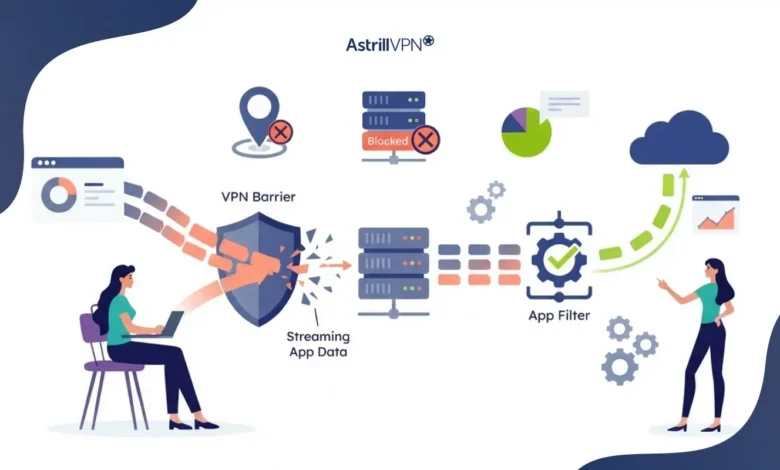
A Virtual Private Network (VPN) is generally used to redirect how internet traffic is delivered to online services, but sometimes that redirection may affect the behavior of individual apps. For instance, a banking application could deny a login, a video service might prevent content from playing, a game might disconnect, or even a local card payment app might stop functioning altogether.
Variations in this kind of behavior do not necessarily reflect a malfunction in the VPN itself. A particular app or service might be picking up the IP address of a different geographic location on a VPN server and reacting accordingly; you may be supposed to stay on your local network, or it could be a routing issue the software can’t navigate.
Such a situation presents a real challenge: you probably don’t want to run a bunch of apps and services on your device all through the same VPN connection, since that would restrict some features. The good thing is, the VPN app filtering or split tunneling feature allows you to keep most of the privacy and security advantages while using the VPN.
Table of Contents
Why Do Apps Block VPNs?
Apps can restrict or behave differently when a VPN is active for several technical and business-related reasons. A VPN changes the public IP address that a service sees and can also alter the apparent location and network path of your connection.
For some services, these changes are enough to trigger additional security checks or compatibility problems.
1. The App Detects a Known VPN IP Address
One of the most common reasons apps don’t work with a VPN is IP address detection. VPN services generally route traffic through servers whose IP addresses may be shared by many users. Some websites and applications maintain databases of IP addresses associated with VPNs, proxies, data centers, or other anonymizing services.
When an app sees a connection coming from one of these addresses, it may:
- Block the connection completely
- Request additional verification
- Temporarily restrict account access
- Prevent certain features from loading
- Display a location or network error
This is particularly relevant to financial services, streaming platforms, gaming services, and websites that enforce geographic restrictions. Importantly, an IP address being associated with a VPN does not automatically mean the connection is malicious. It simply means the service has characteristics that differ from those of a typical residential connection.
2. Location Mismatch Can Trigger Security Checks
Many applications use your IP address as one of several signals for determining your approximate location. When you connect to a VPN server in another city or country, the application may see the VPN server’s location instead of your actual network location.
For example, imagine you normally access a payment application from Pakistan. If your VPN connection routes your traffic through a server in another country, the payment service could see a foreign IP address.
That can create a mismatch between:
- Your account’s normal location
- Your IP address
- Your device location
- Your billing information
- Your recent login history
A financial service may treat this as an unusual login and require additional verification. This is one reason simply disconnecting the VPN is often the quickest workaround. However, constantly turning the VPN off is inconvenient and leaves other applications unprotected.
3. Some Services Require a Local IP Address
Certain apps are designed around local or regional connectivity. Banking and payment applications are common examples. A service may expect connections from particular geographic regions, while local streaming platforms may deliver content based on the user’s domestic IP address.
The same issue can occur with:
- Local government services
- Regional news platforms
- Local payment systems
- Workplace applications
- Internet service provider applications
- Regional streaming services
If only one application requires your normal connection, there is little reason to disable the VPN for every other application. Split tunneling allows you to separate those traffic paths.
4. VPN Routing Can Interfere With the App
A VPN does more than change your IP address. Depending on its configuration, it can route an application’s traffic through a different server before it reaches its destination. Most applications work normally with this arrangement, but some are sensitive to network routing.
For example, an application might depend on:
- A particular network route
- A local server
- A corporate network
- A specific DNS configuration
- Local-device discovery
- Direct communication with another device
5. Local-Network Apps May Need Direct Connectivity
Some applications communicate with devices on the same local network. Smart-home applications, printers, media devices, casting tools, file-sharing applications, and certain business systems can depend on local network discovery.
Routing their traffic through a VPN may interfere with that communication. This is different from an application deliberately blocking VPNs. In some cases, the app simply needs access to a local device that is not reachable through the VPN’s routing configuration.
When Should You Use App Filtering?
App filtering is particularly useful when:
One application fails while everything else works
There is little reason to disable the VPN for your entire device when only one application has a compatibility problem.
A local service requires your normal region.
Local payment, banking, government, or streaming services may work better when they see your regular IP address.
A game requires lower latency.
If routing through the VPN introduces noticeable latency, excluding the game can allow it to connect directly.
A local-network app cannot find your devices.
Excluding the relevant application may restore communication with devices on your local network.
You only need VPN protection for specific applications
You can use the reverse configuration and tunnel only selected apps rather than routing everything through the VPN.
Which Apps Are Commonly Affected by VPN Connections?
Not every application reacts to VPNs in the same way. Problems tend to appear most often in applications where IP address, location, latency, authentication, or network discovery matters.
Banking and Financial Apps
Banking applications may use IP addresses, device information, location signals, and login history as part of their security systems. A VPN can therefore result in an unusual login warning, additional authentication, or restricted functionality.
If a banking application consistently works only after disconnecting the VPN, routing that particular application outside the tunnel can be a practical solution. However, bypassing the VPN means the application’s traffic will no longer receive VPN protection. You should therefore continue using the bank’s official app, enable MFA where available, keep your device updated, and avoid untrusted networks.
Payment and Local-Service Apps
Digital wallets and payment applications can have similar requirements. Some services are closely tied to a particular country or network environment. A foreign VPN IP can make the connection appear inconsistent with the user’s normal location.
For these applications, excluding the payment app from the VPN can allow it to connect through the regular ISP connection while other applications remain tunneled.
Streaming Services
Streaming platforms frequently use geographic information to determine which content should be available to a user. A VPN can change the apparent region of the connection. A service may consequently display different content, request verification, or block playback.
There is another complication: streaming platforms can distinguish between residential IP addresses and IP addresses associated with hosting providers or VPN infrastructure. This means changing VPN servers does not always resolve the problem.
If you simply want your local streaming service to use your normal connection while keeping other applications on the VPN, app or site-based filtering can provide a more targeted configuration.
Gaming Applications
Gaming services can be affected by VPNs in several ways. Routing traffic through an additional server can increase latency, which may be noticeable in multiplayer games. A game or gaming platform may also use geographic restrictions, anti-abuse systems, or network checks that react differently to VPN traffic.
For some users, the solution is to keep the game outside the VPN while routing browsers and other applications through it. However, this should be evaluated on a game-by-game basis. Some users may specifically want gaming traffic to run through the VPN for privacy or other networking requirements.
Video-Calling Apps
Video calls are particularly sensitive to latency, packet loss, and connection stability. A VPN adds another network hop, which can sometimes affect call quality, depending on the distance to the VPN server and the quality of the underlying connection.
If a video-calling application performs poorly while everything else works normally, routing only that application directly through your ISP connection may improve its connectivity.
Local-Network and Smart-Home Apps
Applications that communicate with devices on your home network can also encounter problems. For example, a smart-home application may need to discover a device on your Wi-Fi network. A VPN configuration that changes how traffic is routed can interfere with that process.
In these situations, excluding the affected app from the VPN can restore local connectivity without requiring you to disconnect the VPN completely.
What Is VPN App Filtering?
VPN app filtering is a form of split tunneling that lets you decide which applications use the VPN and which applications use your normal internet connection. Instead of using a single setting for your entire device, you can create application-specific routing rules.
There are generally three approaches:
Tunnel All Apps
Every supported application sends its traffic through the VPN. This provides the broadest VPN coverage because applications do not need to be individually added to the tunnel.
Tunnel Only Selected Apps
Only applications that you specifically select use the VPN. Everything else uses your normal internet connection. This approach can be useful if you only need VPN protection for particular applications.
Exclude Selected Apps
Most applications continue to use the VPN, except for those you specifically exclude.
For example:
VPN connection → Browser, messaging app, work tools
Regular connection → Banking app
This setup is particularly useful when one or two applications have compatibility problems, but you still want the rest of your device traffic protected by the VPN.
How VPN Split Tunneling Solves Compatibility Problems?
The biggest advantage of split tunneling is that you do not have to choose between using a VPN and using an application that does not work well with a VPN. Instead, you can separate their connections.
Consider this example:
You have a banking app that rejects your VPN connection.
Without app filtering, your choices might be:
- Disconnect the VPN
- Use the banking app
- Reconnect the VPN afterward
That becomes frustrating if you need to switch frequently.
With split tunneling, you can configure:
Banking app → Regular ISP connection
Browser → VPN
Messaging app → VPN
Other privacy-sensitive applications → VPN
The banking application receives the expected connection, while the rest of your selected traffic remains within the encrypted VPN tunnel.
App Filtering vs. Website Filtering
App filtering and website filtering solve related but different problems. App filtering determines routing based on the application generating the traffic. Website filtering determines routing based on the destination website or IP address.
This distinction matters. Suppose you want your entire browser to use the VPN except for one local website. Website filtering may be more appropriate. But if an entire banking application needs to bypass the VPN, application filtering is generally more direct.
Astrill supports both approaches. Its Application Filter provides options to tunnel all apps, tunnel only selected apps, or exclude selected apps. Its Site Filter provides comparable controls for websites and destinations.
How to Troubleshoot Apps Not Working With a VPN?
Before changing your VPN configuration, it is worth determining what is actually causing the problem.
Check Whether the App Works Without the VPN
Temporarily disconnect the VPN and test the application. If the app immediately starts working, the VPN connection is likely the cause of the problem.
That does not necessarily mean the VPN itself is malfunctioning. The application may simply be incompatible with the VPN’s IP address or routing configuration.
Try a Different VPN Server
If the application works with one VPN server but not another, the issue may be related to the particular server’s IP address or geographic location. For example, an application may reject one VPN IP range while accepting another. Testing a nearby server can also reduce latency.
Check Your App and Device Updates
Compatibility problems can sometimes originate from outdated software rather than the VPN.
Update:
- The affected application
- Your operating system
- Your VPN application
- Network drivers where applicable
Restart the application after making changes.
Check Whether the Problem Is Location-Related
If an application works when connected to your normal network but fails when using a foreign VPN server, a location mismatch may be contributing to the problem. A local VPN server may behave differently, although there is no guarantee that the service will accept any VPN address.
Use Split Tunneling When Only One App Is Affected
If the VPN works correctly for everything else, you may not need to turn it off completely. Instead, use app filtering to route only the problematic application outside the tunnel. This is often the cleanest approach because it limits the exception to the application that actually needs it.
How Astrill’s App Filter Fixes VPN Compatibility Problems?
AstrillVPN Application Filter gives users control over which applications use the VPN connection.
Astrill provides three primary modes:
- Tunnel all apps
- Tunnel only selected apps
- Exclude selected apps
This means you can keep most applications inside the VPN while allowing a specific application to use your normal ISP connection. Astrill Application Filter is available as software for Windows, macOS, Linux, and Android, with support for OpenWeb, OpenVPN, StealthVPN, and WireGuard.
For example, if a local banking application rejects VPN connections, you can place that application in the Exclude selected apps list. The banking app can then connect via the regular internet connection while your browser and other selected applications continue to use Astrill.
Astrill’s documentation also notes an important trade-off: applications excluded from the VPN use the default internet connection, meaning their traffic does not receive the VPN tunnel’s protection. That distinction is important when configuring split tunneling.
Astrill Site Filter for Website-Specific Problems
Not every VPN compatibility problem involves an entire application. Sometimes a particular website or service needs to use your regular connection.
Astrill’s Site Filter lets users create website-specific routing rules. Depending on the protocol, users can tunnel all sites, tunnel selected destinations, or exclude specific destinations. Astrill documents Site Filter support across OpenWeb, OpenVPN, StealthVPN, and WireGuard, with the implementation varying by protocol.
For example, you might want:
Local banking website → ISP connection
International websites → VPN
Browser traffic generally → VPN
This provides more granular control than repeatedly turning the VPN on and off. Astrill also documents an Only International Sites configuration for certain protocols, which is designed to keep local traffic direct while routing international traffic through the VPN.
Security Considerations When Excluding an App From the VPN
Split tunneling is convenient, but it should not be treated as a way to make every application secure. When you exclude an application from the VPN, its traffic uses your regular internet connection.
That means you should consider what information the application handles.
For example, if you exclude:
- A banking app
- A password manager
- A business application
- A messaging platform
- A cloud administration tool
You should understand that those connections are no longer passing through the VPN tunnel. A VPN is only one layer of security. MFA, strong passwords, software updates, device security, secure application design, and account monitoring remain important.
How to Use Astrill’s Application Filter?
The exact interface can vary by operating system and Astrill software version, but the basic concept is straightforward.
Step 1: Open AstrillVPN
Launch the Astrill application and sign in.
Step 2: Open Application Filter
Go to the application’s settings and select Application Filter.
Step 3: Choose a Routing Mode
Select whether you want to:
- Tunnel all apps
- Tunnel only selected apps
- Exclude selected apps
Astrill’s documentation describes these three modes for Application Filter.
Step 4: Add the Problematic Application
If a banking app is incompatible with the VPN, for example, select the banking application under Exclude selected apps.
Step 5: Connect to the VPN
Reconnect to Astrill and test the application. If the VPN route caused the problem, the application should now use the regular connection, while the other applications remain under the VPN configuration.
Conclusion
VPNs can occasionally cause applications to stop working by changing the IP address, geographic location, DNS behavior, or network route used by the application. Banking, payment, streaming, gaming, video calling, and local network apps can be particularly sensitive to these changes. The solution does not always have to be disconnecting the VPN.
VPN app filtering and split tunneling allow you to decide which applications should use the VPN and which should connect directly. This gives you a practical middle ground: applications that require a direct connection can bypass the tunnel, while other traffic continues through the VPN.
The important consideration is what you give up when bypassing the VPN. An excluded application uses the normal connection, so filtering should be applied selectively rather than treating it as a universal compatibility fix.

Secure your privacy instantly. Try AstrillVPN with zero risk.
About The Author










No comments were posted yet