




What Is VPN Passthrough and How Does It Work?

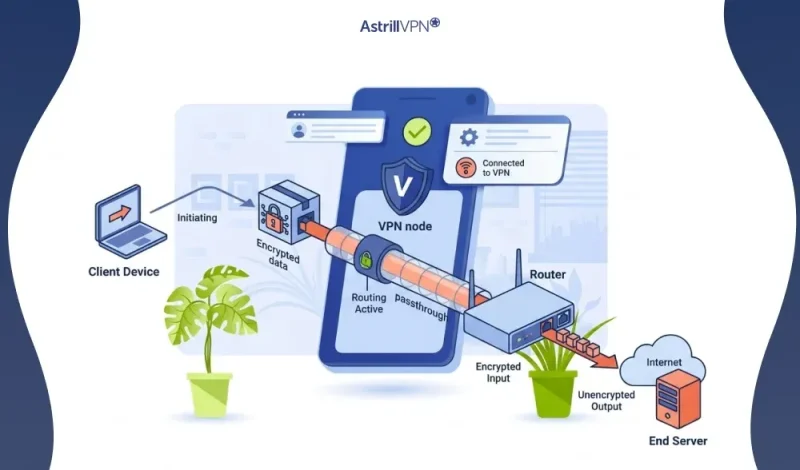
Virtual Private Networks (VPNs) have become an essential tool for protecting online privacy, securing remote work connections, and bypassing network restrictions. When using a VPN behind certain routers or firewalls, users may encounter connectivity issues. This is where VPN passthrough becomes important.
VPN passthrough is a networking feature that allows VPN traffic to pass through a router or firewall without being blocked. It ensures that devices within a private network can establish secure connections to external VPN servers. Understanding how VPN passthrough works, especially with protocols such as IPsec, can help users properly configure their routers and maintain reliable VPN connectivity.
Table of Contents
VPN Passthrough Key Statistics
VPN usage and network security demands have grown significantly in recent years. The following statistics highlight the growing importance of VPN technology and network compatibility features such as VPN passthrough:
- More than 31% of internet users worldwide use a VPN, according to global cybersecurity reports.
- Over 68% of remote workers rely on VPN connections to securely access corporate networks.
- Around 93% of organizations use VPN technology as part of their cybersecurity strategy.
- The global VPN market is expected to exceed $130 billion by 2030, driven by rapid adoption among businesses and individuals.
- Studies show that over 70% of home networks use routers with NAT, which makes VPN passthrough necessary for many connections.
What Is VPN Passthrough?
VPN passthrough is a router feature that allows VPN traffic to move through the router to devices within the local network. Most routers use Network Address Translation (NAT) to allow multiple devices to share a single internet connection. While NAT helps manage network traffic efficiently, it can interfere with certain VPN protocols.
When VPN passthrough is enabled, the router recognizes VPN traffic and allows it to pass through NAT without blocking it. This enables a device such as a laptop, smartphone, or desktop computer to connect securely to a remote VPN server even when it is behind a router. Without VPN passthrough, some VPN protocols may fail to establish connections, especially in home or office networks with multiple connected devices.
How VPN Passthrough Works?
It works by following this process:
Device Initiates a VPN Connection
When a user starts a VPN connection on a device such as a laptop, smartphone, or desktop computer, the device sends encrypted VPN traffic to the router. This traffic is meant to reach a remote VPN server that will create a secure tunnel for communication.
Router Detects VPN Protocol
The router inspects outgoing traffic and identifies the VPN protocol in use, such as IPsec, PPTP, or L2TP. These protocols use specific ports and packet structures that routers can recognize.
NAT Handling by the Router
Most home and office routers use Network Address Translation (NAT) to allow multiple devices to share one public IP address. NAT modifies packet information, which can break certain VPN protocols. VPN passthrough ensures that this modification does not disrupt VPN-encrypted packets.
Encrypted Traffic Is Forwarded Properly
When VPN passthrough is enabled, the router allows the encrypted VPN packets to pass through the NAT system without blocking or altering them. This preserves the integrity of the VPN connection.
Secure Tunnel Is Established
The VPN server receives the packets and authenticates the connection. Once authentication is complete, a secure, encrypted tunnel is created between the user’s device and the VPN server.
Data Travels Securely Through the Tunnel
After the VPN tunnel is established, all internet traffic from the device travels through the encrypted connection. The router continues forwarding the traffic without interfering, allowing secure communication between the device and the VPN server.
Types of VPN Passthrough
Different VPN protocols require different levels of passthrough support. Routers commonly support passthrough for protocols such as IPsec, PPTP, and L2TP.
IPsec Passthrough
IPsec passthrough allows VPN connections using the Internet Protocol Security (IPsec) protocol to pass through a router. IPsec is widely used in corporate VPNs because it offers strong encryption and authentication.
However, IPsec can have difficulty working with NAT because it authenticates the entire data packet, including the IP address. With IPsec passthrough enabled, the router properly manages this traffic, allowing VPN connections to be established without errors. This feature is especially important for employees accessing company networks remotely.
PPTP Passthrough
PPTP passthrough enables VPN traffic that uses the Point-to-Point Tunneling Protocol to pass through a router. Routers that support PPTP passthrough recognize the protocol and allow PPTP traffic to traverse the NAT system.
Although PPTP was once widely used due to its speed and simplicity, it is now considered less secure than modern VPN protocols. As a result, many organizations have shifted toward more secure alternatives.
L2TP Passthrough
L2TP passthrough supports VPN connections using the Layer 2 Tunneling Protocol. L2TP is often combined with IPsec to provide stronger encryption and security. Routers that support L2TP passthrough enable this protocol combination to function properly behind NAT. This is useful for both businesses and individuals who rely on secure VPN connections.
VPN Passthrough Router
A VPN passthrough router is a router that supports VPN passthrough protocols by default. These routers allow devices on the network to establish VPN connections to external servers without additional configuration.
Most modern home and office routers include VPN passthrough. Once enabled, the router recognizes VPN traffic and forwards it correctly, allowing users to connect to their VPN provider smoothly. It is important to understand that VPN passthrough routers do not create VPN connections themselves. Instead, they simply allow VPN connections from network devices to pass through the router.
How to enable VPN Passthrough?
VPN passthrough allows VPN traffic (such as IPsec, PPTP, or L2TP) to pass through your router so devices behind it can connect to a VPN server. Most modern routers have this feature, but sometimes you need to enable it manually in the router settings.
Below is a simple step-by-step guide to enable it.
1. Log in to Your Router’s Admin Panel
Access your router’s settings.
Steps:
- Open a web browser.
- Enter your router’s IP address in the address bar. Common ones are:
- 192.168.1.1
- 192.168.0.1
- 192.168.1.1
- Enter your router username and password.
2. Find the VPN Passthrough Settings
After logging in:
- Go to Advanced Settings.
- Look for a section called VPN, Firewall, or NAT Passthrough.
- You will usually see options like:
- IPsec Passthrough
- PPTP Passthrough
- L2TP Passthrough
- IPsec Passthrough
3. Enable VPN Passthrough
Once you find the options:
- Turn ON / Enable:
- IPsec Passthrough
- PPTP Passthrough
- L2TP Passthrough
- IPsec Passthrough
4. Save the Settings
After enabling the options:
- Click Save or Apply.
- Restart the router if required.
5. Test Your VPN Connection
Try connecting to your VPN using your VPN service. If VPN passthrough is working correctly, the connection should establish without errors.
Benefits of VPN Passthrough
The following are the benefits of VPN Passthrough:
Allows VPN Connections Behind Routers
One of the primary advantages of VPN passthrough is that it allows devices behind a router to connect to external VPN servers without encountering NAT-related issues. This ensures smooth connectivity for users in home and office environments.
Supports Secure Remote Work
With the rise of remote work, many employees rely on VPN connections to access internal systems. VPN passthrough ensures that workers can securely connect to corporate networks when they are using home routers or shared internet connections.
Simplifies Network Configuration
Most routers enable VPN passthrough automatically, which reduces the need for manual configuration. Users can connect to VPN services without needing advanced networking knowledge.
Limitations of VPN Passthrough
Although VPN passthrough is useful, it does have some limitations. Some routers support only a limited number of simultaneous VPN connections, which can cause problems in networks with many users connecting to VPN servers at the same time.
Another limitation is that VPN passthrough only supports certain protocols. If a VPN service uses a protocol not recognized by the router, the connection may fail or require additional configuration.
AstrillVPN and VPN Passthrough Compatibility
Using a reliable VPN service is important when relying on VPN passthrough connections. AstrillVPN is designed to function smoothly across various network environments, including routers that support VPN passthrough.
AstrillVPN supports multiple advanced VPN protocols that work effectively behind NAT routers. Its infrastructure is designed to maintain stable connections even in networks with strict firewall and router restrictions. This makes it a useful option for users who frequently connect to VPN servers from home networks, offices, and shared Wi-Fi environments. AstrillVPN provides strong encryption, high-speed servers, and privacy-focused features that enhance online security while ensuring reliable connectivity via VPN passthrough on routers.
FAQs
Here are some of the frequently asked questions.
In most situations, VPN passthrough should be enabled if you want devices within your network to connect to external VPN servers. Without this feature, certain VPN protocols may fail to establish a connection because the router blocks or alters encrypted traffic. If the VPN is configured directly on the router itself, VPN passthrough may not be necessary.
VPN passthrough is generally safe because it does not compromise the VPN connection’s encryption. The router simply allows VPN traffic to pass through the network without interfering with it. Security still depends on the VPN protocol used and the reliability of the VPN service provider.
VPN passthrough typically does not significantly reduce internet speed. The router forwards VPN traffic without deep processing, so the performance impact is minimal. VPN speed can still depend on factors such as the VPN server location, network congestion, encryption protocols, and the router’s overall performance.

Secure your privacy instantly. Try AstrillVPN with zero risk.
About The Author










No comments were posted yet