


How to Change your IP Address with 4 Easy Methods

Arsalan Rathore
One of the simplest ways someone can track you is through your IP address. It is your virtual address in numerical format. Your IP address contains your location information, and anyone can track where you are located through your IP address.
Changing your IP address is the best way to protect yourself from cyber threats. This way, you will become untraceable online as no one will be able to track your actual location. Now the question is how to change your IP address?
Follow this guide thoroughly and learn all you need to know about changing your IP address. In this guide, you will also see how you can change an IP address on different devices and which tools you can use to do so.
Table of Contents
Where To Find Your IP Address
There are numerous ways you can use to find your IP address; a simple Google search for ‘what’s my IP would show your IP address. Another way of doing it is through Astrill’s IP checking tool, which will tell you your current IP address.
Other ways of finding your IP address are:
For Windows:
- Go to the Start menu.
- Open the ‘Run’ command window.
- In it, type cmd and click Enter.
- A command prompt will open.
- Type ipconfig in the command line and press Enter.
- Your IP address will be displayed.
Mac users:
- Open System Preferences.
- Click on Network.
- You can see your IP address in the settings.
How to Change Your IP Address: 4 Quick Methods
There are 3 common ways of changing your IP address:
1. Restart Your Router (Easiest & Free Method)
The fastest and cheapest way to change your IP address is by simply restarting your router. This method works if your ISP has assigned you a dynamic IP address.
2. Use a VPN
A VPN is the best option for changing your IP address to maintain your online security and bypass geo-restrictions. Unlike restarting your router (which only changes your IP within your ISP’s local pool), a VPN lets you choose your virtual location from anywhere in the world.
It is the best option for changing an IP address because it makes the process easy, and VPN apps are available for almost all commonly used operating systems and devices.
For example, AstrillVPN has apps for operating systems like Windows, iOS, macOS, Linux, and Android, and it is also compatible with VPN routers.
VPNs are super easy to use, and any new user can easily get started. Log in to the VPN app, select a suitable server and switch on your connection. Once you connect to the VPN server, it’ll mask your IP address, and your ISP will not be able to track your new IP address. VPNs are legal, except for a few countries where there are restrictions on using VPNs.
AstrillVPN supports advanced protocols such as OpenWeb, WireGuard, and their own proprietary StealthVPN, which provides enhanced encryption and the ability to bypass deep packet inspection (DPI) and censorship.
Additionally, AstrillVPN offers features like split tunneling, which enables users to route specific applications through the VPN while allowing others to connect directly to the internet. This can be particularly useful for managing bandwidth or accessing local content alongside VPN-protected activities.
Another valuable feature is its built-in kill switch, which automatically disconnects your internet connection if the VPN fails, ensuring that your real IP address and data remain protected.
A Tom’s Guide survey (May 2025) revealed that 65% of VPN users understand that one key function of a VPN is to change their IP address
3. Use Tor Browser
The “Onion Router,” also known as Tor, is an open-source privacy solution that encrypts user traffic before routing it through various nodes and servers. Users’ identities are safeguarded, and their online anonymity is permitted by this encrypted communication with other nodes or servers.
However, Tor is just a browser, and it will not change your IP completely, it will only encrypt the traffic passing through it. So, as long as you are using the Tor browser, you will stay anonymous, and you will have a changed IP address.
4. Use a Proxy Server
You can use a proxy server, which functions as a gateway, to access blocked websites and services. Proxy servers are somewhat like a VPN, though they are not powerful as them.
A proxy server can protect your internet traffic by changing your IP and enabling your access to some geo-restricted services. However, they are not as reliable as a VPN because they are not compatible with various devices or have strong security protocols.
How to Change Your IP Address on Different Devices with a VPN
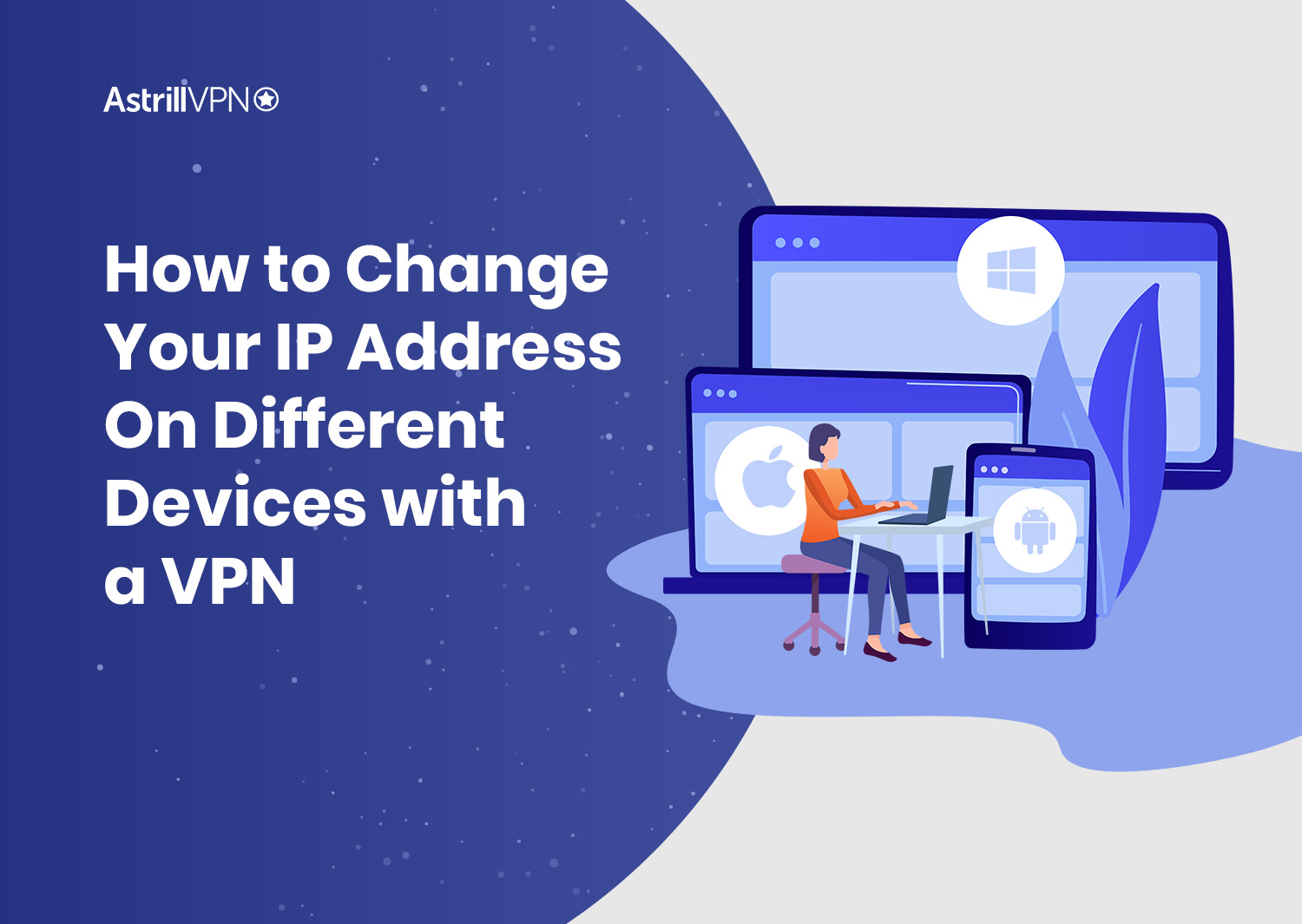
The process of changing your IP address is different for every device. Follow the steps mentioned below for your respective device:
How to Change Your IP Address on a Windows PC
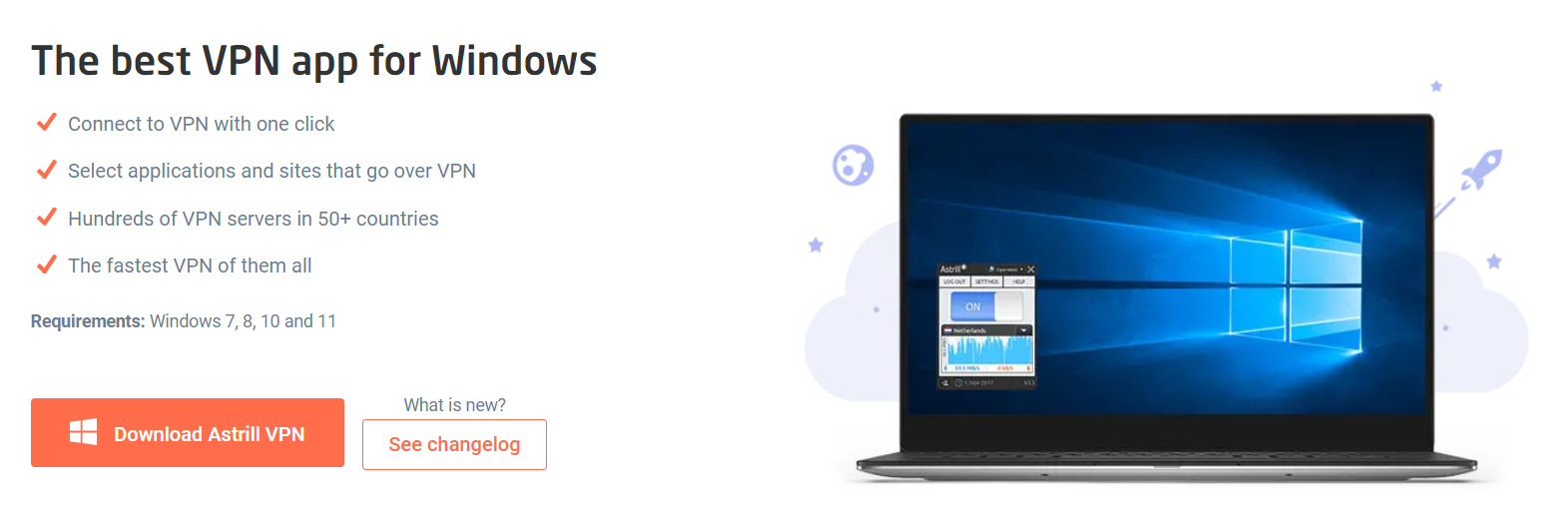
- Download Astrill VPN Windows Client
- Install Astrill VPN
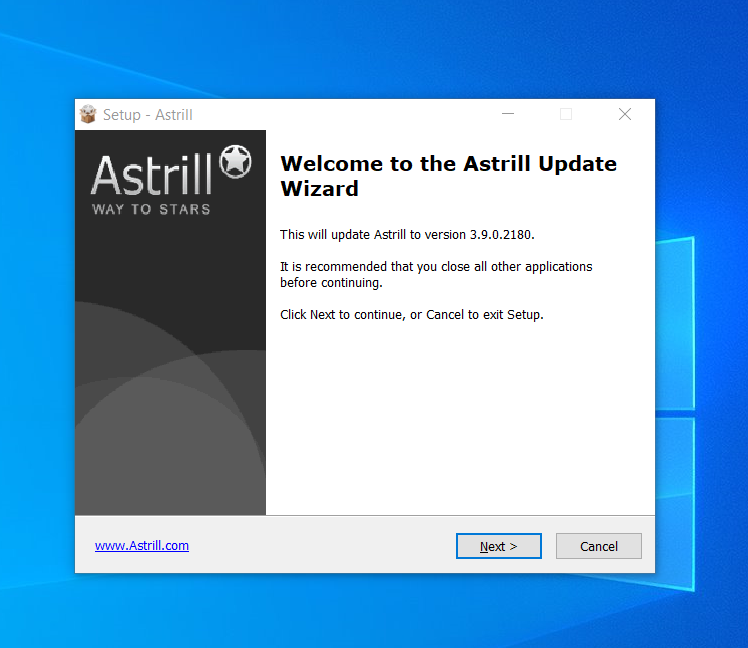
This process should only take a minute. Please reboot your system once the installation is complete.
- Open the VPN Client
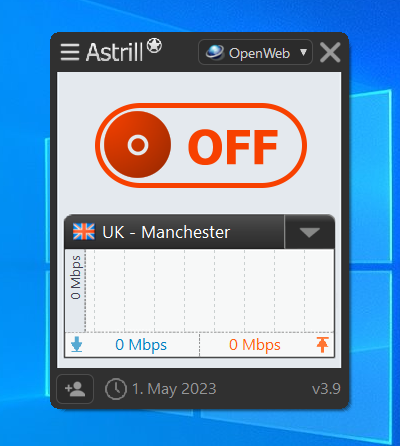
- Turn on VPN Connection.
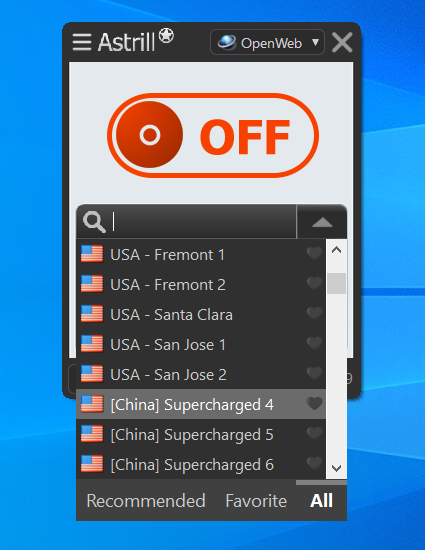
Select any server and then click the toggle button, which will switch from ‘Off’ to ‘On’ when the connection is established.
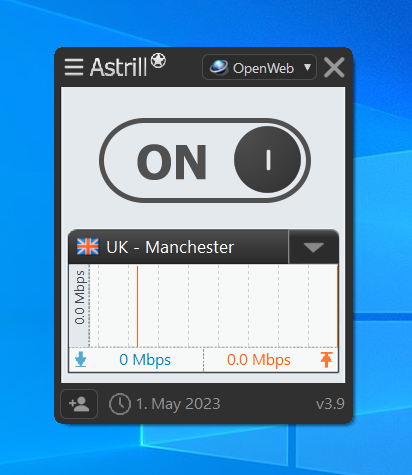
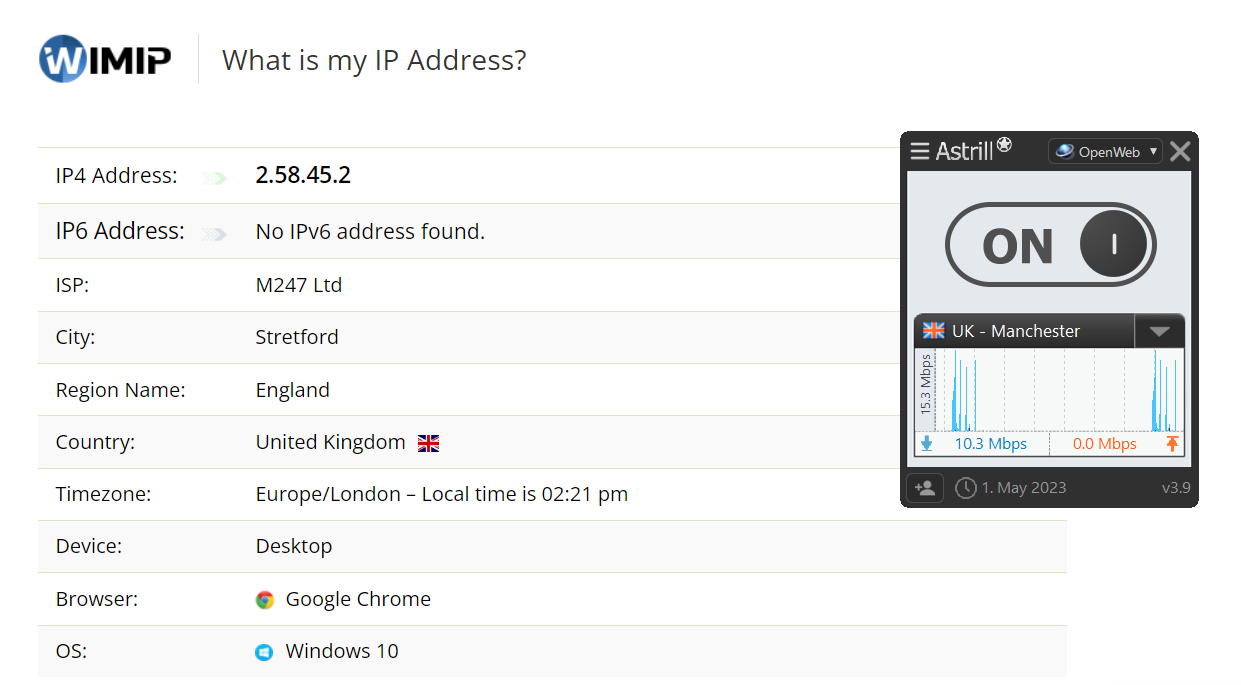
After connecting to your desired server, check your IP and DNS; they should be changed now.
You can check out the Astrill VPN on Windows guide for more information.
Hide Your Real IP with AstrillVPN Instantly
Start Browsing Securely
How to Change Your IP Address on a Mac
One way of hiding your IP Address or changing it on a Mac is by installing the Astrill VPN app on your Mac and following the steps mentioned earlier for windows (the process is similar).
You can also change the IP address on a Mac manually by following these steps:
- Open System Preferences.
- Select Network.
- Open Network Connection.
- Tap Configure IPv4.
- Click on ‘Manually.’
- Now type in the IP address that you want to keep.
That’s it! Changing the IP address manually is also easy.
How to Change Your IP Address on Android
Follow these steps to learn how to hide IP address on Android through the Astrill VPN Android app:
- Download and Install the Astrill Android application.
- Open the App and login into it using your credentials.
- Select any of the preferred servers from the list.
- Toggle OFF the ON/OFF switch, and you will be connected.
Other than this, you can also change your IP address on your Android device manually by following these steps:
- Open Settings.
- Go to Wireless & Networks and click on your Wi-Fi network.
- Click on Modify Network.
- Click on Advanced Options.
- Replace the current IP address with the new one.
How to Change Your IP Address on an iPhone
You can follow these steps to change your IP address on your iPhone:
- Open the Apple ID login page.
- Click On create Your Apple ID.
- Fill out the registration form.
- Get the verification code from your email inbox.
- Open iTunes on your computer.
- Sign In to your Apple ID.
- Find a US address.
- Fill out the address form and select “None” for the payment option.
Also Read: How To Change Your Location On iPhone
How to Change IP Address on a PS4
If you are a PS4 user, then you can follow these steps to install Astrill VPN on your PS4 and change your IP address:
- Open the Astrill VPN app and log in.
- After login in, switch to StealthVPN.
- Click on the hamburger menu from the top left corner and select “VPN Sharing.”
- Enable VPN sharing.
- Once VPN sharing is enabled, a dialog will appear; click on the OK button from that dialog.
- After enabling VPN Sharing, an IP address will appear in the VPN Sharing window on the Astrill app; note that IP address.
- Turn On the VPN connection.
- Configure VPN sharing on other devices and connect your PS4 to the network.
How to Change Your IP Address on a Router
Follow these simple steps to set up a VPN router:
- Sign up for the Astrill VPN service.
- Ensure that the router you purchase is compatible with the service.
- This configuration guide will give detailed instructions for configuring your Astrill VPN account on your router.
- Now login using the credentials provided to you by Astrill.
How to Change Your IP Address on a Smart TV
If you want to change your IP address on a smart TV, the process will vary depending on the manufacturer and model. However, there’s one common method to change your IP address on a smart TV:
- Turn on your smart TV and go to the settings menu.
- Look for the network or internet settings option and select it.
- Find the option to change the IP address and select it.
- Enter the new IP address you want to use, along with any additional information, such as the subnet mask and gateway address.
- Save your changes and exit the settings menu.
- Test your connection to ensure that the new IP address is working properly.
How to Check if Your IP Address Has Been Changed
If you’ve changed your IP address and want to confirm that the change has taken effect, then use Astrill’s “What is my IP” tool. It will tell you what your current IP is and then you’ll be able to verify if it has changed or not. Other than this, one method to check your IP is to visit a website such as WhatIsMyIPAddress.com or IPChicken.com.
Another way is to use the command prompt on your computer and type in “ipconfig” (for Windows) or “ifconfig” (for Mac/Linux). This will display information about your network connection, including your current IP address. If the address shown is different from your previous address, then the change has been successful.
Risks of Changing Your IP Address
Changing your IP address can enhance your privacy, help you bypass restrictions, or resolve network issues. But it’s not totally risk-free. If you mess it up or don’t really know what you’re doing, it could cause connection issues, access troubles, or even slow down your performance. Here are some common risks to consider before making changes.
1. Temporary Network Disruption
Changing your IP address manually can sometimes lead to internet issues, especially if it doesn’t align with what your router expects or if it conflicts with your ISP’s settings. To steer clear of any problems, it’s a good idea to double-check that your new IP settings match those of your router and comply with your ISP’s guidelines. If you do find yourself losing that connection, don’t worry, simply restarting your router or resetting your network adapter usually does the trick to get you back online.
2. Website Login Issues and Security Flags
Websites keep an eye on IP addresses to spot any weird activity. If your IP address suddenly changes, it may raise security flags, leading to annoying login verification requests or even locking you out of your account.
For instance, attempting to log in from a different country could be perceived as suspicious. Using a reliable VPN like AstrillVPN can help with this, as it provides a stable IP address, which reduces the likelihood of triggering those security alerts.
3. IP Configuration Errors Breaking Connectivity
Using the wrong IP address, subnet mask, or gateway can completely disrupt your connection, especially if you’re setting static IP addresses manually. Just one little slip-up can stop you from talking to your router or getting online.
To steer clear of this headache, it’s smart to double-check your setup or just let DHCP do its thing. With AstrillVPN, they take care of the IP assignments automatically, so you can enjoy a smooth and hassle-free connection.
4. Local Network Conflicts (IP Address Already in Use)
If you assign an IP address that is already in use by another device on your local network, both devices may lose connectivity. This conflict confuses the router, as it cannot determine which device owns the IP address.
5. VPN Blocking by Websites and Services
Some websites and apps may not allow you access if you’re using a VPN or proxy IP address, which can be a real hassle. AstrillVPN has got you covered with private, high-quality IPs that are less likely to get blocked. They utilize advanced routing technology to ensure your connection remains secure and uninterrupted while you browse.
6. Slower Internet Speeds
Switching to a VPN or proxy can sometimes slow down your internet speed. This happens when your data has to travel through servers that are located far away or if the server you’ve chosen is extremely busy.
However, with AstrillVPN, you can avoid these issues. It lets you choose from a selection of optimized servers worldwide, and it automatically connects you to the fastest and most reliable option. So, even when your IP changes, your performance stays strong.
When and Why Do IP Addresses Change Automatically?
Many people believe their IP address remains the same each time they connect online, but this is not always the case. ISPs often use dynamic IP addresses, which can change without notice depending on the connection’s configuration.
ISPs have a range of IP addresses that they assign to customers. When a router or device reconnects to the network, it may receive a different IP address from this pool. This approach enables ISPs to manage their resources more effectively and ensures that every connected device has a valid IP address.
There are several common reasons why your IP address might change automatically:
- Router or Modem Reboot: Restarting your router or modem can cause your ISP to assign a new IP address when the device reconnects.
- ISP Maintenance or Network Updates: Internet providers occasionally reset or reconfigure their systems. During these updates, your current IP address may be released and replaced with a new one.
- DHCP Lease Renewal: Most networks use the Dynamic Host Configuration Protocol, which assigns IP addresses for a limited time. When that time expires, a new address can be issued to your device.
- Switching Between Networks: Connecting to different Wi-Fi networks, mobile hotspots, or switching to mobile data automatically assigns a new IP address that matches each network.
- Mobile Network Movement: When you travel and your phone connects to different towers or regions, the network automatically changes your IP address to match your new location.
Hide Your Real IP with AstrillVPN Instantly
Start Browsing Securely
Why Do You Need to Change Your IP Address?
Changing your IP address gives you control over your online experience. It helps protect your privacy, improves access to global content, and strengthens your connection security. Whether you are working, streaming, gaming, or simply browsing, changing your IP lets you move freely and safely across the internet.
Here are some key reasons why you might need to change your IP address.
1. Protect Your Privacy from Tracking
Your IP address is like your digital ID card. It tells websites, advertisers, and even your Internet Service Provider where you are and what you are doing online. This makes it easy for them to build a profile of your activities and interests.
Changing your IP address helps stop this kind of tracking. When you connect through AstrillVPN, your actual IP address is replaced with a secure one from a different location. This hides your identity and prevents anyone from tracing your online behavior back to you.
2. Access Geo-Blocked Content and Streaming Services
Many streaming platforms and websites restrict their content based on your location. A show or game available in one country may not be available in another. By changing your IP address to appear as if you are connecting from a different country, you can access that content.
AstrillVPN makes this easy by allowing you to choose from servers in various regions, so you can watch, play, or read whatever you want without restrictions.
3. Bypass Censorship and Internet Restrictions
In some regions, governments or organizations block access to social media, news sites, or messaging apps. Even schools or offices sometimes restrict what you can view online.
Changing your IP address allows you to bypass those restrictions and connect to a free and open internet. With AstrillVPN, you can browse securely and communicate without limitations, no matter where you are.
4. Secure Public WiFi Connections
Public WiFi is convenient but risky. Hackers often target unsecured networks in places like coffee shops and airports to steal your information. Using AstrillVPN secures your connection with strong encryption, so even if someone tries to spy on the network, they can’t see your activities or steal your data.
5. Avoid ISP Throttling and Improve Speeds
Internet providers may throttle your connection when you’re streaming videos or gaming, depending on your IP address and the activity you’re engaging in online. But with AstrillVPN, you can switch up your IP address and keep your traffic private, which means your ISP can’t keep tabs on you. This results in smoother streaming, faster downloads, and a more reliable browsing experience.
6. Protect Against DDoS Attacks
If you’re a gamer, streamer, or host online events, you should know about DDoS attacks. These attacks flood your IP address with fake traffic, leading to downtime. To protect yourself, change your IP address. AstrillVPN masks your real IP behind secure servers, blocking malicious traffic from reaching your network.
Troubleshooting: What if Your IP Address Did Not Change?
If your IP address isn’t changing, it’s usually because of some tech stuff going on. Understanding why it happens and how to fix it can really improve your connection. Here are some common issues and their solutions.
1. Your VPN Connection Failed or Disconnected
Sometimes, your VPN may not establish a secure connection, leaving you vulnerable with your original IP address. This can happen due to unstable networks, wrong settings, or temporary server issues.
Check your VPN connection status in the AstrillVPN app. Reconnect to the same server or try a different one to see if your IP address changes. You can verify the change using AstrillVPN’s built-in IP checker or an online IP lookup tool.
2. Browser Cache or DNS Cache Still Shows the Old IP
Your device or browser may display an outdated IP address due to cached data. To resolve this issue, clear your browser’s cache and flush your DNS. On Windows, open Command Prompt, type ‘ipconfig /flushdns’, and press Enter. Then, refresh your browser and check your IP again.
3. Your ISP Assigned a Static IP
Some Internet Service Providers assign static IP addresses that remain fixed for your account. In such cases, your IP will not change even if you restart your router or renew your connection. Contact your ISP to confirm whether your connection uses a static IP. If it does, you can request a dynamic IP or simply use AstrillVPN to obtain a new, private IP address instantly, without relying on your provider.
4. Router Did Not Refresh the Network Lease
Your router assigns IP addresses using a lease system. If the lease period has not expired or the router has not been restarted, your device may retain the same IP address. Restart your router or log into its settings panel to manually renew the DHCP lease.
You can also disconnect your device from the network for a few minutes before reconnecting. This often triggers a new IP assignment.
5. Manual IP Configuration Errors
If you entered a new IP address manually and it did not apply, there may be an error in the configuration. Entering an incorrect subnet mask, gateway, or DNS address can prevent the new IP from taking effect.
Double-check your network settings to ensure the values match your network’s configuration. If you are unsure, switch back to automatic settings and let your system obtain an IP address automatically through DHCP.
6. VPN or Proxy Detection by Websites
Some websites can detect VPN or proxy usage and may reveal your actual IP address, even when your VPN is active. This can occur due to browser extensions or WebRTC leaks that expose your local IP address. To protect your IP, disable unnecessary browser extensions and enable WebRTC protection in your browser or VPN settings. AstrillVPN features built-in safeguards against WebRTC leaks, keeping your real IP address hidden.
Conclusion
Changing your IP address is beneficial because it protects you from cyber threats and provides you with accessibility to geo-blocked content and services. As we discussed how you could change your IP address, you can select any method and start. However, using a VPN to change your IP address is highly recommended because you cannot risk it.
Faqs:
The ‘Internet Protocol’ or IP address is a 32-bit numeral format, which is the device’s device’s identity when connected to a network. It represents a device, website, or router’s location, allowing them to send and receive data.
When your phone or computer connects to the internet, it gets an IP address, which acts as its identity, and contains all the location information. Your IP address contains the following details your country, state, province, city, and ZIP code of the device.
Yes! It is legal to change your IP address. People change their IP addresses to bypass ISP throttling, maintain privacy and security, and access geo-restricted streaming services. If you are using Astrill VPN, no one will be able to tell you your IP address has changed.

Secure your privacy instantly. Try AstrillVPN with zero risk.
About The Author
No comments were posted yet