




Remote Work and BYOD: How AstrillVPN Router Setup Secures Your Whole Home Network?

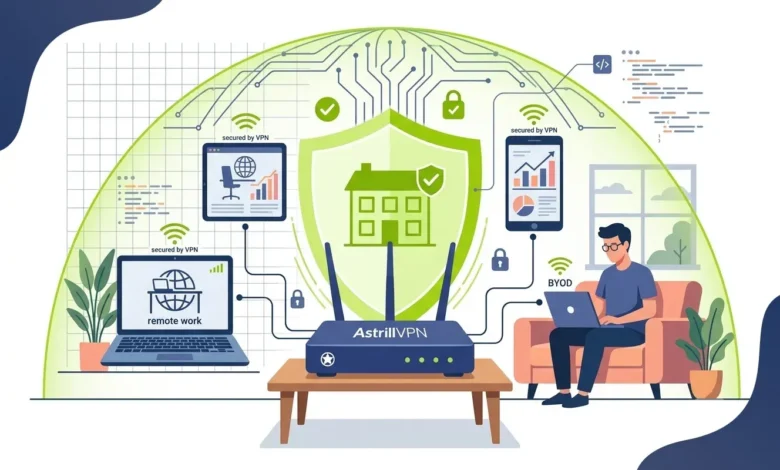
The workplace as a whole has experienced a significant makeover. What used to be a work-from-home solution has now become a key element in a company’s worldwide business strategy. As part of this transition, Bring Your Own Device (BYOD) has gradually become widespread, a policy that allows workers to use their personal laptops, mobile phones, tablets, etc., for work purposes on their personal devices. While they do increase employees’ efficiency and work-life balance, these changes also present several cybersecurity risks that traditional in-office security models weren’t equipped to handle.
A large number of employees working from home still depend on individual device-specific Virtual Private Network (VPN) applications. This method may protect the specific device it is on, but it cannot secure the entire home network. That is the Smart TV, the gaming console, the IoT devices, the family members’ smartphones, the tablets, and devices left with guests, etc., which are quite commonly found in every home on the same network but remain unsecure under the protection of a personal device’s VPN.
AstrillVPN router setup is a solution to this problem. It works by making the security of a Personal Network Router a little more like that of a Company Router through a technique called Network Address Translation (NAT), which routers use to protect the local private network when connected to the Internet. Rather than having each device set up individually, the internet traffic to the router is encrypted, so all devices connected to the router are protected. This means that both work and personal devices, as well as devices that come into the house, are secured. Additionally, VPN management, which might have been a headache in a company with workers spread across different countries, can now be considerably eased at the device level by using a router that supports virtual private networks.
Table of Contents
What Is a VPN Router Setup?
A VPN router setup involves configuring your wireless router to establish a secure VPN connection. Rather than running VPN software separately on each device, the router itself connects to the VPN server and routes all network traffic through an encrypted tunnel.
How Router-Level VPN Differs from App-Based VPN?
Traditional VPN apps must be installed, configured, and maintained on every supported device. While effective, this approach has several limitations:
- Every device requires its own installation.
- Some smart devices don’t support VPN applications.
- Users may accidentally disconnect or forget to enable the VPN.
- Managing multiple devices becomes increasingly complex.
A router-level VPN eliminates these issues. Once configured, every device connected to the router automatically benefits from encrypted internet traffic without requiring additional software.
Why Every Connected Device Benefits Automatically, Without Individual Installs?
One of the biggest advantages of router-based VPN protection is universal coverage. Devices that typically cannot run VPN software, including smart TVs, IP cameras, gaming consoles, printers, smart speakers, and IoT devices, are automatically protected. This centralized approach reduces administrative overhead while ensuring consistent security across the entire network.
Why Remote Workers Need Whole-Network VPN Protection?
Remote employees frequently access confidential company information from home networks that lack enterprise-grade security controls.
Common Security Risks in Home-Based Remote Work Setups
Unlike corporate offices, home networks often contain dozens of connected devices with varying security levels. Common risks include:
- Weak Wi-Fi passwords
- Outdated router firmware
- Unsecured guest access
- Public-facing remote management
- Malware infections on personal devices
Attackers often exploit these weaknesses to gain unauthorized access to sensitive business information.
BYOD Risks: Personal Phones, Tablets, Smart Devices, and IoT Sharing Your Network
BYOD policies improve employee flexibility but increase the attack surface considerably.
Personal devices may:
- Miss security updates
- Use unsecured applications
- Download risky software
- Connect to unsafe public Wi-Fi before returning home
If compromised, these devices can expose shared network resources or serve as launch points for broader attacks.
Unsecured Home Wi-Fi as an Entry Point for Corporate Data Breaches
Cybercriminals increasingly target home networks because they typically lack enterprise monitoring and intrusion detection. Once an attacker compromises a vulnerable device, they may attempt to intercept communications, steal credentials, or move laterally toward work systems. Encrypting all network traffic through a VPN significantly reduces these risks.
How AstrillVPN Router Setup Works?
AstrillVPN supports router-level installations, enabling users to protect every device connected to their home network.
Supported Router Types and Firmware Compatibility
AstrillVPN supports various VPN-capable routers and firmware platforms, including:
- AsusWRT Merlin
- DD-WRT
- Tomato
- Merlin firmware
- OpenWRT (selected models)
- Other compatible VPN-enabled routers
Users should verify compatibility before beginning the installation process.
Configuring AstrillVPN on a Router
The setup process generally includes:
- Begin by connecting your Astrill router as follows:
a. Connect a cable from the Ethernet port on your computer into port 1 of your Astrill router. (After setup you can connect by wireless)
b. Connect a cable from the Internet/WAN port of your Astrill router into an Ethernet port of your modem or primary router.
c. Plug in the power to your Astrill router and wait for the power light to be solid. (Note that the E3000 has an actual power button that may need to be turned to the on position.)
- Next open a web browser on your computer, preferably Google Chrome or Mozilla Firefox, and enter 192.168.199.1 in the address bar. (The login and password are admin/astrillpass123.)
- Your router is pre-set with the wireless information as shown below.
Here are the device settings:
For the Linksys E2000, Linksys E3000, Linksys E4200 and Asus RT-N16:
IP Address: 192.168.199.1
Subnet Mask: 255.255.255.0
Router Control Panel Username: admin
Router Control Panel Password: astrillpass123
Wireless 2.4 ghz SSID: Astrill24
Encryption: WPA2 – Personal / AES: astrillpass123
For the Linksys E3000 only:
Wireless 5.8 ghz SSID: Astrill58
Encryption: WPA2 – Personal / AES: astrillpass123
- Click on the Astrill Setup link in the menu. Enter your Astrill E-mail address, Astrill Password, and your Sabai Code (located on a sticker on the bottom of the router), and click Setup My Astrill Router.
- Your router will connect with the Astrill server and display your account information, available servers and settings, basic setup instructions, and support information.
a. Choose your desired server from the drop-down list.
b. Click the box to “Start Automatically”
c. Click Connect, and your VPN will automatically begin the connection process.
d. Note that you have the service valid date information as well as the current status on this screen.
6. After you have your VPN set up, please click on the Diagnostics/System menu and enter the following command and click Execute. This will allow your router to reconnect if there is a power failure or reboot is initiated.
nvram commit
7. If your router is ever completely reset and has lost the registration information, you will need to go back to step 2 of these instructions
Choosing the Right Protocol (StealthVPN and WireGuard) for Router-Level Use
Astrill offers multiple protocols designed for different networking environments.
- StealthVPN is designed to bypass restrictive network environments while maintaining secure encrypted connections.
- WireGuard provides modern encryption with high speeds and lower latency, making it suitable for streaming, video conferencing, and everyday remote work.
Choosing the appropriate protocol depends on your network conditions, performance requirements, and compatibility with your router.
Key Benefits of Securing Your Whole Home Network with Astrill
- Smart home devices often receive infrequent security updates. Router-level VPN protection encrypts their communications without requiring native VPN support.
- Employees no longer need to remember to launch VPN software before starting work. Every connection leaving the home network is automatically encrypted.
- Organizations operating under security frameworks or internal IT policies often require encrypted communications. A router VPN helps maintain encrypted traffic across all work devices while reducing the chance of user error.
- Even when family members use personal devices on the same Wi-Fi network, router-level VPN protection helps reduce exposure by encrypting outbound traffic for every connected device.
BYOD-Specific Advantages of Router-Level VPN
A router-level VPN addresses many of these challenges by securing internet traffic at the network level rather than relying on individual users to install and maintain VPN software on every device. This approach provides consistent protection across the entire home network while reducing the risks associated with unmanaged devices.
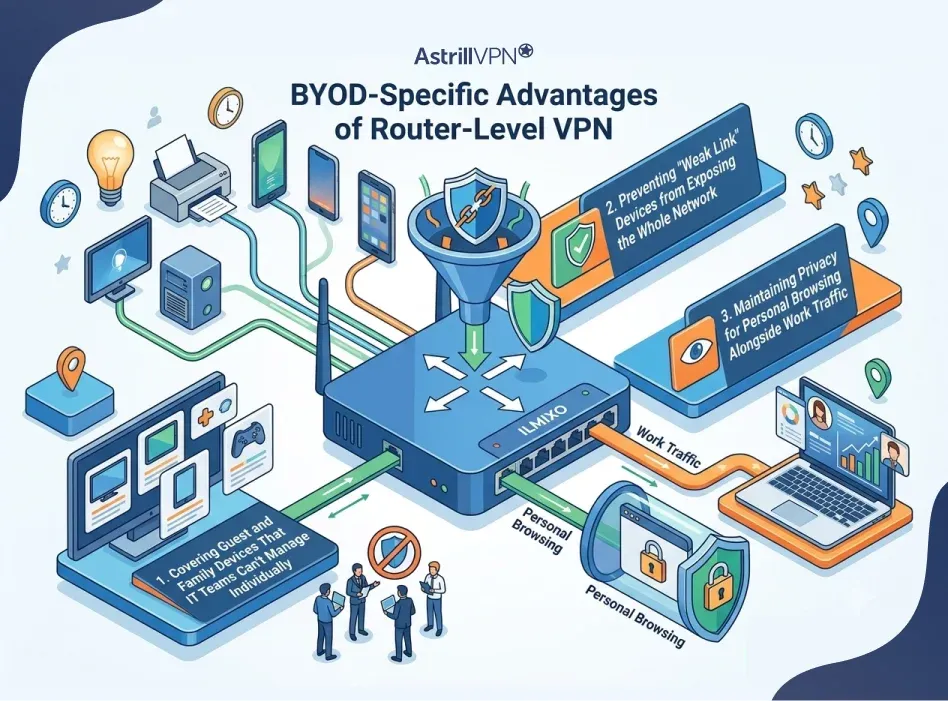
Covering Guest and Family Devices That IT Teams Can’t Manage Individually
In a typical home, a remote worker’s corporate laptop shares the same Wi-Fi network with family smartphones, children’s tablets, streaming devices, gaming consoles, smart TVs, and guest devices. Unlike company-issued hardware, these personal devices are outside the organization’s security management and may not follow the same standards for software updates, antivirus protection, or safe browsing.
With an AstrillVPN router setup, every device connected to the home network automatically benefits from encrypted internet traffic. Family members and guests don’t need to install a VPN application or configure separate settings. This centralized protection helps reduce the likelihood that unsecured personal devices expose network traffic to eavesdropping or other online threats.
For employees, this means they can work securely without worrying that other devices on the same network are transmitting data over unencrypted connections.
Preventing “Weak Link” Devices from Exposing the Whole Network
Cybercriminals often look for the easiest point of entry rather than targeting well-protected work computers directly. Internet of Things (IoT) devices such as smart cameras, voice assistants, printers, thermostats, and smart plugs may receive infrequent security updates or use default configurations, making them attractive targets.
If one of these devices is compromised, it can increase the risk of unauthorized activity within the home network. While a router-level VPN does not replace device security or prevent malware infections, it encrypts internet traffic for connected devices and helps reduce exposure to certain forms of network interception and monitoring. Combined with strong passwords, updated firmware, and proper network segmentation, it forms an important layer in a broader security strategy.
By consistently protecting network communications, a router VPN helps reduce the impact of weaker devices that might otherwise create security gaps in a BYOD environment.
Maintaining Privacy for Personal Browsing Alongside Work Traffic
Remote work often blurs the line between professional and personal internet use. Employees may switch between business applications, online banking, social media, shopping, streaming services, and personal communication throughout the day. Using separate VPN applications on each device can be inconvenient, and users may forget to enable protection when switching devices.
A router-level VPN automatically encrypts internet traffic for all connected devices, helping protect both work-related and personal online activities. This consistent protection can reduce exposure to unsecured networks and help limit unnecessary visibility into browsing activity by third parties such as internet service providers, when traffic is routed through the VPN.
For households with multiple users, this creates a more seamless experience. Family members can continue using their own devices normally while benefiting from the same encrypted connection, and remote workers can access company resources without repeatedly connecting or disconnecting VPN software throughout the day.
Overall, router-level VPN protection offers a practical way to support BYOD environments by simplifying security, improving privacy, and ensuring that every device connected to the home network benefits from a consistent layer of encrypted communication.
Setting Up AstrillVPN on Your Router: Practical Considerations
Selecting a VPN-Compatible Router (or Using Astrill’s Dedicated Router Service)
Not every router supports VPN client functionality. Users should choose hardware capable of handling VPN encryption or consider Astrill’s dedicated router solutions where available. Higher-performance routers generally deliver better speeds when encrypting traffic for multiple devices simultaneously.
Balancing Speed and Security When Routing All Traffic Through VPN
VPN encryption introduces processing overhead. Selecting modern hardware with faster processors can minimize performance impacts while maintaining strong security. Users can also choose nearby VPN servers to reduce latency and improve connection speeds.
Managing Multiple SSIDs (Work vs Personal Network Segmentation)
Advanced routers allow multiple wireless networks (SSIDs). Segmenting devices helps organize traffic and provides additional control over which devices access specific resources.
For example:
- Work Network
- Personal Network
- Guest Network
Common Challenges and their solutions
The common challenges are listed below, along with their solutions.
Router Performance and Speed Trade-Offs
Older routers may struggle with encryption, which can reduce internet speeds.
Solutions include:
- Upgrading router hardware
- Using WireGuard where supported
- Connecting to geographically closer VPN servers
- Reducing unnecessary background traffic
Troubleshooting Connectivity for Smart Devices
Some smart devices rely on location-based services or have strict networking requirements.
If connectivity issues occur:
- Update device firmware.
- Restart the router.
- Test different VPN protocols.
- Exclude incompatible devices if necessary, using router settings.
When to Use Split Tunneling Instead of Full Router-Level VPN?
Certain devices or applications may not require VPN protection. Split tunneling allows selected traffic to bypass the VPN while keeping sensitive work traffic encrypted. This can improve performance for services that function best with a direct internet connection.
Best Practices for Remote Workers Using a VPN Router
Following these best practices helps maximize the effectiveness of your AstrillVPN router setup while reducing the risk of unauthorized access, data breaches, and network vulnerabilities.
Combining Router VPN with Strong Wi-Fi Passwords and Firewall Settings
While a router-level VPN encrypts internet traffic between your home network and the VPN server, it doesn’t replace basic network security. An attacker who gains unauthorized access to your Wi-Fi network can still pose risks, making it essential to properly secure your router and wireless network.
Start by using a strong, unique Wi-Fi password that combines uppercase and lowercase letters, numbers, and special characters. If your router supports it, enable WPA3 encryption, which offers stronger protection than older standards. If WPA3 isn’t available, use WPA2-AES and avoid outdated protocols like WEP or WPA.
You should also change the router’s default administrator username and password immediately after installation. Default credentials are widely known and can make your router an easy target for attackers.
In addition, enable your router’s built-in firewall to monitor and filter incoming and outgoing network traffic. Firewalls act as an additional security barrier, helping block unauthorized connection attempts and reducing exposure to common network-based attacks.
Other recommended practices include:
- Disable remote router administration unless it’s absolutely necessary.
- Turn off unused services such as UPnP if you don’t need them.
- Create a separate guest Wi-Fi network for visitors.
- Restrict access to your router’s management interface to trusted devices only.
When combined with a VPN, these measures create multiple layers of protection that make your home network significantly more resilient against cyber threats.
Regularly Updating Router Firmware and VPN Client Settings
Cybersecurity is an ongoing process, and keeping your router up to date is one of the simplest yet most important steps you can take.
Router manufacturers frequently release firmware updates to:
- Patch newly discovered security vulnerabilities.
- Improve overall system stability.
- Enhance VPN compatibility.
- Fix software bugs.
- Add support for newer encryption protocols.
Running outdated firmware can leave your home network vulnerable to exploits that attackers actively scan for online.
Likewise, ensure your Astrill VPN configuration remains up to date. If newer VPN protocols or security improvements become available, updating your router’s VPN settings can help improve both performance and protection.
It’s also a good idea to:
- Check for firmware updates every few months.
- Install security updates promptly.
- Reboot the router periodically after major updates.
- Review VPN server settings if connection issues occur.
- Remove outdated or unused VPN profiles.
Keeping your software up to date helps ensure your VPN router continues to deliver reliable performance and the latest security enhancements.
Using Dedicated IPs for Consistent, Secure Remote Access to Company Systems
Many businesses protect internal resources by allowing access only from approved IP addresses. If your VPN connection uses shared IP addresses that change frequently, you may need to complete additional verification steps or experience disruptions when accessing company systems.
A dedicated IP address provides a consistent public IP that is assigned exclusively to your account. This can simplify secure access to:
- Corporate VPN gateways
- Remote desktop services
- Internal web portals
- Cloud-based business applications
- Secure file servers
For remote employees, a dedicated IP address can reduce authentication issues and make it easier for IT administrators to apply IP-based access controls. It also helps maintain a more predictable connection when working with business applications that require a stable source IP.
Keep in mind that a dedicated IP should be used as part of a broader security strategy rather than as a replacement for strong authentication. Organizations should continue to implement measures such as multi-factor authentication (MFA), endpoint protection, and role-based access controls to strengthen overall security.
By combining a dedicated IP with a properly configured Astrill VPN router setup, remote workers can enjoy secure, reliable access to company resources while minimizing interruptions to their daily workflows.
Conclusion
Remote work and BYOD have permanently changed how businesses operate, but they have also expanded employees’ security responsibilities when working from home. Protecting a single laptop is no longer enough when dozens of connected devices share the same network.
AstrillVPN router setup delivers comprehensive, always-on protection by securing every device connected to your home Wi-Fi. Instead of relying on individual VPN applications that users may forget to activate, router-level protection provides continuous encryption across work devices, personal electronics, and smart home equipment.
For professionals handling sensitive business information, a router-based VPN offers a practical way to strengthen home network security, simplify device management, and create a safer remote working environment without adding complexity to everyday workflows.
FAQs
Here are some of the most frequently asked questions.
No, your router must support VPN client functionality or compatible firmware such as AsusWRT Merlin, DD-WRT, Tomato, or other supported platforms. Always verify compatibility before purchasing or configuring a router.
Some reduction in speed is normal because encryption requires processing power. However, a modern router with a capable processor and efficient protocols such as WireGuard can significantly reduce performance impacts.
A router-level VPN automatically protects every device connected to the network, including those that cannot install VPN software. App-based VPNs only secure the specific device on which they are installed.
A router VPN provides encrypted network traffic but should be used alongside endpoint security measures such as antivirus software, device encryption, multi-factor authentication (MFA), endpoint detection and response (EDR), and regular software updates. Together, these layers create a more comprehensive security posture for remote work environments.

Secure your privacy instantly. Try AstrillVPN with zero risk.
About The Author










No comments were posted yet