




App-Based vs Website-Based Split Tunneling: What Is the Difference?

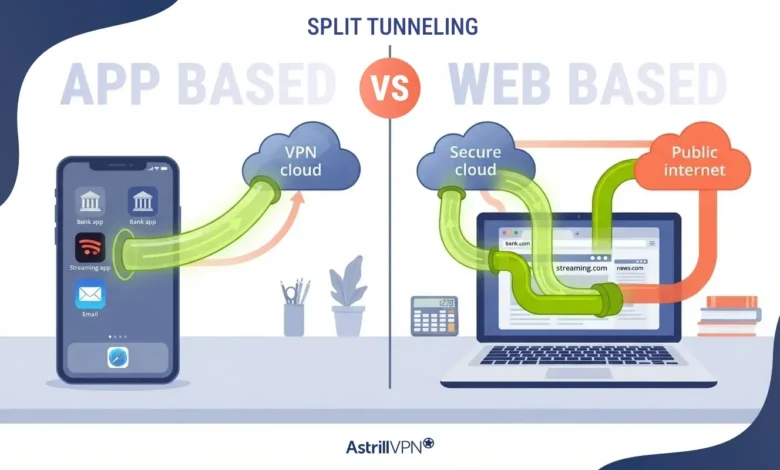
You click on the button to connect to your VPN, open your online bank, and after a few moments, you get a message saying that there has been an unusual sign-in. After some experimentation, you manage to find the split tunneling setting, but now you face the question of whether to exclude the online banking app itself, the browser you are using, or the online banking website.
To break it down in even simpler terms, App-level split tunneling is controlled by individual applications (i.e. programs). Website-level split tunneling, on the other hand, is controlled by specific websites (or IP addresses).
So there’s a difference between sorting traffic by who sent it and by where it’s going. And yes, that’s a big difference. That’s what the app-based vs website-based split tunneling question is all about. How to set up your VPN in order to fix that one issue with your bank login.
Below, we’ll get into the specifics of how each type of split tunneling works and where each falls short, followed by a rundown of what you can expect from each type of app/connect(s) for typical use cases (banking, streaming, work apps, gaming, torrenting, etc.).
Table of Contents
What Is Split Tunneling?
A quick primer on what a VPN typically does: it encrypts all of your web traffic and sends it down a single tunnel to a server somewhere in the world. Everything goes through that tunnel: every app, every website, everything.
Split tunneling allows you to select which applications go through the VPN encrypted tunnel and which go directly over your ISP, with your real IP address showing.
Why would you want to do this? Running all your traffic through a VPN can cause problems with websites and services such as online banking, your food delivery app, work logins etc. They often appear to think you are located in a different country and some will even block access to your accounts and services. And of course, the lazy solution of disabling the VPN until the problem goes away (which it rarely does) is to just forget to re-enable it later. Yes, I’ve done this, and I’m pretty sure most people who use VPNs do too.
Split tunneling lets you leave the VPN on and carve out the few things that need to go around it. It works in two directions:
- Include mode: only the apps or sites you list go through the VPN. Everything else connects directly.
- Exclude mode: everything goes through the VPN except what you list. You’ll also hear this called inverse split tunneling.
You can do either one with apps or with websites. And that choice, apps or websites, is what this whole article is about. If you want the full basics first, our guide on how split tunneling works covers them.
How App-Based Split Tunneling Works
This one’s pretty simple. The VPN looks at which app opened a connection, checks your list, and routes it. If Chrome is on the exclude list, Chrome goes direct. Every tab. Every request. Doesn’t matter what site it’s loading.
What It Covers
Pretty much anything on your device that talks to the internet. Browsers, torrent clients, game launchers, WhatsApp desktop, Outlook, Teams, Slack, streaming apps, banking apps on Android. If it runs as a program, you can usually add it to the list.
Where It Falls Short
- One app gets one rule: Browsers are where this gets annoying. Exclude Chrome and every site in Chrome skips the VPN, including the ones you wanted protected. Tunnel Chrome and your bank’s site gets the VPN IP too. It’s all or nothing. The usual workaround? Two browsers, one tunneled and one not. It works. It’s also a bit clunky.
- Some apps sneak traffic out through side doors: Updaters, background services, built-in web views. They often run as separate processes, so they might not follow the main app’s rule. Check after you set things up.
- Not every device plays along: App-level control needs the operating system to tell the VPN which app owns which connection. Windows, macOS, Linux and Android do that. iOS mostly doesn’t, which is why per-app filtering is usually missing on iPhones and iPads.
How Website-Based Split Tunneling Works
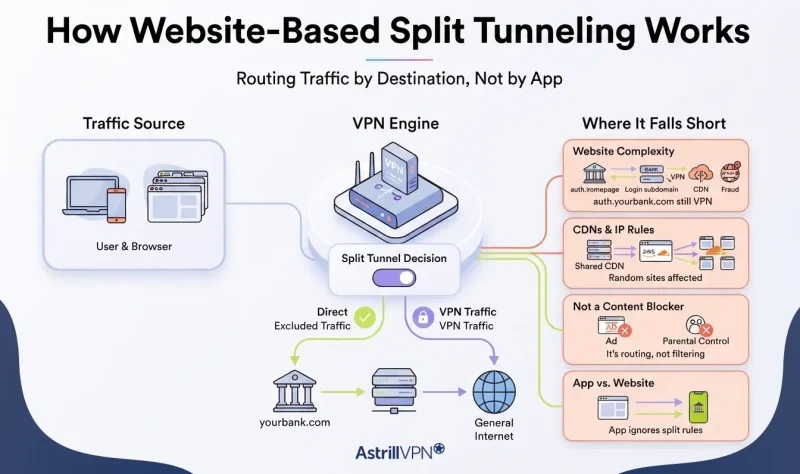
This flips the question around. Instead of asking “which app sent this?”, the VPN asks “where is this going?” You make a list of destinations. Traffic headed there follows your rule, and everything else follows the default. Some providers refer to it as URL-based or domain-based split tunneling. Same idea.
Now here’s the part most guides skip. VPNs build this in two different ways, and they behave pretty differently:
- Domain rules: You type in something like yourbank.com. This usually happens inside the browser or a proxy, where the VPN can see the site name. Easy to set up. But it normally only covers browser traffic.
- IP rules: You enter IP addresses or ranges. This happens at the network level, so it applies to any app on your device that connects to those addresses. More coverage. More work too, because one website can sit on lots of IPs, and they change.
Where It Falls Short
- One website is rarely just one website: Load your bank’s homepage and your browser quietly talks to a bunch of hosts. The main domain, a login subdomain, a CDN, a payment provider, some fraud-check script. Exclude only yourbank.com, and the login page on auth.yourbank.com might still go through the VPN. Now your bank sees two different IPs in one session. Which, funnily enough, is exactly what fraud systems are built to catch.
- CDNs make IP rules messy: Loads of sites share the same CDN servers. Exclude one of those IPs and you might drag a few random sites out of the tunnel with it. And the addresses can change without warning.
- It doesn’t block anything. People mix this up a lot. A “site filter” decides the route, not whether a site loads. It’s not an ad blocker or a parental control.
- It might not cover the app version: A domain rule in your browser does nothing for the same company’s desktop or mobile app. Exclude your bank’s website, then log in through the bank’s app, and the app just follows whatever your app rules say.
App-Based vs Website-Based Split Tunneling: Side by Side
Want the quick version? Here it is in one table.
| App-based split tunneling | Website-based split tunneling | |
|---|---|---|
| Decides based on | Which app sends the traffic | Where the traffic is going (domain or IP) |
| Granularity | The whole app | Individual sites or IP ranges |
| Browser traffic | All or nothing per browser | Different rules for different sites in the same browser |
| Non-browser traffic | Fully covered | Only with IP rules, not domain rules |
| Setup effort | Low: pick apps from a list | Medium: add domains, subdomains or IPs |
| Maintenance | Low, unless an app changes | Higher: IPs and third-party hosts change |
| Good for | Torrent clients, games, work apps, banking apps | Bank and checkout pages, streaming sites, region-locked web services |
| Can’t do | Split traffic inside one app | Reliably follow a service across every subdomain, CDN and app |
When to Use Which: Real Scenarios
Theory’s nice. But you probably have a specific thing that’s broken right now. So let’s go through the usual suspects.
Banking and Local Payment Sites
Banks watch where you log in from. When a login comes from a VPN IP that hundreds of other people are also using, it looks a lot like someone trying to break into your account. So you get the fraud alert, the extra OTP, or a flat “access denied.”
- Bank through an app? Go app-based. Exclude the banking app and it connects with your normal IP.
- Bank in a browser? Go website-based. Exclude the main domain, and watch for login or payment subdomains during sign-in. Add those too.
- Checkout keeps failing? Exclude the store and the payment page it sends you to. Once your IP matches your billing address, things usually calm down.
I went deeper on this in our guide to Smart Mode and split tunneling for banking and shopping.
Streaming
Local streaming services usually want your home IP. Fair enough. But you still want the VPN for everything else. If you watch in a browser, website-based rules fit better, since you can send that one streaming site direct and leave every other tab in the tunnel. Using a dedicated app on your laptop or Android? App-based is simpler. Just exclude the app.
Work Tools That Block VPN IPs
Corporate logins can be finicky. Many of them will refuse login from unknown or datacenter IPs, and may have problems interacting with your personal VPN. To work around this with desktop applications such as Teams, Zoom, Slack, etc. as well as your company’s VPN client, use app-level exclusion.
For browser-based logins to portal sites that use single sign-on, simply add the portal URL and the SSO page to be excluded to a rule, website-based. Video conferencing appears to work better on direct connectivity as well.
Torrent Clients
This one’s the opposite. You don’t want your torrent client skipping the VPN. You want to make sure it never does. Use the app-based include mode so the client can only connect through the tunnel, and turn on a kill switch as well. Website rules are useless here anyway. A torrent swarm connects to thousands of random peer IPs. Good luck listing those.
Gaming
Games care about ping, and game servers are IP addresses, not websites. So app-based is really the only option that makes sense. Exclude the game and its launcher if you want the lowest latency. Or keep them tunneled if your ISP throttles gaming traffic or you’re trying to reach a server in another region.
Region-Locked Services
Need just one foreign service through the VPN and everything else on your normal connection? That’s website-based include mode. Tunnel that one service and nothing else. If you live somewhere with heavy censorship, there’s an easier version: tunnel everything international and send everything local directly. More on that in a bit.
Devices on Your Local Network
Printers, NAS drives, casting devices. They all sit on private IP ranges at home. Add your local range as an IP rule, and they stay reachable while the rest of your traffic stays in the tunnel.
Can You Use App-Based and Website-Based Split Tunneling Together?
Yep. If your VPN supports both, it’s often the cleanest way to set things up. They solve different problems, so they don’t really fight each other.
Here’s a setup a lot of people end up with. The app filter excludes the game launcher and work apps. The site filter excludes the bank and a local streaming site inside the browser. Everything else, including every other tab, stays in the tunnel.
A couple of tips if you go this route:
- Test every rule. Open a what is my IP check from the app or tab you just changed. If it shows your VPN IP when it should show your real one (or the other way round), something’s off.
- Keep both lists short. Two small lists are easy to keep track of. Two long ones start overlapping in ways that get confusing fast.
Security Considerations Before You Exclude Anything
Quick reality check. Split tunneling is about flexibility and speed. It doesn’t make you safer. Every time you exclude something, you’re making a trade, so make it on purpose.
- Excluded traffic isn’t protected. At all. It uses your real IP, and your ISP can see where it’s going. HTTPS still encrypts what’s on the page, but on airport or café Wi-Fi, keep that exclusion list as short as you can.
- Keep an eye on DNS. Excluded traffic usually goes through your ISP’s DNS. That’s normal. The real problem is when a bad setup makes your tunneled traffic leak DNS requests outside the tunnel, too. Run a DNS leak test after you change your rules. Takes a few seconds.
- The kill switch only protects tunneled traffic. If the VPN drops, excluded apps keep working, because they were never in the tunnel to begin with. That’s how it should work. It just means the kill switch won’t save you if you excluded something sensitive by accident.
- Exclude mode is safer for everyday use. With exclude mode, anything new you install or visit goes through the VPN by default. With include mode, anything you forget to add goes out unprotected. And you will forget something eventually.
- Clean up now and then. Exclusions pile up. Every few months, take a look and remove the ones you don’t need anymore.
How Astrill VPN Handles App-Based and Website-Based Split Tunneling
So which one does Astrill do? Both. Plus an automatic mode for people who’d rather not build lists at all. Everything sits in the Settings menu of the Astrill app, and the Website and App Filter feature page has the full rundown.
Application Filter (App-Based)
Three modes: Tunnel all apps, Tunnel only selected apps and Exclude selected apps. Want your torrent client locked inside the VPN? Include mode. Need your banking app or work client on your real IP? Exclude mode.
It works with OpenWeb, OpenVPN, StealthVPN and WireGuard in Astrill’s own apps for Windows, macOS, Linux and Android. On desktop you can pair it with Kill Switch and App Guard, which cut the internet for specific apps (or all of them) if the VPN drops. So nothing slips out while you’re reconnecting.
You can use AstrillVPN’s app filter by following these steps:
- Login to your app go to settings.
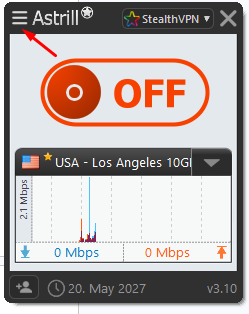
- Click on Application Filter.
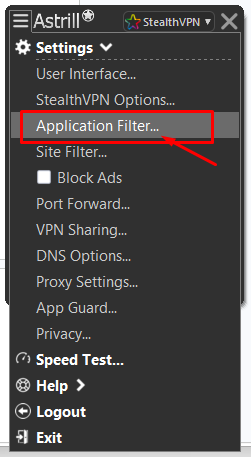
- Select the option you want, either you want to tunnel all the apps or any specific ones.
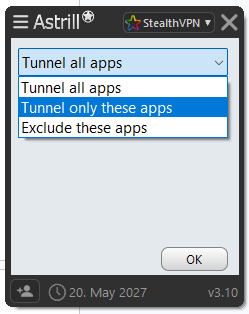
- Click OK and you’re all set.
Site Filter (Website-Based)
Same three basic modes: Tunnel all sites, Tunnel only these sites and Exclude these sites. What you type in depends on the protocol:
- On OpenWeb, which is built for browsers, you just enter the domain name.
- On OpenVPN, StealthVPN and WireGuard, you enter IP addresses or ranges. That means the rule covers any app on your device connecting to those addresses, not just the browser.
And then there’s a fourth mode I really like: Tunnel only international sites. Everything inside your own country goes direct, so local streaming, news, chat apps and payment services see your real IP. Everything international stays in the tunnel. The Site Filter works on Windows, macOS, Linux and Astrill VPN routers. Set it up on a router and the rules cover every device in your house.
Here’s how you can setup site filter in your AstrillVPN app:
- Login to your AstrillVPN app and go to settings.
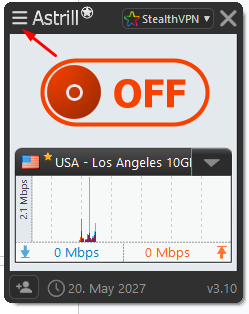
- Click on Site Filter.
- Select either you want to tunnel any specific sites or you want to exclude any sites. Just enter the URL of those sites and click OK.
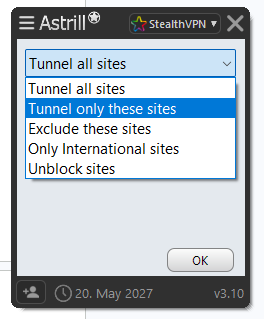
- Then click OK and you’re all set.
Smart Mode (Automatic)
Don’t want to maintain lists at all? Totally fair. That’s what Smart Mode is for. It automatically sends regional sites through your direct connection and tunnels the international ones, so local services and banking keep working without you touching anything. It runs on Windows, macOS, Linux, Android, iPhone and iPad.
On iOS it’s basically your main routing option, since per-app filtering isn’t available there. One thing to know: Smart Mode is only offered in certain countries, so check with Astrill support for the current list. In places like China, there’s a similar “Unblock sites” mode that tunnels only the sites that are blocked locally.
Which Astrill Option Should You Use?
| If you want to… | Use |
|---|---|
| Keep one app locked inside the VPN (torrents, messaging) | Application Filter: Tunnel only selected apps |
| Let a banking, work or game app use your real IP | Application Filter: Exclude selected apps |
| Exclude your bank or a store in the browser only | Site Filter: Exclude these sites |
| Send one foreign service through the VPN, nothing else | Site Filter: Tunnel only these sites |
| Keep local services direct without building lists | Smart Mode, or Site Filter: Tunnel only international sites |
| Split traffic on iPhone or iPad | Smart Mode |
Plenty of VPNs give you one of these. Not many put app-level, site-level and automatic routing in the same app. And that kind of changes the whole question. App-based or website-based? With Astrill, you don’t really have to pick.
Final Thoughts
So, app-based or website-based? They’re really two answers to the same problem, coming at it from opposite ends. One asks which app is talking. The other asks where the traffic is headed.
App rules are simple and cover everything an app does, but they can’t tell one site from another inside your browser. Website rules can. They just need a bit more babysitting, with subdomains, CDNs and apps that never touch the browser.
My advice? Figure out what’s actually broken first. Then pick the method that fits, keep your exclusions short, and test after every change. And if your VPN gives you app rules, site rules and an automatic mode in one place, don’t overthink it. Use them together.
FAQs
Think of it like this. App-based split tunneling asks “which app is this?” and applies one rule to everything that app sends. Website-based split tunneling asks “where is this going?” and applies rules to specific sites or IP ranges, no matter which app or tab sent the traffic.
Pretty much, yes. URL-based, domain-based and website-based all mean routing by destination. The catch is how it’s built. Some VPNs use domain names, some use IP addresses, and that decides whether apps outside the browser are covered.
Neither, really. Both reduce protection for whatever you exclude. The safest setup is the one with the fewest exclusions, ideally in exclude mode so anything new gets tunneled by default.
Depends how it’s built. Domain rules in the browser only affect the browser. IP rules affect any app connecting to those addresses. In Astrill, the Site Filter uses domains on OpenWeb and IPs on OpenVPN, StealthVPN and WireGuard.
For the stuff you exclude, often yes. That traffic skips the VPN server and the encryption, so it can be quicker. Everything still in the tunnel runs the same as before.
If a whole app needs one rule, like a torrent client, a game or a work app, go app-based. If you need different rules for different sites in the same browser, go website-based. And if your VPN offers both? Use both.

Secure your privacy instantly. Try AstrillVPN with zero risk.
About The Author










No comments were posted yet